Home Contact us Terms & conditions Shopping cart Surplus sales


Linux SoM


This article is obsolete or related to an obsolete product.
Please contact us at info@acmesystems.it for any further information.

FTP access

The FOX board has an always active FTP server that operate on the port number 21. Let's see how to connect to it from a Windows PC

Windows has a default FTP client FTP accessible from Command Prompt pressing:

ftp 192.168.0.90

If the FOX board is correctly visible on the LAN we'll see the username request with the followin message:

Username (192.168.0.90:(none)):

answer root to it and then at the password request:

Password:

answer: pass (or acme on some boards).
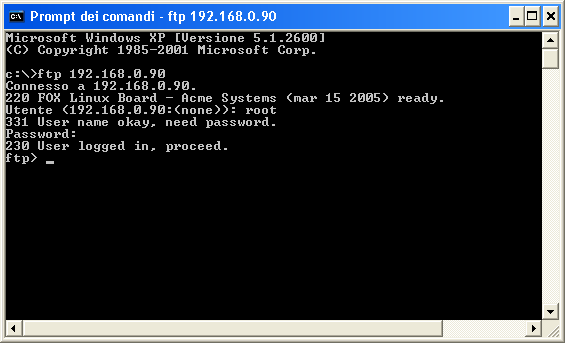

Accesso alla scheda FOX via FTP

Now, having the access granted from the FOX board we can for example press:

ls

In this way we will see the file list on the FOX filesystem at the root level.
To see the complete list of command available from the FTP prompt just press: "?" followed by the key "Enter".

FTP access from Internet Explorer

As an alternative you can access to the FOX FTP server using the FTP capabilities of Internet Explorer.
Open Internet Explorer and insert the address:

ftp://192.168.0.90
At the username and password requests insert root and pass.
Inside the page shown you should see files and directories of the FOX filesystem as presented in the following figure:
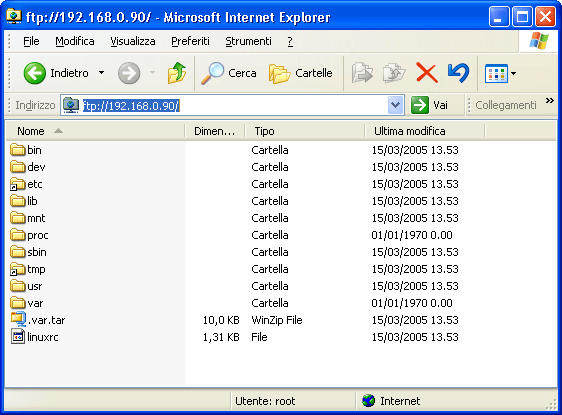

FTP access from Internet Explorer

It is possible to navigate inside the filesystem and copy files using drag and drop with the other windows.


Acme Systems srl
Via Aldo Moro 53 - 00055 Ladispoli (RM) - Italy
P.IVA/C.F. 08114831004
Tel +39.06.99.12.187 - Fax +39.06.622.765.31
http://www.acmesystems.it -
Iscritta al Registro delle Imprese di Roma al n. 08114831004


Atmel© Certified Partner

Documentation Terms of Use
Acme Systems provides this documentation "as is" without warranty or guarantees of any kind. The mantainer of this site (Sergio Tanzilli), has gone to a great deal of effort into making this documentation as correct as possible. Acme Systems doesn't provide any direct support for the Open Source preinstalled software but provides, through these pages and forum posts, all the information required to obtain the sources, install, use and update the Open Source softwares runnable on the FOX Board, NetusG20, AriaG25 and Terra platforms. Please note that all the preinstalled softwares, used on the Acme Systems products, are Open Source and you will have to check the license terms provided (usually the GPL) by each author before using it in any commercial or non-commercial product, by yourself. Before sending emails or calling the Acme staff here are our contacts please note that WE ARE MAINLY HARDWARE DESIGNERS and NOT LINUX GURUS so could be better to post your questions directly to the forum listed below to be sure that all the contributors of this site and the large software developers community will read and reply to your questions.

This work is licensed under a Creative Commons Attribution-NonCommercial-ShareAlike 3.0 Unported License.
Creative Commons License