Using the I2C bus
This article explains how to manage the I2C bus on the FOX Board LX
There are two ways to connect I2C chips on the FOX Board LX:
- Using the kernel driver improved by Geert Vancompernolle and implemented by default in the Phrozen SDK
- Using bit-banging routines implemented directly in the user space application
Test circuitry
|
To test both methods we've used an
I2C 8-bit A/D converter Philips PCF8591. This is a single-chip, single-supply
low power 8-bit CMOS data acquisition device with four analog inputs,
one analog output and a serial I2C-bus interface. Four trimmers are used to
change the input voltage on the four A/D chanels. The D/A channel is not used in this example.
As shown on the following table, the I2C driver uses the standard I2C data and clock lines located
by Axis on PB0 and PB1 I/O lines. On the other side with the user space bit banging example the line
used are IOG24 (data) and OG25 (clock).
The following table shows how to connect the I2C lines on both examples:
| Signals | Lines used by the
kernel driver | Lines used by the
user space routines |
| SDA | J6.32 (PB0) | J7.21 (IOG24) |
| SCL | J6.31 (PB1) | J7.13 (OG25) |
| 3.3V | J6.1 or J6.2 or J7.39 or J7.40 |
| GND | J7.1 or J7.2 or J6.39 or J6.40 |
|
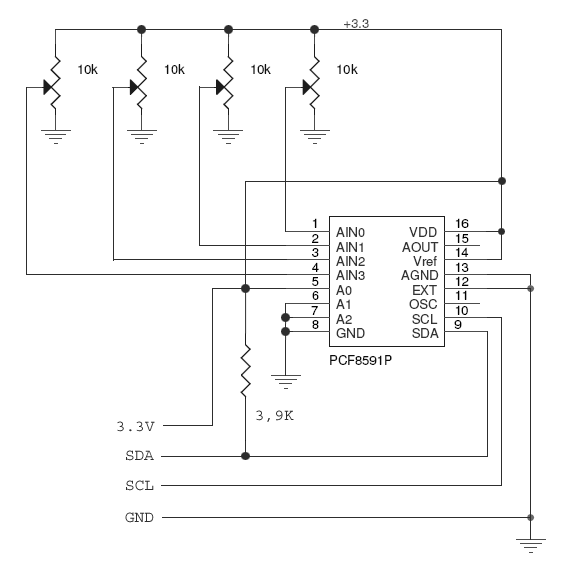
Wiring between the PCF8591 and the FOX board LX
|
Kernel driver method
This example reads the values from the four A/D channels using the I2C kernel driver and shows the voltage value to the screen:
@source='pcf8591d.c'
To compile this code with the SDK use this makefile (see @h1='711'):
@source='Makefile'
Running the example
Copy the executable file to the /mnt/flash directory and type:
[root@axis /mnt/flash]103# ./pcf8591d
Reading from 4 ch 8 bit A/D converter PCF8591
CH0 = 0.40v (1F hex)
CH1 = 1.19v (5C hex)
CH2 = 1.15v (59 hex)
CH3 = 3.30v (FF hex)
User space method
This example reads the values from the four A/D channels managing from user space directly the I/O lines used for the I2C bus
and shows the voltage value to the screen:
@source='pcf8591nd.c'
To compile this code with the SDK (see @h1='711') use the same makefile of the previous example changing this line:
PROGS = pcf8591d
in
PROGS = pcf8591nd
Running the example
Copy the executable file to the /mnt/flash directory and type:
[root@axis /mnt/flash]103# ./pcf8591nd
Reading from 4 ch 8 bit A/D converter PCF8591
CH0 = 0.40v (1F hex)
CH1 = 1.19v (5C hex)
CH2 = 1.15v (59 hex)
CH3 = 3.30v (FF hex)
Download
pcf8591nd.c I2C sample code using the bit banging methon in user space
Makefile Makefile to compile the C code inside the SDK
etraxi2c.h Hearder filer requested by vmeter.c
i2c_errnoc.h Hearder filer requested by vmeter.c
Related links
@shop='FOXLX832'