Installing PHP and SQLite
written by Sergio Tanzilli
This tutorial will explain how to configure the FOX Board SDK to install PHP and SQLite on the FOX Board

http://www.php.net
PHP is a widely-used general-purpose scripting language that is especially suited for Web development and can be embedded into HTML.
|

http://www.sqlite.org
SQLite is a small C library that implements a self-contained, embeddable, zero-configuration SQL database engine.
|
Configuration steps
Go to the SDK root folder the type:
# make menuconfig
Select your FOX Board model and enable the PHP support from this menu:
Applications -->
  Applications -->
    [*] Enable PHP 5.0.5
Save, exit and type:
# ./configure
...
# make
...
After a while flash your FOX Board (see @h1='703') and see an example of php page on http://192.168.0.90.
First test
To test PHP you can use this simple PHP script:
@source='phpinfo.php'
Copy it on FOX Board into /mnt/flash/root (your DocumentRoot) and add the execution flag typing:
# chmod +x phpinfo.php
Now run it from your browser using this URL http://192.168.0.90/phpinfo.php
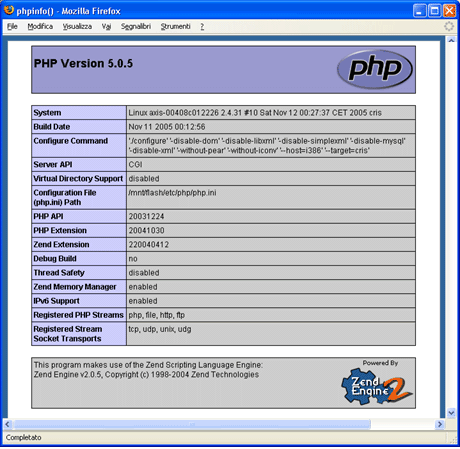
Web page generated with phpinfo()
Click to see the whole page
This example works starting from FOX Board SDK version 205. Update your SDK with ./sdk_update command.
Related links
- @h1='34'
- foXServe a ready to run appliance for the FOX Board with Apache+PHP+SQLite
Credits
Many thanks to:
- Fabio Sfuncia (porting)
- Mark Richards
- John Crispin (SDK integration)