Simple half duplex RS485 interface for the FOX Board LX
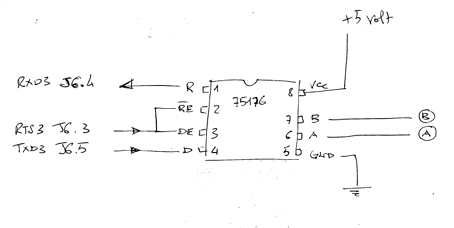
The schematic below is the simplest RS485 interface suitable for FOX Board LX. This interface is included in the FOXZB add-on board (see @h1='42').
Simple half duplex RS485 interface for the FOX Board LX
|
|
The only serial port enabled to work as RS485 is the /dev/ttyS3.
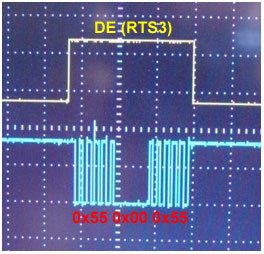
To use correctly the RS485 interface chip we need to configure the serial port driver in the Phrozen SDK to manage the RTS3 signals (Request To Send) to enable the TX section (DE pin) only when data are transmitted on TXD3 line (Transmit Data) as shown in this image. To enable the RS485 support use make kernelconfig command and enable: Drivers for built-in interfaces ---> [*] RS-485 support then generate the new flash image and transfer it to the FOX Board LX (@h1='703'). |