# KNX bus interface
This article explains how to install the knxd daemon on a CM3-Home and use it with the KNX bus interface.
Tested with Raspberry Pi OS Release date: January 11th 2021
@include='knx_warning'
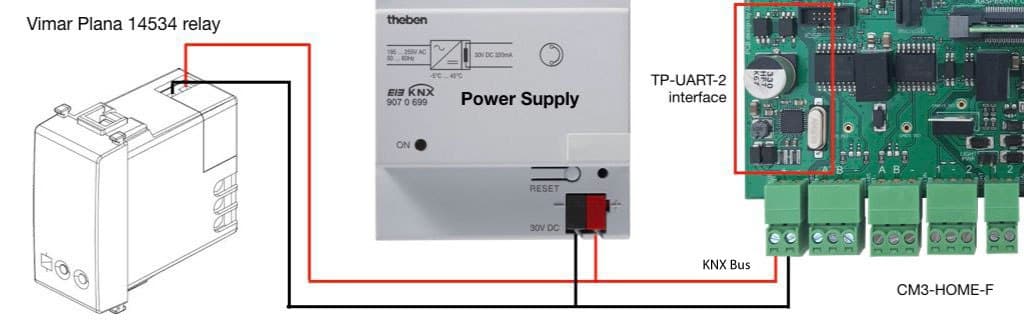
In this article we will control a KNX relay PLANA 1453 made by Vimar wired as shown below. The relay
address was already configured.
 ## Install knxd-tools
sudo apt update
sudo apt install knxd-tools
## Setup
Comment this line in __/etc/knxd.conf__:
# KNXD_OPTS="-e 0.0.1 -E 0.0.2:8 -u /tmp/eib -b ip:"
and add this line in order to use the KNX port available on the CM3-Home board:
KNXD_OPTS="-e 1.1.128 -E 1.1.129:1 -u /tmp/eib -b tpuarts:/dev/ttyAMA0"
Change the User and Group from __knxd__ to __root__ on __/lib/systemd/system/knxd.service__:
[Unit]
Description=KNX Daemon
After=network.target knxd.socket
Requires=knxd.socket
[Service]
EnvironmentFile=/etc/knxd.conf
ExecStart=/usr/bin/knxd $KNXD_OPTS
#User=knxd
#Group=knxd
User=root
Group=root
Type=notify
Restart=on-failure
RestartSec=10
[Install]
WantedBy=multi-user.target network-online.target
Also=knxd.socket
then reload the systemd definitions:
sudo systemctl daemon-reload
and restart the __knxd__ daemom:
sudo systemctl restart knxd.service
In case of errors check the log messages by typing:
journalctl -f -u knxd
## Let's try to control the KNX relay
Relay ON:
knxtool on ip:localhost 1/6/105
Relay OFF:
knxtool off ip:localhost 1/6/105
## Links
* [Knxd repository on GitHub](https://github.com/knxd/knxd)
* [Command line parameters](https://github.com/knxd/knxd/wiki/Command-line-parameters)
@include='bio_guiott'
@include='bio_tanzilli'
## Install knxd-tools
sudo apt update
sudo apt install knxd-tools
## Setup
Comment this line in __/etc/knxd.conf__:
# KNXD_OPTS="-e 0.0.1 -E 0.0.2:8 -u /tmp/eib -b ip:"
and add this line in order to use the KNX port available on the CM3-Home board:
KNXD_OPTS="-e 1.1.128 -E 1.1.129:1 -u /tmp/eib -b tpuarts:/dev/ttyAMA0"
Change the User and Group from __knxd__ to __root__ on __/lib/systemd/system/knxd.service__:
[Unit]
Description=KNX Daemon
After=network.target knxd.socket
Requires=knxd.socket
[Service]
EnvironmentFile=/etc/knxd.conf
ExecStart=/usr/bin/knxd $KNXD_OPTS
#User=knxd
#Group=knxd
User=root
Group=root
Type=notify
Restart=on-failure
RestartSec=10
[Install]
WantedBy=multi-user.target network-online.target
Also=knxd.socket
then reload the systemd definitions:
sudo systemctl daemon-reload
and restart the __knxd__ daemom:
sudo systemctl restart knxd.service
In case of errors check the log messages by typing:
journalctl -f -u knxd
## Let's try to control the KNX relay
Relay ON:
knxtool on ip:localhost 1/6/105
Relay OFF:
knxtool off ip:localhost 1/6/105
## Links
* [Knxd repository on GitHub](https://github.com/knxd/knxd)
* [Command line parameters](https://github.com/knxd/knxd/wiki/Command-line-parameters)
@include='bio_guiott'
@include='bio_tanzilli'