@include='daisy_eol'
This module is designed for the FOX Board G20 and is not compatible with the Aria and Arietta G25
boards.
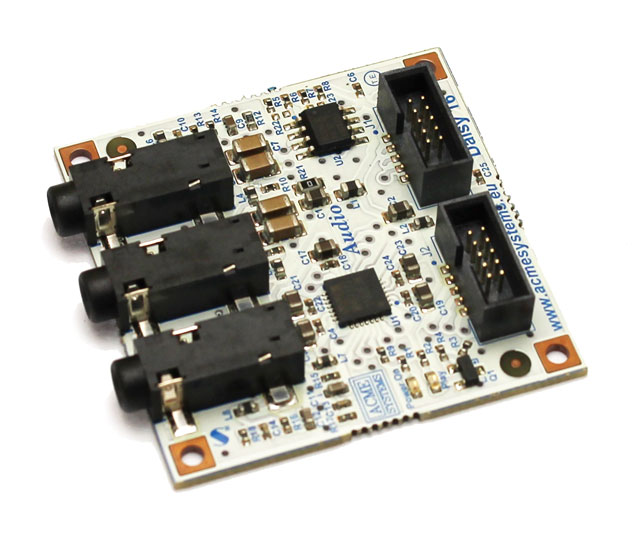
The audio codec used is the WM8731, is low power stereo codec with an integrated headphone driver, stereo line-out, stereo line-in and mono microphone level audio inputs.
*WM8731 Codecs is supported by the Linux kernel and works with alsa drivers.*
Dimension: 40x40mm
## WM8731 Codec Features
* Stereo 24-bit, multi-bit sigma delta ADCs and DACs are used with oversampling digital interpolation and decimation filters.
* Highly Efficient Headphone Driver
* Audio Performance : ADC SNR 90dB at 3.3V , DAC SNR 100dB at 3.3V
* Low Power : Playback only 22mW
* Selectable ADC High Pass Filter
* Microphone Input and Electret Bias with Side Tone Mixer
## Communication between Fox Board and Codecs
Audio Interface
PB16
PB17
PB18
PB19
PB21
TK0
TF0
TD0
RD0
RF0
Control Interface
PA23
PA24
SDA
SCL
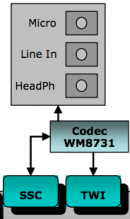
The communication between the Fox Board and the Codec is done by SSC (Synchronous Serial Controller) for the audio interface (Daisy D5 to J2) and TWI (I2C) for control interface (Daisy D6 to J1).
PB31 (PCK1) provides Master Clock to codec.
RK0 is not used so PB20 control the Play-LED
## Add audio support to the Linux Kernel for the Daisy16
WM8731 codecs is supported in the linux kernel but to be used with the Daisy16 needs some changes. You must apply an additional patch.
### Precompiled Kernel Image
Files to store in the first FAT16 partition:
* Kernel 2.6.35.4 image [daisy16_2.6.35.4_uImage](http://www.acmesystems.it/download/daisy16/daisy16_26354_uImage) (MD5:daf39e532a84e1a29f764efbe31a4e05)
* Kernel 2.6.38 image [daisy16_2.6.38_uImage](http://www.acmesystems.it/download/daisy16/daisy16_2638_uImage) (MD5:74ba68dd909db3edb2ab73bff9707250)
### How to apply Madefree patch and compile kernel
**Linux kernel 2.6.35.4**
* Download the kernel sources and apply Acme Systems patch:
wget http://www.kernel.org/pub/linux/kernel/v2.6/linux-2.6.35.4.tar.bz2
tar -xjvf linux-2.6.35.4.tar.bz2
cd linux-2.6.35.4
wget http://www.acmesystems.it/foxg20/download/kernel/0003-Acme-Systems-board-files.patch
patch -p1 < 0003-Acme-Systems-board-files.patch
wget http://www.acmesystems.it/foxg20/download/kernel/makefile
* Download the Madefree Patch [daisy16_26354.tar.gz](http://www.acmesystems.it/download/daisy16/daisy16_26354.tar.gz) (MD5:8e5ede6d218e34574c71cfdbcb880dfc)
* Apply the patch:
tar -xzvf daisy16_26354.tar.gz
patch -p1 < daisy16_26354/daisy16_26354.patch
* Then copy the .config to use the last Madefree factory default configuration files:
cp daisy16_26354/daisy16_26354.config .config
* Configuring kernel (if you need):
make menuconfig
* Building kernel:
make
**Linux kernel 2.6.38**
* Download the kernel sources:
wget http://www.kernel.org/pub/linux/kernel/v2.6/linux-2.6.38.tar.bz2
tar -xjvf linux-2.6.38.tar.bz2
cd linux-2.6.38
wget http://foxg20.acmesystems.it/download/kernel_2.6.38/makefile
* Download the Madefree Patch [daisy16_2638.tar.gz](http://www.acmesystems.it/download/daisy16/daisy16_2638.tar.gz) (MD5:c9f75aca53b6858c3c82edd5a497b718)
* Apply the patch:
tar -xzvf daisy16_2638.tar.gz
patch -p1 < daisy16_2638/daisy16_2638.patch
* Then copy the .config to use the last Madefree factory default configuration files:
cp daisy16_2638/daisy16_2638.config .config
* Configuring kernel (if you need):
make menuconfig
* Building kernel:
make
## Check the functionalities
* Check *dmesg* after boot:
...
ssc ssc.0: Atmel SSC device at 0xc48a0000 (irq 14)
...
netusG20_wm8731 : daisy16: wm8731__init() called
asoc: wm8731-hifi <-> atmel-ssc-dai.0 mapping ok
ALSA device list:
  #0: DAISY16
...
* Install *alsa-utils*:
apt-get install alsa-utils
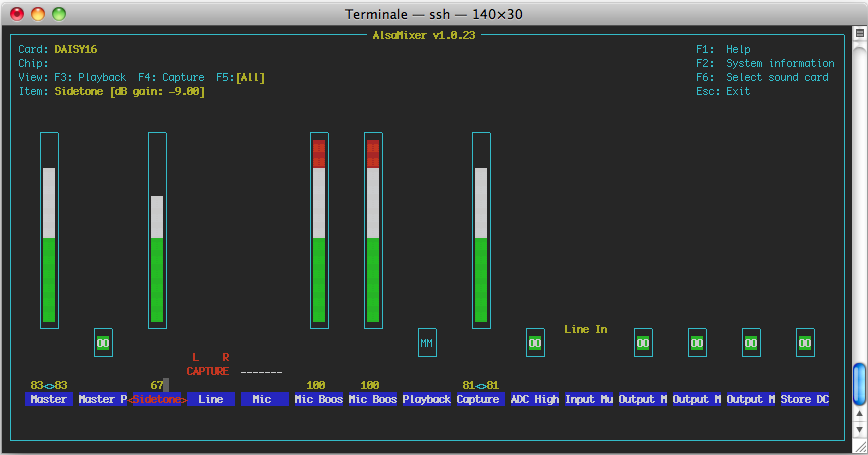
* Run *alsamixer*:
alsamixer -V all
* Configure *alsa* like this:
* Launch recording for 5sec. stereo wav acquisition and play what you recorded:
## Play your music library
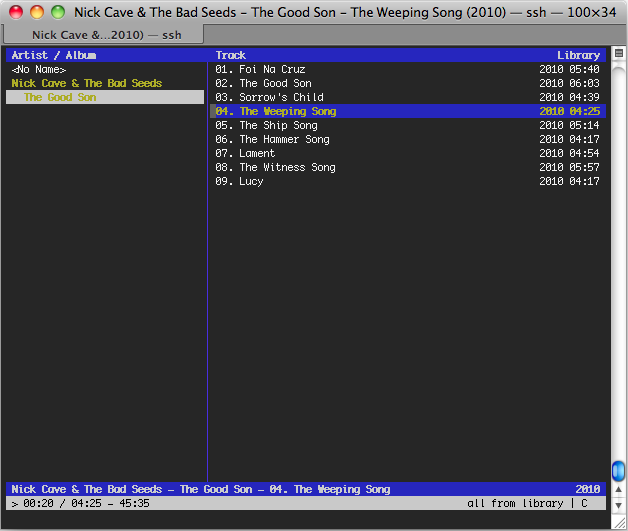
A great console music player is [cmus](http://cmus.sourceforge.net/).
apt-get install cmus
cmus
Change output plugin (from cmus command line)
:set output_plugin=ao
Cmus has a syntax very similar to vim:
:add 'directory_audio'  # add audio file to playlist
:q  # exit to cmus
z  # previous
x  # play
c  # pause
v  # stop
b  # next
^L # refresh
n  # search-next
r  # toggle repeat
1  # view tree
2  # view sorted
3  # view playlist
4  # view queue
5  # view browser
6  # view filters
7  # view settings
+  # vol +10%
-  # vol -10%
## Playing in remote access
You can use Music Player Daemon (MPD) to allow remote access for playing audio files (Ogg-Vorbis, FLAC, MP3, Wave, and AIFF), streams (Ogg-Vorbis, MP3) and managing playlists.
* Install mpd
apt-get install mpd
* Stop mpd daemon
/etc/init.d/mpd stop
* Configure /etc/mpd.conf more info [here](http://mpd.wikia.com/wiki/Configuration), we have create an adhoc config file for you [mpd.conf](http://www.madefree.eu/download/daisy16/mpd.conf) (MD5:a52a320d5e609b0265091ee276587d39)
cp mpd.conf /etc/mpd.conf
* Create database
mpd --create-db
* Start mpd daemon
/etc/init.d/mpd start
default directory to store your music is /var/lib/mpd/music/
Now connect the server with the client you want, a list [here](http://mpd.wikia.com/wiki/Clients).
Configure the client with right IP address of the server and *mpd* as password.
In this video we chose as client [MPDroid](https://play.google.com/store/apps/details?id=com.namelessdev.mpdroid&hl=it) for Android phone and [Theremin](http://theremin.sigterm.eu/) for Mac...
## Related links
* [Schematic in pdf format](http://terzo.acmesystems.it/download/schematics/schematic_daisy16.pdf)
* [WM8731 Datasheet](http://www.wolfsonmicro.com/documents/uploads/data_sheets/en/WM8731.pdf)
 Dimension: 40x40mm
## WM8731 Codec Features
* Stereo 24-bit, multi-bit sigma delta ADCs and DACs are used with oversampling digital interpolation and decimation filters.
* Highly Efficient Headphone Driver
* Audio Performance : ADC SNR 90dB at 3.3V , DAC SNR 100dB at 3.3V
* Low Power : Playback only 22mW
* Selectable ADC High Pass Filter
* Microphone Input and Electret Bias with Side Tone Mixer
## Communication between Fox Board and Codecs
Dimension: 40x40mm
## WM8731 Codec Features
* Stereo 24-bit, multi-bit sigma delta ADCs and DACs are used with oversampling digital interpolation and decimation filters.
* Highly Efficient Headphone Driver
* Audio Performance : ADC SNR 90dB at 3.3V , DAC SNR 100dB at 3.3V
* Low Power : Playback only 22mW
* Selectable ADC High Pass Filter
* Microphone Input and Electret Bias with Side Tone Mixer
## Communication between Fox Board and Codecs
 * Launch recording for 5sec. stereo wav acquisition and play what you recorded:
 ## Playing in remote access
You can use Music Player Daemon (MPD) to allow remote access for playing audio files (Ogg-Vorbis, FLAC, MP3, Wave, and AIFF), streams (Ogg-Vorbis, MP3) and managing playlists.
* Install mpd
## Playing in remote access
You can use Music Player Daemon (MPD) to allow remote access for playing audio files (Ogg-Vorbis, FLAC, MP3, Wave, and AIFF), streams (Ogg-Vorbis, MP3) and managing playlists.
* Install mpd