# DAISY-4 - One channel relay board
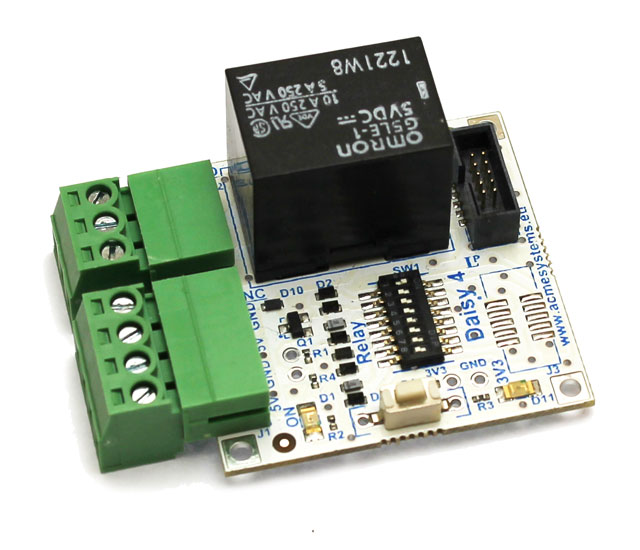
The DAISY-4 module allows Terra and FOX G20 boards to control larger loads and devices like AC or DC Motors, electromagnets, solenoids, and incandescent light bulbs.
@include='daisy_eol'
 ##Wirings
Up to 8 Daisy-4 modules can be wired using an unique flat cable. In that case you can make the flat cable with more IDC sockets by yourself.
This is the usable connectors where to plug this board using the factory default Linux image:
| FOX | Terra | Notes |
|-----|-------|-----------------|
| D2 | D11 | Up to 8 modules |
| D5 | D12 | Up to 8 modules |
On the FOX Board G20 is requested a [Daisy-1](/DAISY-1) adapter to wire this boards.
## On-field wirings
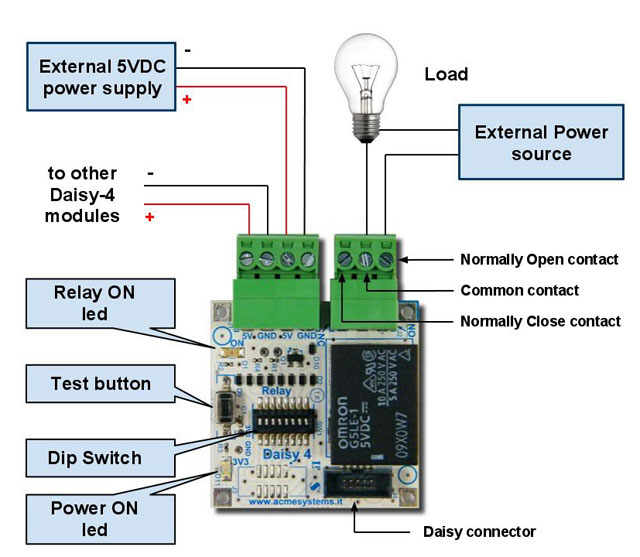
This is a very simple example of how to wire an external load to the Daisy-4 module.
##Wirings
Up to 8 Daisy-4 modules can be wired using an unique flat cable. In that case you can make the flat cable with more IDC sockets by yourself.
This is the usable connectors where to plug this board using the factory default Linux image:
| FOX | Terra | Notes |
|-----|-------|-----------------|
| D2 | D11 | Up to 8 modules |
| D5 | D12 | Up to 8 modules |
On the FOX Board G20 is requested a [Daisy-1](/DAISY-1) adapter to wire this boards.
## On-field wirings
This is a very simple example of how to wire an external load to the Daisy-4 module.
 ## Dip-switch set up
A dip switch enables you to select on which GPIO line the relay will be drives.
## Dip-switch set up
A dip switch enables you to select on which GPIO line the relay will be drives.
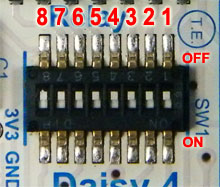 Usually only one DIP must be placed "ON".
## Code example in Python
The following code examples illustrate how to manage the Daisy-4 module
in Python. They work with a Daisy-11 module plugged on D5 connector
and the dip switch 1 moved to the "ON" position.
Turn ON a Relay
* @pg='python/daisy4/relayon.py'
Turn OFF a Relay
* @pg='python/daisy4/relayoff.py'
To launch it install the code playground directory following this article: @article='playground' then move into playground directory:
Usually only one DIP must be placed "ON".
## Code example in Python
The following code examples illustrate how to manage the Daisy-4 module
in Python. They work with a Daisy-11 module plugged on D5 connector
and the dip switch 1 moved to the "ON" position.
Turn ON a Relay
* @pg='python/daisy4/relayon.py'
Turn OFF a Relay
* @pg='python/daisy4/relayoff.py'
To launch it install the code playground directory following this article: @article='playground' then move into playground directory:
debarm:~/playground/python/daisy4# python relayon.py
debarm:~/playground/python/daisy4# python relayoff.py
The main part of this code is the class Daisy4() that gets as parameter
the Daisy connector (i.e. D2, D5, etc) and the dip switch in ON position
(DIP1, DIP2 .. DIP8).
myrelay = daisy.Daisy4('D5','DIP1')
myrelay.on()
myrelay.off()
The relay mounted on this board can control external devices that work at ~120 VAC or ~220 VAC.
This is considered HIGH VOLTAGE, which as many know, can be lethal so NEVER work on this
when it is plugged in. Make sure all connections are how they should be, and verify that they
are fully insulated and won't short each other out, or you could cause a fire.
Also, be aware of what is going on around you, be alert, and never
work on with high voltage if you feel you can't devote enough concentration to what you are doing.
And lastly, if you ever have to service the connections inside this device, ALWAYS unplug it before doing so.
Acme Systems is not responsible for any electric hazard or damage caused by using this module.
##Schematic
* [Schematic in pdf format](/download/schematics/schematic_daisy4.pdf)