#BEE Board 1-Wire Protocol
This article illustrates how to manage a Dallas DS18B20 thermal sensor to the BeeBoard and how to read the temperatures using the OneWire library
_"The DS18B20 digital thermometer provides 9-bit to 12-bit Celsius temperature measurements. It communicates over a 1-Wire bus that by definition requires only one data line (and ground) for communication with a central microprocessor. It has an operating temperature range of -55C to +125C and is accurate to +-0.5C over the range of -10C to +85C. In addition, the DS18B20 can derive power directly from the data line ("parasite power"), eliminating the need for an external power supply"_
[(read more)](http://www.maxim-ic.com/datasheet/index.mvp/id/2812)
## Library to manage 1-Wire with BEE Board
_The Arduino OneWire library is maintained by [Paul Stoffregen](http://www.pjrc.com/teensy/td_libs_OneWire.html)_
* Download library [here](http://www.pjrc.com/teensy/arduino_libraries/OneWire.zip)
* Install library by following [this guide](http://www.acmesystems.it/beeboard_add_libraries_to_ide).
* open IDE and iclude OneWire library.
## Create your OneWire application with Daisy-12
In this example the data pin is connected to pin 5 of the Daisy connector
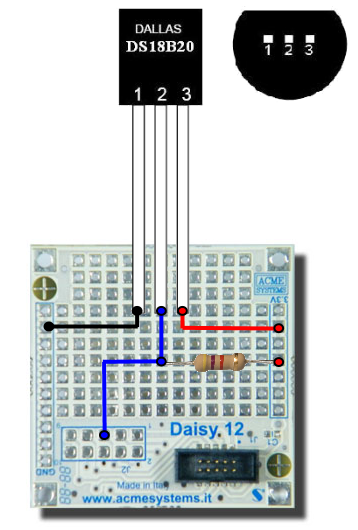 ## Example: Read Temperature
DS18x20_Temperature.pde
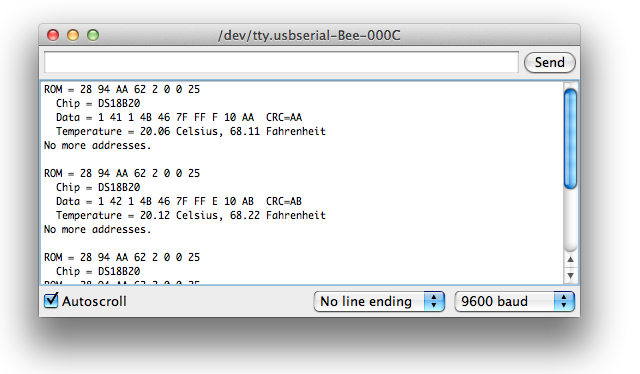
### Serial Results
## Example: Read Temperature
DS18x20_Temperature.pde
### Serial Results
 ## Related links
* [Maxim IC OneWire](http://www.maxim-ic.com/datasheet/index.mvp/id/2812)
* [Arduino OneWire library](http://www.pjrc.com/teensy/td_libs_OneWire.html)
* [BEE Board PINOUT](/beeboard_pinout)
@shop='BEEBOARD'
@shop='BEEKIT-1'
@shop='DAISY-12'
@shop='DS18B20'
@shop='FC-19818-10P-FF'
@shop='JJ-02291-10P-F'
@shop='FC-3754-1M'
## Related links
* [Maxim IC OneWire](http://www.maxim-ic.com/datasheet/index.mvp/id/2812)
* [Arduino OneWire library](http://www.pjrc.com/teensy/td_libs_OneWire.html)
* [BEE Board PINOUT](/beeboard_pinout)
@shop='BEEBOARD'
@shop='BEEKIT-1'
@shop='DAISY-12'
@shop='DS18B20'
@shop='FC-19818-10P-FF'
@shop='JJ-02291-10P-F'
@shop='FC-3754-1M'