This article illustrates how to import contributed libraries to the Arduino Environment.
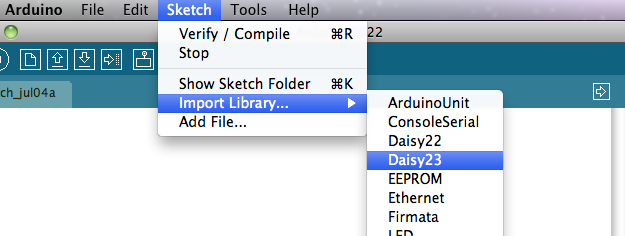
## Install Library * Close Arduino IDE. * Clone Daisy-like libraries from our git repository.git clone https://github.com/Madefree/Bee-Libraries.git* Create a directory called *libraries* within your *sketchbook directory*. * Copy the library there. For example, to install the Daisy5 library, its files should be in the */libraries/Daisy5* sub-folder of your *sketchbook folder*. ## Import Library in a sketch * Open Arduino IDE. * Select library from the *Sketch > Import Library* menu.
Arduino 1.0 is now supported by Bee Libraries! [info](http://www.acmesystems.it/beeboard_getting_started)
## Related links * [Madefree web site](http://beeboard.madefree.eu/doku.php/software_tools:add_library_to_the_ide) * [BEE Board PINOUT](http://www.acmesystems.it/beeboard_pinout) @shop='BEEBOARD' @shop='BEEKIT-1' @shop='BEEKIT-2'