#BEE Board and Stepper Motor
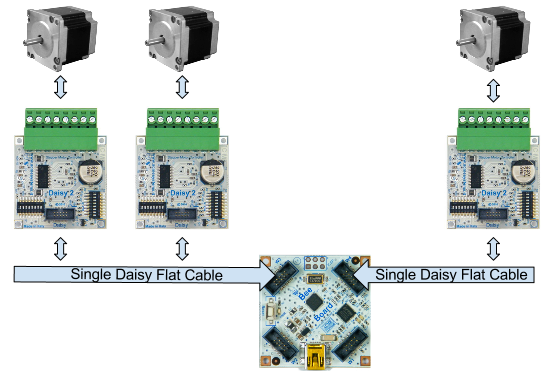
This article shows on how to drive up to three unipolar stepper motor using a [BEE Board](/BEEBOARD) and the [DAISY-2](/DAISY-2) stepper
motor controller.
The BEE Board can simultaneously drive up to 3 motors to manages, for example, 3 axis mechanical.
## Dip Switch S1 Configuration
Configuration 'A'
Pin
S1 Switch
1
OFF
2
OFF
3
ON
4
OFF
5
ON
6
OFF
7
ON
8
OFF
Configuration 'B'
Pin
S1 Switch
1
OFF
2
OFF
3
OFF
4
ON
5
OFF
6
ON
7
OFF
8
ON
For more information about DIP Switch configuration visit [this page](/DAISY-2)
## Raw Mode
In this Example my Daisy2 was wired on W3 with 'A' configuration
RawMotor.pde
## Library to manage Daisy2 with BEE Board
This library is a simple way to drive the motor with no PWM. You can connect up to 2 stepper motors to W3 (Configuration 'A' and 'B') and one stepper motor to W4 (configuration 'A').
* Download and Install it by following [this guide](http://www.acmesystems.it/beeboard_add_libraries_to_ide).
* Plug Ribbon Cable on Wings W3 or W4.
* open IDE and iclude Library.
## Plug one Daisy2 to W3 with configuration 'A'
OneMotor.pde
## Plug two Daisy2 to W3 with configuration 'A' and 'B'
TwoMotor.pde
## Related links
* [Madefree web site](http://beeboard.madefree.eu/doku.php/fly_on_daisy:daisy2_stepper_motor)
* [BEE Board PINOUT](http://www.acmesystems.it/beeboard_pinout)
@shop='BEEBOARD'
@shop='BEEKIT-1'
@shop='DAISY-2'
@shop='FC-19818-10P-FF'
@shop='JJ-02291-10P-F'
@shop='FC-3754-1M'
 ## Dip Switch S1 Configuration