# The Debug Port Interface (DPI)
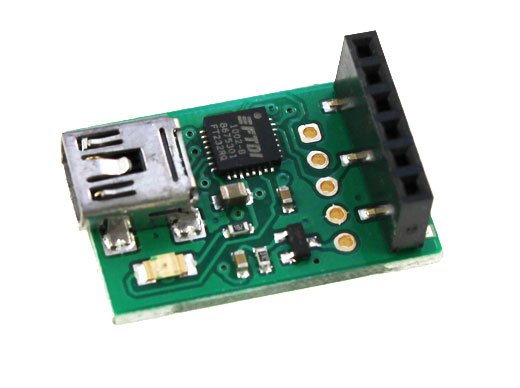
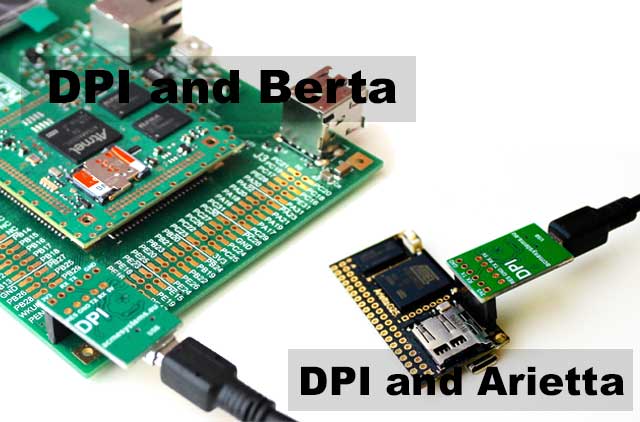
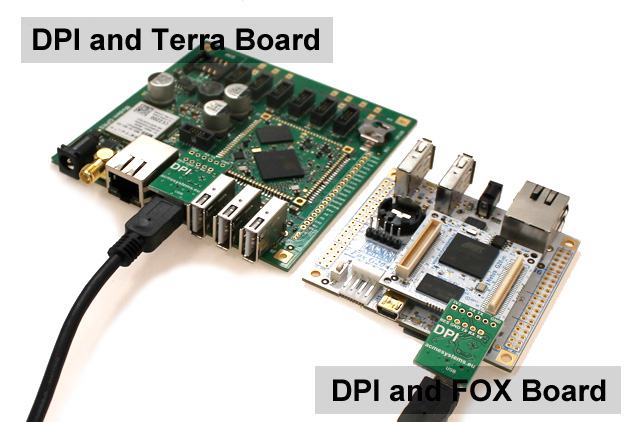
DPI is an USB-to-serial interface based on FTDI chip FT232RQ designed to link the Acme boards debug ports
to a PC USB host port and have access at the Linux system console using a terminal emulator program like
minicom, putty, hyperterminal, etc.
 ## Driver
DPI is based on the popular FTDI FT232 chip and its driver are often already installed on any operating system.
If not download and install it from this page:
*
Windows users can click on "setup executable" link available on [this page](https://www.ftdichip.com/Drivers/VCP.htm)
and execute it to install the driver:
## Driver
DPI is based on the popular FTDI FT232 chip and its driver are often already installed on any operating system.
If not download and install it from this page:
*
Windows users can click on "setup executable" link available on [this page](https://www.ftdichip.com/Drivers/VCP.htm)
and execute it to install the driver:
 ##Using the DPI on Windows
__putty__ is a free and sample utility to get access to the serial port available using the DPI
* [Download PUTTY.EXE it from this link](http://www.chiark.greenend.org.uk/~sgtatham/putty/download.html).
It doesn't need to be installed, just download and run it.
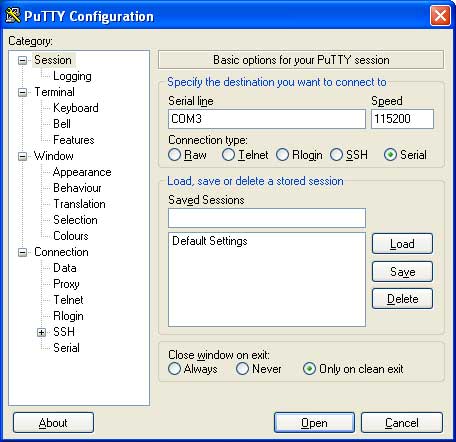
At startup you have to specify:
* Connection type: **Serial**
* Serial line: **COMx** where x is the serial port allocated by the ftdi device driver
* Speed: **115200**
Save this configuration and press the Open button to continue.
##Using the DPI on Windows
__putty__ is a free and sample utility to get access to the serial port available using the DPI
* [Download PUTTY.EXE it from this link](http://www.chiark.greenend.org.uk/~sgtatham/putty/download.html).
It doesn't need to be installed, just download and run it.
At startup you have to specify:
* Connection type: **Serial**
* Serial line: **COMx** where x is the serial port allocated by the ftdi device driver
* Speed: **115200**
Save this configuration and press the Open button to continue.
 You will receive a request of login end password.
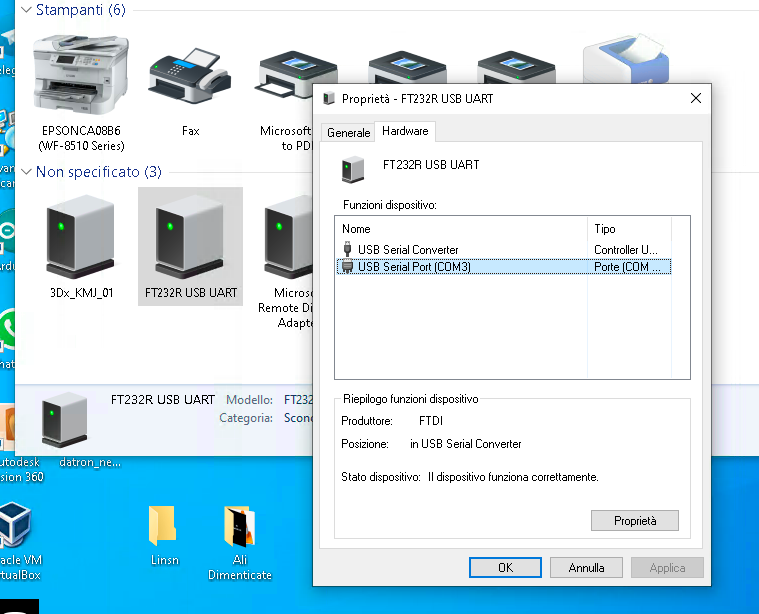
To know which COMx has been allocated for the DPI adapter press the Windows key + R shortcut
to bring up the Run dialog, or open the Command Prompt.
Type "__control printers__" and press Enter.
The Devices and Printers window will open immediately.
Right-click on the FT232R USB UART icon and select "__Hardware__" tab:
You will receive a request of login end password.
To know which COMx has been allocated for the DPI adapter press the Windows key + R shortcut
to bring up the Run dialog, or open the Command Prompt.
Type "__control printers__" and press Enter.
The Devices and Printers window will open immediately.
Right-click on the FT232R USB UART icon and select "__Hardware__" tab:
 ##Using the DPI on Linux
A simple terminal emulator available on Linux is __minicom__.
On Ubuntu/Debian distributions you can install it by typing:
sudo apt update
sudo apt install minicom
To run it type:
sudo minicom
Type __CTRL-A__ followed by __O__ to show the configuration panel. Then select __Serial port setup__ and access to the serial
port configuration.
Set the port as shown below:
+-----------------------------------------------------------------------+
| A - Serial Device : /dev/ttyUSB0 |
| B - Lockfile Location : /var/lock |
| C - Callin Program : |
| D - Callout Program : |
| E - Bps/Par/Bits : 115200 8N1 |
| F - Hardware Flow Control : No |
| G - Software Flow Control : No |
| |
| Change which setting? |
+-----------------------------------------------------------------------+
| Screen and keyboard |
| Save setup as dfl |
| Save setup as.. |
| Exit |
+--------------------------+
Type __ESC__ the select __Save setup as dfl__. Then __ESC__ again. Now pressing __Enter__ you could have access to the board login.
## Schematic
* [DPI schematic in pdf format](/download/schematics/schematic_dpi.pdf)
## Links
* [FOXCONS interface](/?id=106)
## Buy
@shop='DPI'
@shop='USB-3V-SER'
##Using the DPI on Linux
A simple terminal emulator available on Linux is __minicom__.
On Ubuntu/Debian distributions you can install it by typing:
sudo apt update
sudo apt install minicom
To run it type:
sudo minicom
Type __CTRL-A__ followed by __O__ to show the configuration panel. Then select __Serial port setup__ and access to the serial
port configuration.
Set the port as shown below:
+-----------------------------------------------------------------------+
| A - Serial Device : /dev/ttyUSB0 |
| B - Lockfile Location : /var/lock |
| C - Callin Program : |
| D - Callout Program : |
| E - Bps/Par/Bits : 115200 8N1 |
| F - Hardware Flow Control : No |
| G - Software Flow Control : No |
| |
| Change which setting? |
+-----------------------------------------------------------------------+
| Screen and keyboard |
| Save setup as dfl |
| Save setup as.. |
| Exit |
+--------------------------+
Type __ESC__ the select __Save setup as dfl__. Then __ESC__ again. Now pressing __Enter__ you could have access to the board login.
## Schematic
* [DPI schematic in pdf format](/download/schematics/schematic_dpi.pdf)
## Links
* [FOXCONS interface](/?id=106)
## Buy
@shop='DPI'
@shop='USB-3V-SER'