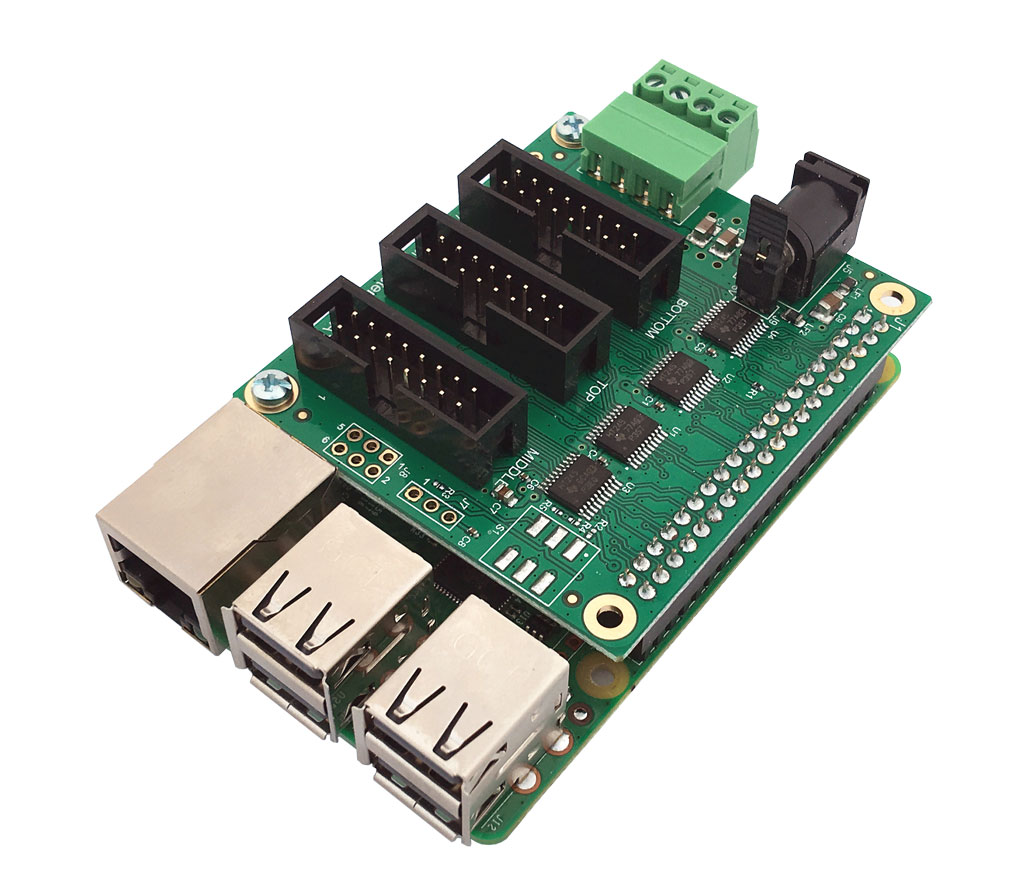
# HAT-A3 - Led RGB controller for Raspberry Pi

<abstract>
HAT-A3 is the Acme Systems version of the Active-3 board designed by 
Henner Zeller to controll RGB led display with Raspberry Pi 
</abstract>

<div class="row">
	<div class="col-md-6">
		<img src="./HAT-A3.jpg" class="img-responsive center-block" width="50%">
	</div>
	
	<div class="col-md-6"  markdown="1">
<iframe width="560" height="315" src="https://www.youtube.com/embed/YqrnfTHiEgs?rel=0" frameborder="0" gesture="media" allow="encrypted-media" allowfullscreen></iframe>		

## Features

* Fully compatible with the [Active-3 board](https://github.com/hzeller/rpi-rgb-led-matrix/tree/master/adapter) and software designed by Henner Zeller (<https://github.com/hzeller/rpi-rgb-led-matrix>)
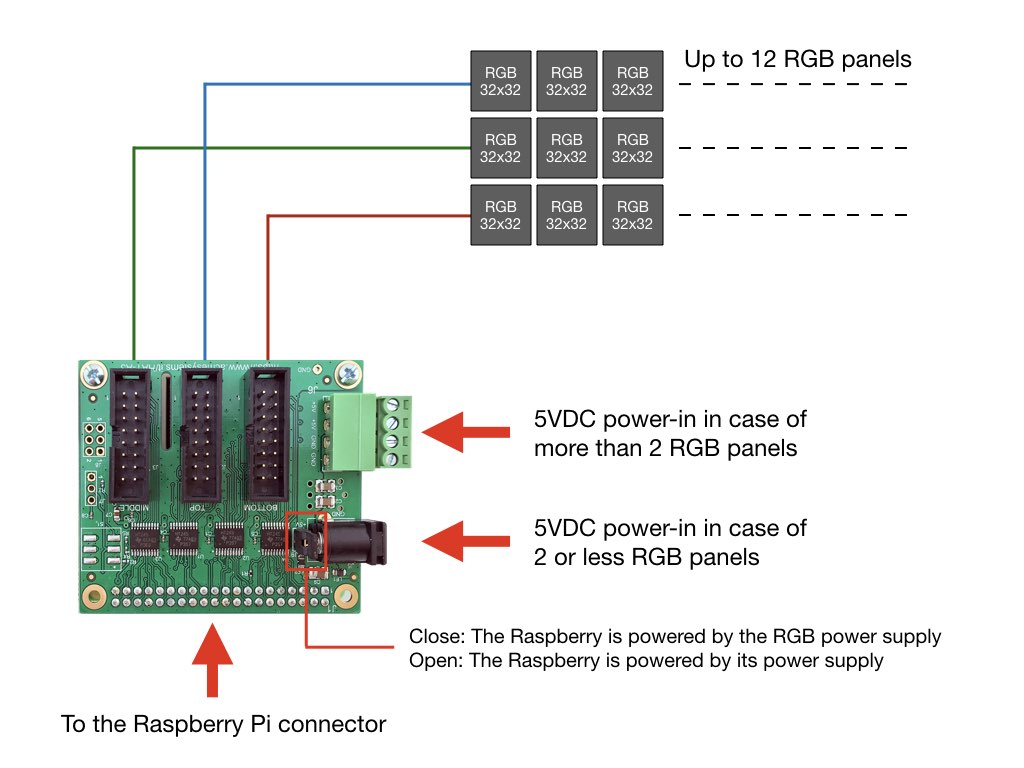
* Supports up to three parallel chains and up to 12 32x32 RGB led modules for each chain
* Active buffering and 3.3V -> 5V level shifting for best reliability. 
* Not requires any SMD soldering.
	</div>
</div>

<img src="./hat-a3-wiring.jpg" class="img-responsive">

## Links

* [HAT-A3 schematic](./hata3_schematic.pdf)
* [Original examples by Henner Zeller](https://github.com/hzeller/rpi-rgb-led-matrix/tree/master/examples-api-use)
* [Node-red node for controlling rgb matrix panels](https://github.com/easybotics/node-red-contrib-easybotics-led-matrix)
* [image-viewer doc](https://github.com/hzeller/rpi-rgb-led-matrix/tree/master/utils)
* @article='rgbled_64x64_module'


## Demo - Digital signage managed by Telegram

This video shows a simple Telegram bot implemented inside a Raspberry Pi 3 B+ with an Acme HAT-A4 running [Node-RED](https://nodered.org/) and [RedBot](http://red-bot.io/).
The program sources and the installation details are available on this link:

* [Telegram Bot on RGB module](/rgbled_64x64_module)

<iframe width="560" height="315" src="https://www.youtube.com/embed/MUhA0V10kdc" frameborder="0" allow="accelerometer; autoplay; encrypted-media; gyroscope; picture-in-picture" allowfullscreen></iframe>

##Install rpi-rgb-led-matrix

The fully documentation to install the Henner Zeller software is available
on his GitHub repository from this link: 

* <https://github.com/hzeller/rpi-rgb-led-matrix>

If you you want to try quickly your HAT-A3 panel these are the Linux commands
to install the software (tested on a Raspbian Buster Lite July 2019).

Download the microSD image from this link:

* <https://www.raspberrypi.org/downloads/raspbian/>

Boot your Raspberry Pi and get the access to the command console. Then type:

	sudo apt update
	sudo apt -y install git libgraphicsmagick++-dev libwebp-dev libavcodec-dev libavdevice-dev libavformat-dev libswscale-dev initramfs-tools
	git clone https://github.com/hzeller/rpi-rgb-led-matrix.git
	cd ~/rpi-rgb-led-matrix/utils
	make led-image-viewer
	make video-viewer
	cd ~/rpi-rgb-led-matrix/examples-api-use
	make 

###Remove the snd_bcm2835 module

<i>"If sound is enabled on your Pi, this will not work together with the LED matrix"</i>. This
problem is explained here: 

* [Bad interaction with Sound](https://github.com/hzeller/rpi-rgb-led-matrix#bad-interaction-with-sound)

To remove this module type the following commands:

	cat <<EOF | sudo tee /etc/modprobe.d/blacklist-rgb-matrix.conf
	blacklist snd_bcm2835
	EOF
	sudo update-initramfs -u
	sudo reboot

## Lets try some demos:

This is a list of ready-to-use demos provided with the rpi-rgb-led-matrix

Move inside the examples-api-use directory:

	cd ~/rpi-rgb-led-matrix/examples-api-use

and type:

	sudo demo
	
to have the list of ready-to-use demo. 

Two parameters are always present:

* __led-parallel__ : Number of HAT-A3 connector used where:
	*  __1__ if is used just the TOP connector
	*  __2__ if are used TOP and MIDDLE connecors
	*  __3__ if are used all the connectors available
* __--led-chain__ : Number of RGB modules connected on a single line. The max number is 12.

If you are using the outdoor P6 RGB module LEDRGB-04 add this other two options:

* led-multiplexing=2
* led-slowdown-gpio=2

### Pulse color

Four RGBLED-02 (P6 32x32 indoor module) on the same line wired on TOP connector:	

	sudo ./demo -D 4 --led-chain=4 --led-parallel=1

Four RGBLED-04 (P6 32x32 outdoor module) on the same line wired on TOP connector:	

	sudo ./demo -D 4 --led-chain=4 --led-parallel=1 --led-multiplexing=2 --led-slowdown-gpio=2

### Show and scroll a ppm image

	sudo ./demo -t 10 -D 4 runtext.ppm --led-chain=1 --led-parallel=1

## Show images

Move inside the utils directory:

	cd ~/rpi-rgb-led-matrix/utils
	
### Show a jpg image

Save a jpg image in this directory and type:

	sudo ./led-image-viewer --led-chain=4 --led-parallel=1  image.jpg
	
Use CTRL-C to exit.

### List of options available 

	./led-image-viewer 

## Play videos

Move inside the utils directory:

	cd ~/rpi-rgb-led-matrix/utils

### Show a mp4 video

Save a mp4 video in this directory and type:

	sudo ./video-viewer --led-chain=4 --led-parallel=1  video.mp4
	
Use CTRL-C to exit.

### List of options available 

	./video-viewer 

## Create a Telegram Bot to play smartphone videos

<img src="./telegramlogo.jpg" width="64px">

[Botbyexamples](https://github.com/tanzilli/botbyexamples/blob/master/chatid.py) is a little set of example
to write [Telegram Bot](https://telegram.org/blog/bot-revolution) in Python.

The example [video_on_hat_a3.py](https://github.com/tanzilli/botbyexamples/blob/master/video_on_hat_a3.py) shows
how to write a Bot that can receive video and play video received from your smartphone.

<br/>
<br/>

<h2>Related products</h2>

<div class="row equal">
<div class="col-md-3 col-sm-6">
@include='card_hata3'
</div>
</div>


## demo options

	usage: ./demo <options> -D <demo-nr> [optional parameter]
	Options:
		-D <demo-nr>              : Always needs to be set
		-t <seconds>              : Run for these number of seconds, then exit.
		--led-gpio-mapping=<name> : Name of GPIO mapping used. Default "regular"
		--led-rows=<rows>         : Panel rows. Typically 8, 16, 32 or 64. (Default: 32).
		--led-cols=<cols>         : Panel columns. Typically 32 or 64. (Default: 32).
		--led-chain=<chained>     : Number of daisy-chained panels. (Default: 1).
		--led-parallel=<parallel> : Parallel chains. range=1..3 (Default: 1).
		--led-multiplexing=<0..10> : Mux type: 0=direct; 1=Stripe; 2=Checkered; 3=Spiral; 4=ZStripe; 5=ZnMirrorZStripe; 6=coreman; 7=Kaler2Scan; 8=ZStripeUneven; 9=P10-128x4-Z; 10=QiangLiQ8 (Default: 0)
		--led-pixel-mapper        : Semicolon-separated list of pixel-mappers to arrange pixels.
		                            Optional params after a colon e.g. "U-mapper;Rotate:90"
		                            Available: "Rotate", "U-mapper". Default: ""
		--led-pwm-bits=<1..11>    : PWM bits (Default: 11).
		--led-brightness=<percent>: Brightness in percent (Default: 100).
		--led-scan-mode=<0..1>    : 0 = progressive; 1 = interlaced (Default: 0).
		--led-row-addr-type=<0..3>: 0 = default; 1 = AB-addressed panels; 2 = direct row select; 3 = ABC-addressed panels (experimental) (Default: 0).
		--led-show-refresh        : Show refresh rate.
		--led-inverse             : Switch if your matrix has inverse colors on.
		--led-rgb-sequence        : Switch if your matrix has led colors swapped (Default: "RGB")
		--led-pwm-lsb-nanoseconds : PWM Nanoseconds for LSB (Default: 130)
		--led-pwm-dither-bits=<0..2> : Time dithering of lower bits (Default: 0)
		--led-no-hardware-pulse   : Don't use hardware pin-pulse generation.
		--led-panel-type=<name>   : Needed to initialize special panels. Supported: 'FM6126A'
		--led-slowdown-gpio=<0..4>: Slowdown GPIO. Needed for faster Pis/slower panels (Default: 1).
		--led-daemon              : Make the process run in the background as daemon.
		--led-no-drop-privs       : Don't drop privileges from 'root' after initializing the hardware.
	Demos, choosen with -D
		0  - some rotating square
		1  - forward scrolling an image (-m <scroll-ms>)
		2  - backward scrolling an image (-m <scroll-ms>)
		3  - test image: a square
		4  - Pulsing color
		5  - Grayscale Block
		6  - Abelian sandpile model (-m <time-step-ms>)
		7  - Conway's game of life (-m <time-step-ms>)
		8  - Langton's ant (-m <time-step-ms>)
		9  - Volume bars (-m <time-step-ms>)
		10 - Evolution of color (-m <time-step-ms>)
		11 - Brightness pulse generator
	Example:
		./demo -t 10 -D 1 runtext.ppm

## led-image_viewer options

	usage: ./led-image-viewer [options] <image> [option] [<image> ...]
	Options:
		-O<streamfile>            : Output to stream-file instead of matrix (Don't need to be root).
		-C                        : Center images.
	
	These options affect images FOLLOWING them on the command line,
	so it is possible to have different options for each image
		-w<seconds>               : Regular image: Wait time in seconds before next image is shown (default: 1.5).
		-t<seconds>               : For animations: stop after this time.
		-l<loop-count>            : For animations: number of loops through a full cycle.
		-D<animation-delay-ms>    : For animations: override the delay between frames given in the
		                            gif/stream animation with this value. Use -1 to use default value.
		-V<vsync-multiple>        : For animation (expert): Only do frame vsync-swaps on multiples of refresh (default: 1)
		                            (Tip: use --led-limit-refresh for stable rate)
	
	Options affecting display of multiple images:
		-f                        : Forever cycle through the list of files on the command line.
		-s                        : If multiple images are given: shuffle.
	
	General LED matrix options:
		--led-gpio-mapping=<name> : Name of GPIO mapping used. Default "regular"
		--led-rows=<rows>         : Panel rows. Typically 8, 16, 32 or 64. (Default: 32).
		--led-cols=<cols>         : Panel columns. Typically 32 or 64. (Default: 32).
		--led-chain=<chained>     : Number of daisy-chained panels. (Default: 1).
		--led-parallel=<parallel> : Parallel chains. range=1..3 (Default: 1).
		--led-multiplexing=<0..16> : Mux type: 0=direct; 1=Stripe; 2=Checkered; 3=Spiral; 4=ZStripe; 5=ZnMirrorZStripe; 6=coreman; 7=Kaler2Scan; 8=ZStripeUneven; 9=P10-128x4-Z; 10=QiangLiQ8; 11=InversedZStripe; 12=P10Outdoor1R1G1-1; 13=P10Outdoor1R1G1-2; 14=P10Outdoor1R1G1-3; 15=P10CoremanMapper; 16=P8Outdoor1R1G1 (Default: 0)
		--led-pixel-mapper        : Semicolon-separated list of pixel-mappers to arrange pixels.
		                            Optional params after a colon e.g. "U-mapper;Rotate:90"
		                            Available: "Mirror", "Rotate", "U-mapper", "V-mapper". Default: ""
		--led-pwm-bits=<1..11>    : PWM bits (Default: 11).
		--led-brightness=<percent>: Brightness in percent (Default: 100).
		--led-scan-mode=<0..1>    : 0 = progressive; 1 = interlaced (Default: 0).
		--led-row-addr-type=<0..4>: 0 = default; 1 = AB-addressed panels; 2 = direct row select; 3 = ABC-addressed panels; 4 = ABC Shift + DE direct (Default: 0).
		--led-show-refresh        : Show refresh rate.
		--led-limit-refresh=<Hz>  : Limit refresh rate to this frequency in Hz. Useful to keep a
		                            constant refresh rate on loaded system. 0=no limit. Default: 0
		--led-inverse             : Switch if your matrix has inverse colors on.
		--led-rgb-sequence        : Switch if your matrix has led colors swapped (Default: "RGB")
		--led-pwm-lsb-nanoseconds : PWM Nanoseconds for LSB (Default: 130)
		--led-pwm-dither-bits=<0..2> : Time dithering of lower bits (Default: 0)
		--led-no-hardware-pulse   : Don't use hardware pin-pulse generation.
		--led-panel-type=<name>  : Needed to initialize special panels. Supported: 'FM6126A', 'FM6127'
		--led-slowdown-gpio=<0..4>: Slowdown GPIO. Needed for faster Pis/slower panels (Default: 1).
		--led-daemon              : Make the process run in the background as daemon.
		--led-no-drop-privs       : Don't drop privileges from 'root' after initializing the hardware.
	
	Switch time between files: -w for static images; -t/-l for animations
	Animated gifs: If both -l and -t are given, whatever finishes first determines duration.
	
	The -w, -t and -l options apply to the following images until a new instance of one of these options is seen.
	So you can choose different durations for different images.

## video-viewer options
 
	usage: ./video-viewer [options] <video>
	Options:
		-O<streamfile>     : Output to stream-file instead of matrix (don't need to be root).
		-s <count>         : Skip these number of frames in the beginning.
		-c <count>         : Only show this number of frames (excluding skipped frames).
		-v                 : verbose.
		-f                 : Loop forever.
	
	General LED matrix options:
		--led-gpio-mapping=<name> : Name of GPIO mapping used. Default "regular"
		--led-rows=<rows>         : Panel rows. Typically 8, 16, 32 or 64. (Default: 32).
		--led-cols=<cols>         : Panel columns. Typically 32 or 64. (Default: 32).
		--led-chain=<chained>     : Number of daisy-chained panels. (Default: 1).
		--led-parallel=<parallel> : Parallel chains. range=1..3 (Default: 1).
		--led-multiplexing=<0..10> : Mux type: 0=direct; 1=Stripe; 2=Checkered; 3=Spiral; 4=ZStripe; 5=ZnMirrorZStripe; 6=coreman; 7=Kaler2Scan; 8=ZStripeUneven; 9=P10-128x4-Z; 10=QiangLiQ8 (Default: 0)
		--led-pixel-mapper        : Semicolon-separated list of pixel-mappers to arrange pixels.
		                            Optional params after a colon e.g. "U-mapper;Rotate:90"
		                            Available: "Rotate", "U-mapper". Default: ""
		--led-pwm-bits=<1..11>    : PWM bits (Default: 11).
		--led-brightness=<percent>: Brightness in percent (Default: 100).
		--led-scan-mode=<0..1>    : 0 = progressive; 1 = interlaced (Default: 0).
		--led-row-addr-type=<0..3>: 0 = default; 1 = AB-addressed panels; 2 = direct row select; 3 = ABC-addressed panels (experimental) (Default: 0).
		--led-show-refresh        : Show refresh rate.
		--led-inverse             : Switch if your matrix has inverse colors on.
		--led-rgb-sequence        : Switch if your matrix has led colors swapped (Default: "RGB")
		--led-pwm-lsb-nanoseconds : PWM Nanoseconds for LSB (Default: 130)
		--led-pwm-dither-bits=<0..2> : Time dithering of lower bits (Default: 0)
		--led-no-hardware-pulse   : Don't use hardware pin-pulse generation.
		--led-panel-type=<name>   : Needed to initialize special panels. Supported: 'FM6126A'
		--led-slowdown-gpio=<0..4>: Slowdown GPIO. Needed for faster Pis/slower panels (Default: 1).
		--led-daemon              : Make the process run in the background as daemon.
		--led-no-drop-privs       : Don't drop privileges from 'root' after initializing the hardware.
		
		
<br/>
<br/>
<br/>

@include='bio_tanzilli'

@product='HAT-A3'		
