#HC-SR04 ultrasonic sensor
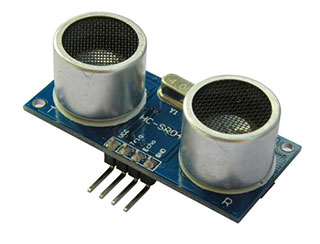
"The HC-SR04 ultrasonic sensor uses sonar to determine distance to an object like bats or
dolphins do. It offers excellent non-contact range detection with high accuracy and
stable readings in an easy-to-use package. From 2cm to 400 cm or 1" to 13 feet.
It operation is not affected by sunlight or black material like Sharp rangefinders
are (although acoustically soft materials like cloth can be difficult to detect).
It comes complete with ultrasonic transmitter and receiver module".
This article illustrates how to interface the HC-SR04 to the [Arietta G25 board](/arietta).
 As explained in its [user manual](https://docs.google.com/document/d/1Y-yZnNhMYy7rwhAgyL_pfa39RsB-x2qR4vP8saG73rE/edit)
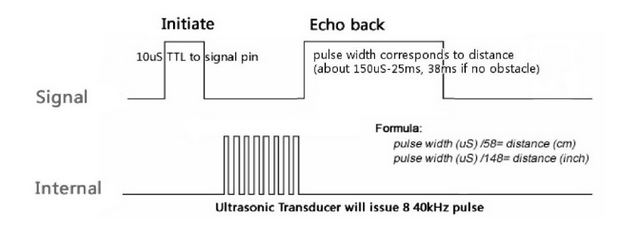
to start the distance measurement the TRIGGER pin of HC-SR04 must receive a pulse of high (5V)
for at least 10us, this will initiate the sensor will transmit out 8 cycle of ultrasonic
burst at 40kHz and wait for the reflected ultrasonic burst. When the sensor detected ultrasonic
from receiver, it will set the Echo pin to high (5V) and delay for a period (width)
which proportion to distance. To obtain the distance, measure the width (Ton) of Echo pin.
Time = Width of Echo pulse, in uS (micro second)
* Distance in centimeters = Time / 58
* Distance in inches = Time / 148
To generate the right TRIGGER signal and measure the ECHO impulse
it is required a program that runs in Linux Kernel space and send back to
the user space the measurement done.
This is code used to do that:
* [hcsr04.c](https://github.com/tanzilli/hc-sr04/blob/master/hcsr04.c)
It generate a TRIGGER pulse when any program tries to read the contents
of this file: /sys/class/hcsr04/value then use an interrupt
routine and an hi-res timer to measure the incoming pulse on the ECHO line.
As explained in its [user manual](https://docs.google.com/document/d/1Y-yZnNhMYy7rwhAgyL_pfa39RsB-x2qR4vP8saG73rE/edit)
to start the distance measurement the TRIGGER pin of HC-SR04 must receive a pulse of high (5V)
for at least 10us, this will initiate the sensor will transmit out 8 cycle of ultrasonic
burst at 40kHz and wait for the reflected ultrasonic burst. When the sensor detected ultrasonic
from receiver, it will set the Echo pin to high (5V) and delay for a period (width)
which proportion to distance. To obtain the distance, measure the width (Ton) of Echo pin.
Time = Width of Echo pulse, in uS (micro second)
* Distance in centimeters = Time / 58
* Distance in inches = Time / 148
To generate the right TRIGGER signal and measure the ECHO impulse
it is required a program that runs in Linux Kernel space and send back to
the user space the measurement done.
This is code used to do that:
* [hcsr04.c](https://github.com/tanzilli/hc-sr04/blob/master/hcsr04.c)
It generate a TRIGGER pulse when any program tries to read the contents
of this file: /sys/class/hcsr04/value then use an interrupt
routine and an hi-res timer to measure the incoming pulse on the ECHO line.
 ##Wiring
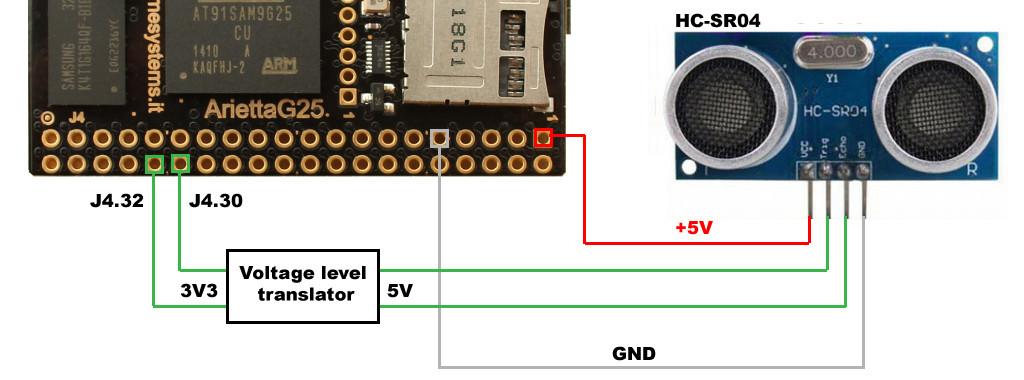
This is the schematic used. The GPIO line used can be changed inside the
code source to any GPIO available.
A voltage translator is required to avoid to damage to the Arietta G25 GPIO lines.
##Wiring
This is the schematic used. The GPIO line used can be changed inside the
code source to any GPIO available.
A voltage translator is required to avoid to damage to the Arietta G25 GPIO lines.
 ## Driver source compilation
To compile and install the hcsr04 driver you need to [install the ARM9 cross toolchain on your Linux PC](/arm9_toolchain)
and generate you Linux image and driver modules following this article:
* @article='compile_linux_3_16'
then clone the GitHub repository on your Linux PC
## Driver source compilation
To compile and install the hcsr04 driver you need to [install the ARM9 cross toolchain on your Linux PC](/arm9_toolchain)
and generate you Linux image and driver modules following this article:
* @article='compile_linux_3_16'
then clone the GitHub repository on your Linux PC
~$ git clone git://github.com/tanzilli/hc-sr04.git
~$ cd hc-sr04.git
~/arietta$ ./install.sh
Write inside the file install.sh the right Linux source folder
and the password to access to your Arietta the compile and install:
~/arietta$ ./install.sh
Go to the Arietta command line and type:
# insmod hcsr04.ko
Now read the ECHO pulse duration in uS incoming from the HC-SR04 sensor by typing:
# cat /sys/class/hcsr04/value
To remove the module type:
# rmmod hcsr04
##Python example
This is a programming example to read from the hcsr04 driver the
sonar measurement in us and print the distance in cm. Copy this source
on the Arietta G25:
distance.py
Then type (don't forget to load the hcsr04.ko module before):
root@arietta:~# python distance.py
38.3 cm
##Related links
* [HC-SR04 user manual](https://docs.google.com/document/d/1Y-yZnNhMYy7rwhAgyL_pfa39RsB-x2qR4vP8saG73rE/edit)
##Where to buy
* [Arietta G25](/catalog_arietta)
* [HC-SR04 on Watterott site](http://www.watterott.com/en/Ultra-Sonic-range-measurement-module-HC-SR04)
* [HC-SR04 on Cytron site](http://www.cytron.com.my/viewProduct.php?pcode=SN-HC-SR04)
* [Voltage level translator on Watterott site](http://www.watterott.com/index.php?page=product&info=2861)