# LOLA Board
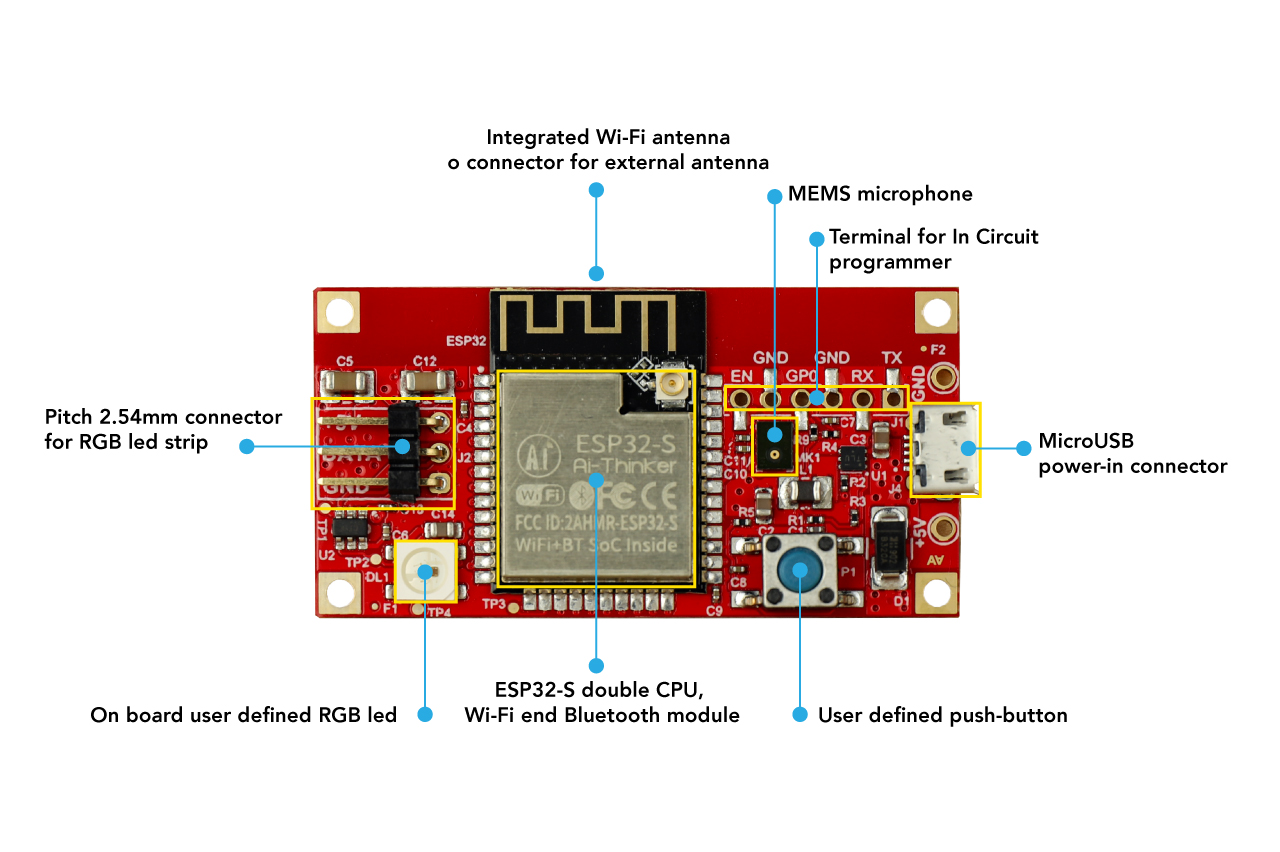
LOLA is an application board based on Espressif ESP32-S module designed to
drive strip of WS2812B RGB led
 ## Features
* [AI-Thinker ESP32-S module](http://www.ai-thinker.com/pro_view-25.html) based on
[Espressif ESP32 CPU](https://www.espressif.com/en/products/socs/esp32)
* [ST MP34DT05-A](https://www.st.com/resource/en/datasheet/mp34dt05-a.pdf) PDM MEMS microphone (optional)
* User defined push button
* User defined [WS2812B RGB led](http://www.world-semi.com/solution/list-4-1.html#141)
* MicroUSB power in at 5VDC (up to 3A)
* Power-in PCB pads for higher current
* Serial lines for ICP using a USB/serial interface
* Enable and GPIO-0 terminal
* PCB size: 53x28mm
* Height: 5 mm
## GPIO Used
#define LED_GPIO 13
#define STRIP_GPIO 14
#define BUTTON_GPIO 16
#define PDMCLK_GPIO 19
#define PDMDOUT_GPIO 18
## Installing the Lola board in Arduino IDE
Download and install the Arduino IDE from this link:
*
Open the menu Arduino -> Preferences
In the field Additional Board Manager URLs insert the URL:
https://dl.espressif.com/dl/package_esp32_index.json
the press the OK button
Open the menu Tools -> Boards -> Boards Manager..., type "ESP" and push the Install button as shown below:
## Features
* [AI-Thinker ESP32-S module](http://www.ai-thinker.com/pro_view-25.html) based on
[Espressif ESP32 CPU](https://www.espressif.com/en/products/socs/esp32)
* [ST MP34DT05-A](https://www.st.com/resource/en/datasheet/mp34dt05-a.pdf) PDM MEMS microphone (optional)
* User defined push button
* User defined [WS2812B RGB led](http://www.world-semi.com/solution/list-4-1.html#141)
* MicroUSB power in at 5VDC (up to 3A)
* Power-in PCB pads for higher current
* Serial lines for ICP using a USB/serial interface
* Enable and GPIO-0 terminal
* PCB size: 53x28mm
* Height: 5 mm
## GPIO Used
#define LED_GPIO 13
#define STRIP_GPIO 14
#define BUTTON_GPIO 16
#define PDMCLK_GPIO 19
#define PDMDOUT_GPIO 18
## Installing the Lola board in Arduino IDE
Download and install the Arduino IDE from this link:
*
Open the menu Arduino -> Preferences
In the field Additional Board Manager URLs insert the URL:
https://dl.espressif.com/dl/package_esp32_index.json
the press the OK button
Open the menu Tools -> Boards -> Boards Manager..., type "ESP" and push the Install button as shown below:
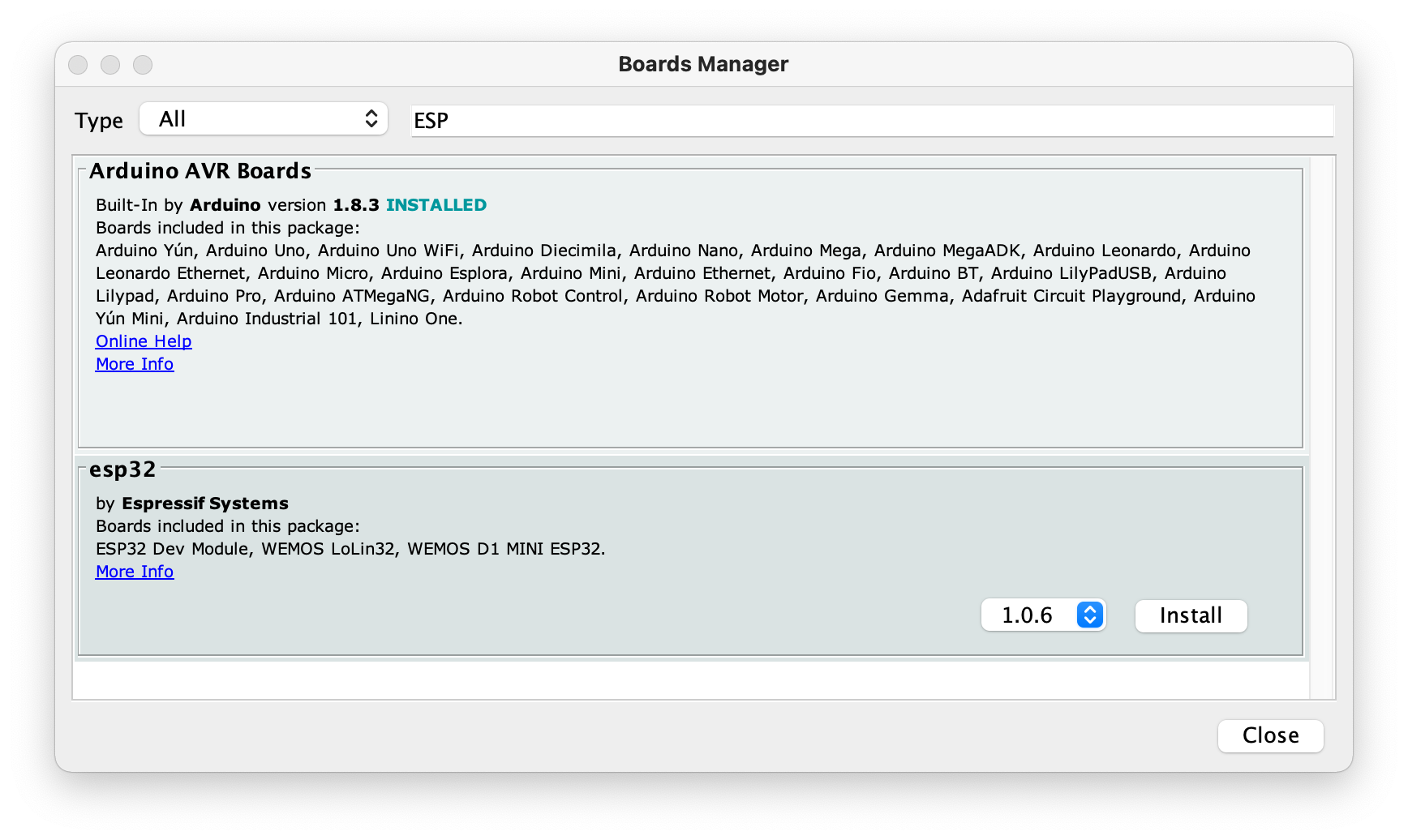 then close the dialog box.
Select the menu Tools -> Boards -> ESP32 Arduino -> ESP32 Dev Module...
Insert the Lola programmer, give the power to the Lola microUSB port, copy this example and press
the upload button.
To see the message send by the function Serial.println() select the menu Tools -> Serial Monitor the select
the speed 115200
## Basic example
This is a basic example just to check if the Lola board is working fine
void setup() {
// put your setup code here, to run once:
Serial.begin(115200);
Serial.println("This is the setup function");
}
void loop() {
// put your main code here, to run repeatedly:
Serial.println("This is the loop");
delay(1500);
}
## Rainbow example
Simple rainbow effect on led strip
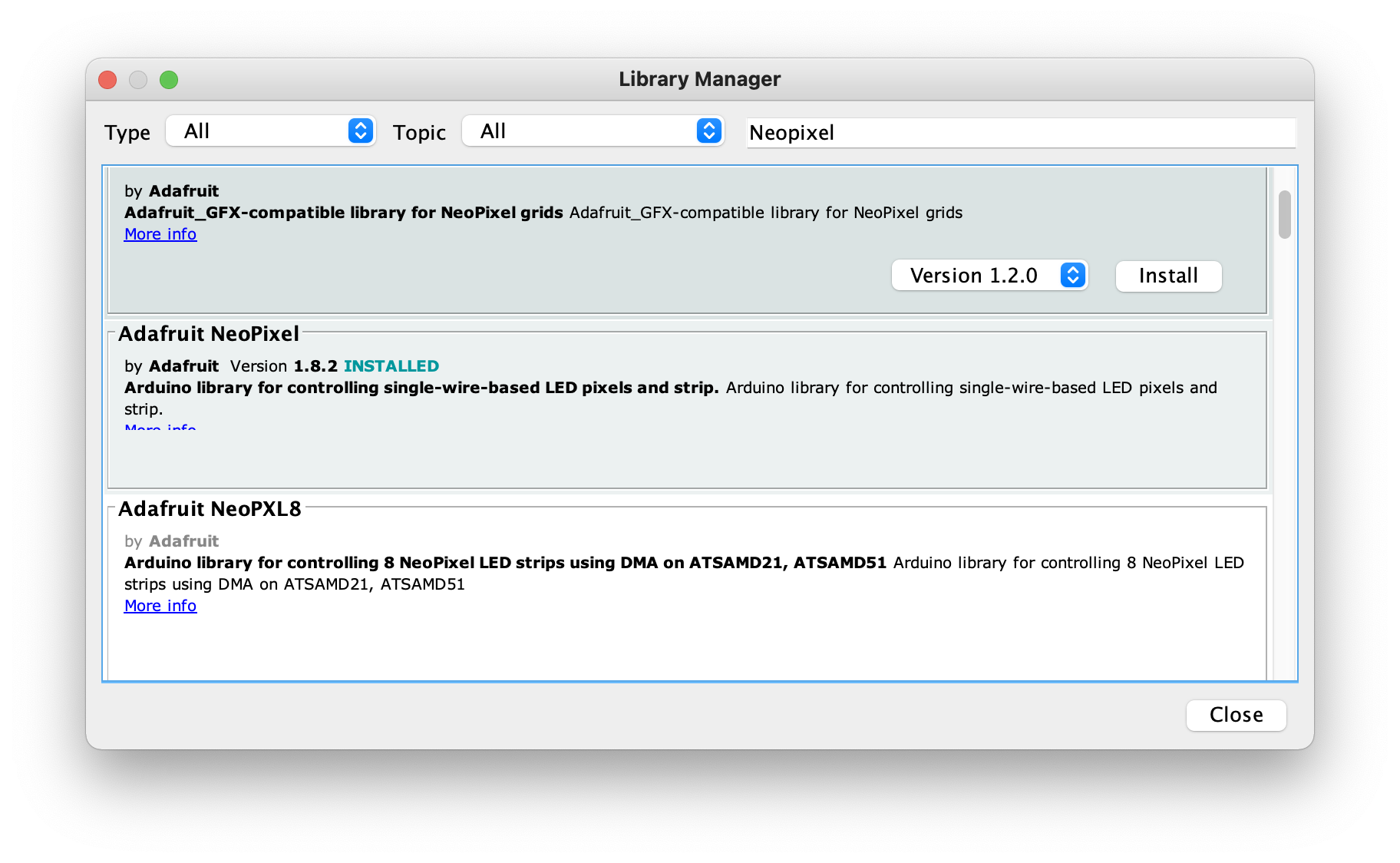
To use this example install the Adafruid NeoPixel library.
Open the menu Tools -> Manage Libraries...
Type "Neopixel" inside the filter field of Library Manager dialog box as shown below:
then close the dialog box.
Select the menu Tools -> Boards -> ESP32 Arduino -> ESP32 Dev Module...
Insert the Lola programmer, give the power to the Lola microUSB port, copy this example and press
the upload button.
To see the message send by the function Serial.println() select the menu Tools -> Serial Monitor the select
the speed 115200
## Basic example
This is a basic example just to check if the Lola board is working fine
void setup() {
// put your setup code here, to run once:
Serial.begin(115200);
Serial.println("This is the setup function");
}
void loop() {
// put your main code here, to run repeatedly:
Serial.println("This is the loop");
delay(1500);
}
## Rainbow example
Simple rainbow effect on led strip
To use this example install the Adafruid NeoPixel library.
Open the menu Tools -> Manage Libraries...
Type "Neopixel" inside the filter field of Library Manager dialog box as shown below:
 // *********************************
// LOLA Basic example
// Rainbow effect
// *********************************
#include
#define SerialMon Serial
#define LED_NUMBER 30
#define LED_PIN 13
#define STRIP_PIN 14
#define PB 16
// On-board LED
Adafruit_NeoPixel led(1, LED_PIN, NEO_GRB + NEO_KHZ800);
// Led strip
Adafruit_NeoPixel strip(LED_NUMBER, STRIP_PIN, NEO_GRB + NEO_KHZ800);
unsigned long t0 = millis();
bool isConnected = false;
int color_counter = 0;
bool rainbow = true;
// Brightness
// Max 255
int brightness = 127;
void setup()
{
Serial.begin(115200);
Serial.println("Start");
// Turn on on GREEN the on board led
led.begin();
led.setPixelColor(0, led.Color(0, 63, 0));
led.show();
pinMode(PB, INPUT);
}
long firstPixelHue = 0;
void loop()
{
// Press the on-board led to switch to red all leds
if (digitalRead(PB) == 0)
{
strip.setBrightness(255);
for (int i = 0; i < strip.numPixels(); i++)
{
strip.setPixelColor(i, led.Color(255, 0, 0));
}
strip.show();
while (digitalRead(PB) == 0);
}
if (rainbow == true)
{
firstPixelHue += 256;
if (firstPixelHue >= 3 * 65536)
{
firstPixelHue = 0;
}
for (int i = 0; i < strip.numPixels(); i++)
{
int pixelHue = firstPixelHue + (i * 65536L / strip.numPixels());
strip.setPixelColor(i, strip.gamma32(strip.ColorHSV(pixelHue)));
}
strip.show();
delay(5);
}
}
## Schematic & mechanical
* [LOLA schematic](./LOLA_schematic.pdf)
* [LOLA step 3D model](./LOLA.step)
## Links
* [Cross-platform PlatformIO IDE](https://platformio.org)
* [Microsoft Visual Studio Code](https://code.visualstudio.com/)
* [AI-Thinker ESP32-S module](http://www.ai-thinker.com/pro_view-25.html)
* [Espressif ESP32 CPU](https://www.espressif.com/en/products/socs/esp32)
* [ST MP34DT05-A datasheet](https://www.st.com/resource/en/datasheet/mp34dt05-a.pdf) MEMS audio sensor omnidirectional digital microphone
* [WS2812B RGB led](http://www.world-semi.com/solution/list-4-1.html#141)
// *********************************
// LOLA Basic example
// Rainbow effect
// *********************************
#include
#define SerialMon Serial
#define LED_NUMBER 30
#define LED_PIN 13
#define STRIP_PIN 14
#define PB 16
// On-board LED
Adafruit_NeoPixel led(1, LED_PIN, NEO_GRB + NEO_KHZ800);
// Led strip
Adafruit_NeoPixel strip(LED_NUMBER, STRIP_PIN, NEO_GRB + NEO_KHZ800);
unsigned long t0 = millis();
bool isConnected = false;
int color_counter = 0;
bool rainbow = true;
// Brightness
// Max 255
int brightness = 127;
void setup()
{
Serial.begin(115200);
Serial.println("Start");
// Turn on on GREEN the on board led
led.begin();
led.setPixelColor(0, led.Color(0, 63, 0));
led.show();
pinMode(PB, INPUT);
}
long firstPixelHue = 0;
void loop()
{
// Press the on-board led to switch to red all leds
if (digitalRead(PB) == 0)
{
strip.setBrightness(255);
for (int i = 0; i < strip.numPixels(); i++)
{
strip.setPixelColor(i, led.Color(255, 0, 0));
}
strip.show();
while (digitalRead(PB) == 0);
}
if (rainbow == true)
{
firstPixelHue += 256;
if (firstPixelHue >= 3 * 65536)
{
firstPixelHue = 0;
}
for (int i = 0; i < strip.numPixels(); i++)
{
int pixelHue = firstPixelHue + (i * 65536L / strip.numPixels());
strip.setPixelColor(i, strip.gamma32(strip.ColorHSV(pixelHue)));
}
strip.show();
delay(5);
}
}
## Schematic & mechanical
* [LOLA schematic](./LOLA_schematic.pdf)
* [LOLA step 3D model](./LOLA.step)
## Links
* [Cross-platform PlatformIO IDE](https://platformio.org)
* [Microsoft Visual Studio Code](https://code.visualstudio.com/)
* [AI-Thinker ESP32-S module](http://www.ai-thinker.com/pro_view-25.html)
* [Espressif ESP32 CPU](https://www.espressif.com/en/products/socs/esp32)
* [ST MP34DT05-A datasheet](https://www.st.com/resource/en/datasheet/mp34dt05-a.pdf) MEMS audio sensor omnidirectional digital microphone
* [WS2812B RGB led](http://www.world-semi.com/solution/list-4-1.html#141)