#AcmeBoot - A tiny bootloader for the FOX Board G20
AcmeBoot is a tiny bootloader that can boot the Linux Kernel uImage directly from microSD without using u-Boot.
Acmeboot is default boot loader used in the [FOX Board G20](/FOXG20) since September 2010.
AcmeBoot is a fork of the Atmel AT91Bootstrap loader version 3.0. and has the following characteristics:
* boots from microSD normal or HC
* loads the default Linux Kernel uImage (~3.5MB) in just 400ms
* open sources available on [Tanzilli's GitHub repository](https://github.com/tanzilli/AcmeBoot)
##Write AcmeBoot on the Netus G20 flash memory
A simple Python utility called [Pizzica](https://github.com/tanzilli/Pizzica) is available to write
AcmeBoot directly on data or serial flash memory via [debug port](/DPI) without any need tu use [Atmel SAM-BA](http://www.atmel.com/tools/atmelsam-bain-systemprogrammer.aspx).
###Install Pizzica on your Linux PC
Pizzica requires Python and Python-Serial module. Install them on your Linux PC by typing:
$ sudo apt-get install python
$ sudo apt-get install python-serial
Clone the Pizzica repository on your home directory by typing:
$ git clone git://github.com/tanzilli/Pizzica.git
With pizzica, also the binary files of AcmeBoot 1.22
for data and serial flash and the macaddress.txt text file
used by Pizzica to setup the default MAC address of your board
will be downloaded.
You can edit macaddress.txt with an ASCII text editor to define
the MAC address to assign to the eth0 interface. The address will be
increased by one by pizzica before to save it in flash memory and
then saved again in macaddress.txt file.
###Flash programming procedure
Connect the FOX Board G20 debug port using the [DPI adapter](/DPI) and check if
the usbserial module driver for the DPI chip is correctly installed typing:
$ dmesg
...
[17286.272311] usb 1-3.2: FTDI USB Serial Device converter now attached to ttyUSB0
Now launch pizzica.py typing:
$ python pizzica.py -f acmeboot_dataflash_1.22.bin -d /dev/ttyUSB0
Pizzica - ISP utility for FOX Board
Version: 1.01
--- Filename: acmeboot_xxx.bin
--- Serial device: /dev/ttyUSB0
File succefully patched
Close the boot pin on netus g20 module and turn-on the board...
Leaving the FOX Board G20 off plug the DPI on the FOX debug port and close
the two contacts shown below on the Netus G20 module with something metallic,
turn-on the board and immediately after that, release the two contacts.
In that way the internal RomBOOT will start and Pizzica will be able
to comunicate with it. The two contacts have not to be kept closed
after switching the FoxG20 on, otherwise the DataFlash will not be reprogrammed.
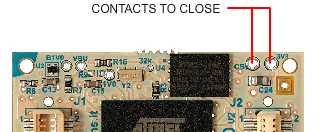 Remove the contacts and see the message sent by Pizzica.
If no message appear probably you have to close better the contacts
and turn off-on the board again.
Check also if your DPI is on the right serial device or if any other
programs like minicom, gkterm, SAM-BA, etc. are using the same serial device.
Remove the contacts and see the message sent by Pizzica.
If no message appear probably you have to close better the contacts
and turn off-on the board again.
Check also if your DPI is on the right serial device or if any other
programs like minicom, gkterm, SAM-BA, etc. are using the same serial device.
Send: [S200000,#]
send EOS
Send: [G200000#]
Characters received from the FOX Board G20 (type Ctrl-C to exit)
At this point Pizzica has reprogrammed the flash memory and started the AcmeBoot
loader. Now it simply show the messages coming from the debug port generated by
AcmeBoot and Linux Kernel.
-- Acme boot ver 1.22 --
MCK = 132MHz
...
The flash memory is now reprogrammed and ready to boot the Kernel uimage from microSD.
Insert the bootable microSD card with the right uimage and reboot the board
powering off and on again.
The second time AcmeBoot will start from flash memory so the Erasing
and Writing messages will not appear.
## How AcmeBoot works
At startup AcmeBoot looks for a Linux Kernel uimage file called uimage
on the first microSD FAT16 partition and then read this two files.
-
cmdline.txt
a text file containing the command line to pass parameters to the kernel at bootstrap like:
mem=64M console=ttyS0,115200 noinitrd root=/dev/mmcblk0p2 rw rootwait init=/sbin/init.
-
machtype.txt
a text file containing the machtype.
If you are using a recent kernel with device tree (>3.4) this two files are unuseful.
##Acmeboot sources
The latest source version is available as .tar.gz or .zip arch in
on GitHub from this page
https://github.com/tanzilli/AcmeBoot.
Click on the Dowload button and select the archive you prefer.
To make a git clone on your PC by typing:
$ git clone git://github.com/tanzilli/AcmeBoot.git
@shop='DPI'