# How to use the 1-WIRE bus on Acqua SOM
This article illustrates how to enable a bit banging 1-wire bus on any Acqua GPIO pin
1-Wire is a device communications bus system designed by Dallas Semiconductor
that provides low-speed data, signaling, and power over a single signal. 1-Wire is similar in concept to I2C,
but with lower data rates and longer range.
1-Wire is typically used to communicate with small inexpensive devices
such as digital thermometers and weather instruments. This article illustrates how to
read a popular DS18B20 thermal sensor.
## The Dallas/Maxim DS18B20 thermal sensor
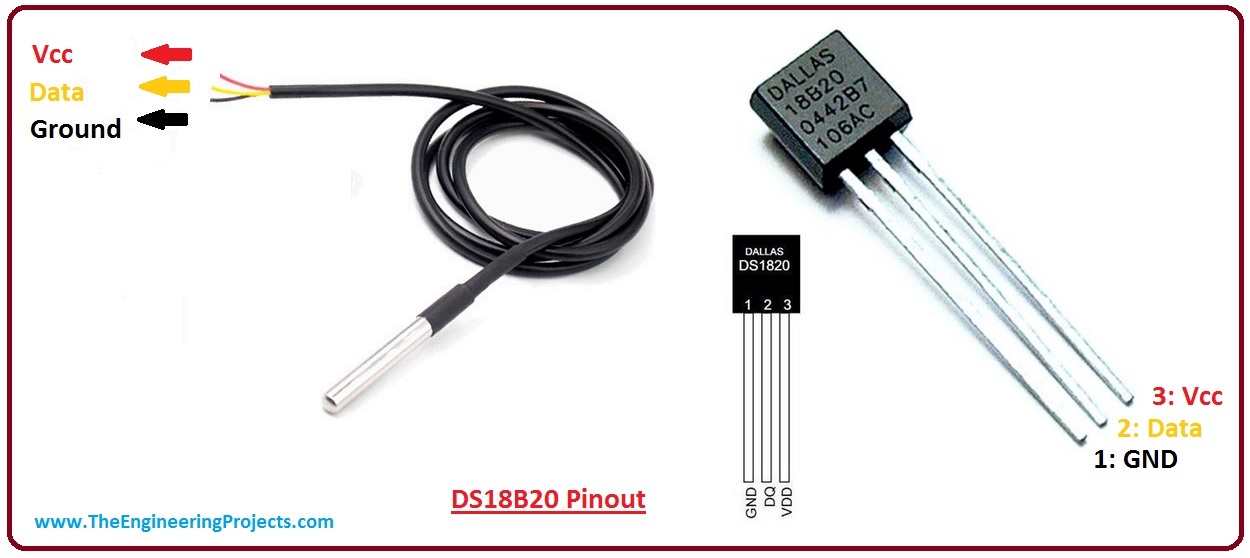 The DS18B20 digital thermometer provides 9-bit to 12-bit Celsius temperature measurements.
It communicates over a 1-Wire bus that by definition requires only one data line (and ground)
for communication with a central microprocessor.
It has an operating temperature range of -55°C to +125°C and is accurate to ±0.5°C over
the range of °10°C to +85°C. ([read more on datasheet](https://datasheets.maximintegrated.com/en/ds/DS18B20-PAR.pdf)).
## Wiring
| DS18B20 | Berta D2 Board |
|----------|----------------|
| 1 - GND | GND |
| 2 . Data | PB5 |
| 3 - Vcc | 3V3 |
The DS18B20 digital thermometer provides 9-bit to 12-bit Celsius temperature measurements.
It communicates over a 1-Wire bus that by definition requires only one data line (and ground)
for communication with a central microprocessor.
It has an operating temperature range of -55°C to +125°C and is accurate to ±0.5°C over
the range of °10°C to +85°C. ([read more on datasheet](https://datasheets.maximintegrated.com/en/ds/DS18B20-PAR.pdf)).
## Wiring
| DS18B20 | Berta D2 Board |
|----------|----------------|
| 1 - GND | GND |
| 2 . Data | PB5 |
| 3 - Vcc | 3V3 |
A 4.7kOhm pull-up resistor is requested between the Data and Vcc pins
We are using PB5 line just for example but any GPIO line can be used.
## Install the kernel drivers
To enable the Kernel drivers (master and slave) follow this tutorial:
* @h1='compile_kernel_5_15'.
Using this command:
make arch=ARM menuconfig
and enable the Dallas 1-wire support and the Thermal family implementation as shown below:
Device Drivers --->
<*> Dallas's 1-wire support
1-wire Bus Masters --->
<*> GPIO 1-wire busmaster
1-wire Slaves --->
<*> Thermal family implementation
## Configuring the kernel driver using the device tree
Edit the device tree source available on arch/arm/boot/dts/acme-acqua.dts of your kernel tree
and add these lines inside the apb section:
onewire_0: onewire_0 {
compatible = "w1-gpio";
gpios = <&pioB 5 GPIO_ACTIVE_HIGH>;
pinctrl-names = "default";
pinctrl-0 = <&pinctrl_onewire_0_default>;
status = "okay";
};
then add also these lines in the section board:
pinctrl_onewire_0_default: onewire_0_default {
atmel,pins =
;
};
It is possible to change PB5 with the GPIO you intend to use):
Changing the gpio parameter you can change the GPIO to use as 1-wire bus
Any GPIO can be used as 1-wire bus. The pin used depends by
the device tree definition
## Read the temperature
The 1-wire driver automatically scans every 10 seconds if new sensors are plugged on the 1-wire bus.
For each 1-wire device detected a new directory is created on /sys/bus/w1/devices.
Type:
ls /sys/bus/w1/devices/
28-000005970839 w1_bus_master1
a thermal sensors has been found and their unique ID is 28-000005970839.
To read the temperature from each sensor type:
cat /sys/bus/w1/devices/28-000005970839/w1_slave
3f 01 4b 46 7f ff 01 10 7a : crc=7a YES
3f 01 4b 46 7f ff 01 10 7a t=19937
t=19937 indicates that the temperature read is 19.9 °C
## Read the temperature each seconds in Python3
#!/usr/bin/python3
import os
import time
w1path = "/sys/bus/w1/devices/w1_bus_master1"
# Extract the sensor id
if not os.path.exists(w1path):
print ("1-wire bus not found")
print ("Check if the 1-wire bus is installed")
exit(1)
deviceList = os.listdir(w1path)
# for deviceId in deviceList:
# print(deviceId)
onewire_id=[deviceId for deviceId in deviceList if deviceId[0:2]=="28"]
# print(onewire_id[0])
# Read temp
while True:
f = open("/sys/bus/w1/devices/" + onewire_id[0] + "/w1_slave","r")
tString=f.read()
f.close()
if tString.find("NO")>=0:
print ("Wrong CRC")
exit(1)
p=tString.find("t=")
value =float(tString[p+2:-1])/1000
formatted_value = "{:.2f}".format(value)
print(formatted_value)
time.sleep(1)
### Download
* [acme-acqua.dtb](./acme-acqua.dtb) Ready to use Device tree blob file to enable PB5 line as 1wire. Save this file
inside the first partition microSD and reboot.
* [acme-acqua.dts](./acme-acqua.dts) Device tree source used
* To compile the device tree blob from source follow this article @article='compile_kernel_5_15'
##Links
* [DS18B20 datasheet](https://datasheets.maximintegrated.com/en/ds/DS18B20-PAR.pdf)
* [Wikipedia 1-Wire definition](http://en.wikipedia.org/wiki/1-Wire)
* [Previous version of this article for Kernel 4.19](/acqua_1wire_419)
@include='bio_tanzilli'