#Write on NANDFLASH end EMMC memories with SAM-BA 3.7
Microchip SAM-BA is a software that provides an open set of tools
for in-system programming of internal and external memories connected
to Microchip 32-MCUs and MPUs. This article illustrates how to use it to write
on NANDFLASH or EMMC memories
In this article is used the command line version of SAM-BA version 3.7
that support the latest generations of Microchip MPUs.
## Installing SAM-BA 3.7
Download the package from Microchip site:
mkdir acqua
wget https://ww1.microchip.com/downloads/aemDocuments/documents/MPU32/ProductDocuments/SoftwareLibraries/Firmware/sam-ba_v3.7-linux_x86_64.tar.gz
Uncompress the tar.gz file:
tar xvf sam-ba_v3.7-linux_x86_64.tar.gz
Move inside the new directory created by tar
cd sam-ba_v3.7-linux_x86_64
## Using SAM-BA
SAM-BA comunicates with the CPU trought the USB client port of Acqua.
If you are using a Berta board set the SW1 switches in this way: 1100.
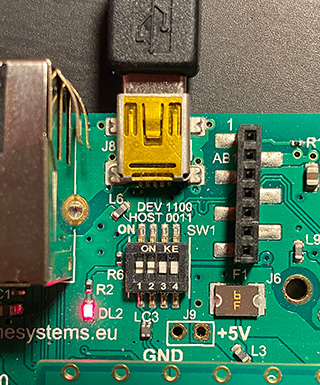 It is also important that the CPU is not booting Linux so:
* Remove any microSD from the microSD holder
* Jump the BOOT pin on Berta board to GND to avoid the bootstrap from the NAND flash (just if
you are using an Acqua board with NAND flash on board)
* Turn-on the board
* Detach the BOOT pin from GND
If everything is OK on the Debug serial port the message
It is also important that the CPU is not booting Linux so:
* Remove any microSD from the microSD holder
* Jump the BOOT pin on Berta board to GND to avoid the bootstrap from the NAND flash (just if
you are using an Acqua board with NAND flash on board)
* Turn-on the board
* Detach the BOOT pin from GND
If everything is OK on the Debug serial port the message RomBOOT will
appear and the port /dev/ttyACM0 became active on our Linux PC
sudo dmesg | grep ttyACM0
[171999.990681] cdc_acm 1-10:1.0: ttyACM0: USB ACM device
Type the command:
lsusb
...
Bus 001 Device 019: ID 03eb:6124 Atmel Corp. at91sam SAMBA bootloader
...
Select the memory you need to manage:
* [NANDFLASH](/acqua_samba#nandflash)
* [EMMC](/acqua_samba#emmc)
## NANDFLASH
### Erase the whole NANDFLASH
sudo ./sam-ba -p usb -b sama5d3-xplained -a nandflash -c erase
### Write the bootloader
sudo ./sam-ba -p usb -b sama5d3-xplained -a nandflash -c writeboot:at91bootstrap.bin
When a bootloader is loaded inside the NANDFLASH to have access again to the NANDFLASH via
SAM-BA close the BOOT pin of Berta Board to GND to avoid that At91bootstrap starts.
### Write to memory from a file
-c write::[]
__Examples__: write and verify at91bootstrap.bin at begin of NANDFLASH
sudo ./sam-ba -p usb -b sama5d3-xplained -a nandflash -c write:at91bootstrap.bin
sudo ./sam-ba -p usb -b sama5d3-xplained -a nandflash -c verify:at91bootstrap.bin
### Read memory to file
Read the whole NANDFLASH content and save in in a file called firmware.bin
sudo ./sam-ba -p usb -b sama5d3-xplained -a nandflash -c read:firmware.bin
The general format of -c read command is:
-c read::[]:[]
for example:
-c read:firmware.bin read all to firmware.bin
-c read:firmware.bin:0x1000 read from 0x1000 to end into firmware.bin
-c read:firmware.bin:0x1000:1024 read 1024 bytes from 0x1000 into firmware.bin
-c read:firmware.bin::1024 read 1024 bytes from start of memory into firmware.bin
### Verify memory from a file
-c verify::[]
examples:
verify:firmware.bin verify that start of memory matches firmware.bin
verify:firmware.bin:0x1000 verify that memory at offset 0x1000 matches firmware.bin
To generate different size sample files use these examples:
dd bs=1K count=64 < /dev/urandom > test64KB.bin
dd bs=1M count=16 < /dev/urandom > test16MB.bin
dd bs=1M count=64 < /dev/urandom > test64MB.bin
dd bs=1M count=128 < /dev/urandom > test128MB.bin
dd bs=1M count=256 < /dev/urandom > test256MB.bin
## Using SAM-BA with QML script files
SAM-BA can execute scripts written in QML to do automaticaly complex functions.
With the following QML script for example it is possible to write and verify at91bootloader
on the NANDFLASH.
import SAMBA 3.5
import SAMBA.Connection.Serial 3.5
import SAMBA.Device.SAMA5D3 3.5
SerialConnection {
device: SAMA5D3Xplained {
}
onConnectionOpened: {
// initialize Low-Level applet
initializeApplet("lowlevel")
// initialize NAND flash applet
initializeApplet("nandflash")
// erase all memory
applet.erase(0, applet.memorySize)
// write file
applet.write(0x000000, "at91bootstrap.bin", true)
// verify file
applet.verify(0x00000, "at91bootstrap.bin", true)
}
}
save it in a file called for example mytest.qml then lauch it by typing:
sudo ./sam-ba -x mytest.qml
## EMMC
### Write the EMMC with a bootable Linux image:
@wip
Download a microSD image from this link:
* @article='download_acqua'
sudo ./sam-ba -p usb -b sama5d3-xplained -a sdmmc -c write:debian-bullseye-acqua.img.xz
### Links
* @article='SAM-BA_applet_build'
* [Microchip SAM-BA web page](https://www.microchip.com/en-us/development-tool/SAM-BA-In-system-Programmer)
* [Sam-ba comms](https://microchipdeveloper.com/32mpu:sam-ba-comms)