;
};
};
};
adc0: adc@f804c000 {
status = "okay";
pinctrl-names = "default";
pinctrl-0 = <&pinctrl_adc0_ad0 &pinctrl_adc0_ad1 &pinctrl_adc0_ad2 &pinctrl_adc0_ad3>;
atmel,adc-channels-used = <0xf>;
atmel,adc-num-channels = <4>;
compatible = "atmel,at91sam9x5-adc";
atmel,adc-startup-time = <40>;
atmel,adc-status-register = <0x1c>;
atmel,adc-trigger-register = <0x08>;
atmel,adc-use-external;
atmel,adc-vref = <3250>;
atmel,adc-res = <8 10>;
atmel,adc-res-names = "lowres", "highres";
atmel,adc-use-res = "highres";
trigger@0 {
trigger-name = "continuous";
trigger-value = <0x6>;
};
};
#### Arietta
Use the Arietta G25 pinout to enable the ADC lines
## Use the ADC from user space
Here is a simple hardware setup to quickly test the A/D lines:
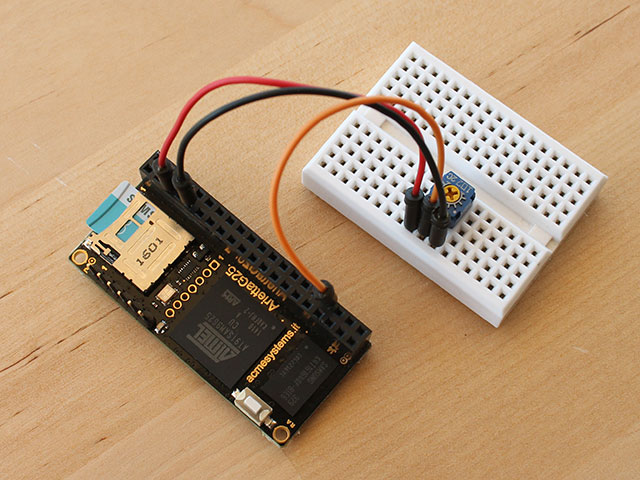 It is a simple linear trimmer (1Kohm but any value is ok) with the central
cursor wired to __J4.34__ (AD0) and the other terminals wired to __J4.9__ (GND) and __J4.5__ (3V3).
To read the cursor position in a range o 0 to 1023 type:
It is a simple linear trimmer (1Kohm but any value is ok) with the central
cursor wired to __J4.34__ (AD0) and the other terminals wired to __J4.9__ (GND) and __J4.5__ (3V3).
To read the cursor position in a range o 0 to 1023 type:
root@arietta:~# cat /sys/bus/iio/devices/iio\:device0/in_voltage0_raw
512
## Python example
import time
def get_adc_value():
with open("/sys/bus/iio/devices/iio:device0/in_voltage3_raw") as f:
value=int(f.read())
return value
while True:
print get_adc_value()
time.sleep(1)
## Links
* [Use of the AT91 ADC driver by Atmel](http://www.at91.com/linux4sam/bin/view/Linux4SAM/IioAdcDriver)
* [Using the SAMA5D2-compatible ADC device](https://www.at91.com/linux4sam/bin/view/Linux4SAM/UsingSAMA5D2ADCDevice#How_it_works)
* @article='roadrunner_adc'
@include='bio_tanzilli'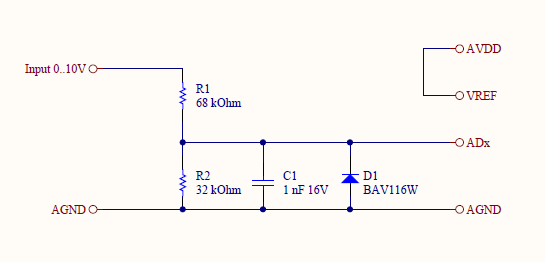 A module called [DAISY-20](/DAISY-20) is available to use these lines in the
range of 0 to 10 volts. Elsewhere use this schematic to test quickly the A/D lines:
A module called [DAISY-20](/DAISY-20) is available to use these lines in the
range of 0 to 10 volts. Elsewhere use this schematic to test quickly the A/D lines:
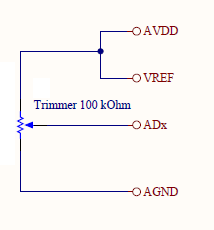 ## Enable the Linux Kernel ADC modules
Follow this tutorial: @h1='compile_linux_kernel' to know how to cross compile the Linux Kernel
and how to configure the drivers to enable inside it.
Enable the IIO user space interface and the Microchip/Atmel ADC device driver
as shown below:
Device Drivers --->
<*> Industrial I/O support --->
<*> Enable software IIO device support
<*> Enable software triggers support
Analog to digital converters --->
<*> Atmel AT91 ADC
<*> Atmel AT91 SAMA5D2 ADC
## Configure the device tree
Edit the device tree source of your board adding these lines:
#### Acqua
Insert this definition to enable the driver and the pin to use ([Acqua pinout](/pinout_acqua)):
adc0: adc@f8018000 {
pinctrl-names = "default";
pinctrl-0 = <
&pinctrl_adc0_adtrg
&pinctrl_adc0_ad0
&pinctrl_adc0_ad1
&pinctrl_adc0_ad2
&pinctrl_adc0_ad3
&pinctrl_adc0_ad4
&pinctrl_adc0_ad5
&pinctrl_adc0_ad6
&pinctrl_adc0_ad7
&pinctrl_adc0_ad8
&pinctrl_adc0_ad9
&pinctrl_adc0_ad10
&pinctrl_adc0_ad11
>;
status = "okay";
};
#### Aria
pinctrl@fffff400 {
adc0 {
pinctrl_adc0_ad0: adc0_ad0 {
atmel,pins =
## Enable the Linux Kernel ADC modules
Follow this tutorial: @h1='compile_linux_kernel' to know how to cross compile the Linux Kernel
and how to configure the drivers to enable inside it.
Enable the IIO user space interface and the Microchip/Atmel ADC device driver
as shown below:
Device Drivers --->
<*> Industrial I/O support --->
<*> Enable software IIO device support
<*> Enable software triggers support
Analog to digital converters --->
<*> Atmel AT91 ADC
<*> Atmel AT91 SAMA5D2 ADC
## Configure the device tree
Edit the device tree source of your board adding these lines:
#### Acqua
Insert this definition to enable the driver and the pin to use ([Acqua pinout](/pinout_acqua)):
adc0: adc@f8018000 {
pinctrl-names = "default";
pinctrl-0 = <
&pinctrl_adc0_adtrg
&pinctrl_adc0_ad0
&pinctrl_adc0_ad1
&pinctrl_adc0_ad2
&pinctrl_adc0_ad3
&pinctrl_adc0_ad4
&pinctrl_adc0_ad5
&pinctrl_adc0_ad6
&pinctrl_adc0_ad7
&pinctrl_adc0_ad8
&pinctrl_adc0_ad9
&pinctrl_adc0_ad10
&pinctrl_adc0_ad11
>;
status = "okay";
};
#### Aria
pinctrl@fffff400 {
adc0 {
pinctrl_adc0_ad0: adc0_ad0 {
atmel,pins =