# How to use the SPI ports on Aria SOM
This article illustrates how to use the SPI on Aria SOM
The Serial Peripheral Interface (SPI) is a synchronous serial communication interface
specification used for short-distance communication, primarily in embedded systems.
The interface was developed by Motorola in the mid-1980s and has become a de facto
standard. Typical applications include Secure Digital cards, memory, converter and liquid
crystal displays.
* [Wikipedia definition](https://en.wikipedia.org/wiki/Serial_Peripheral_Interface)
## Pinout of SPI ports
The SPI bus lines are located on the following pins:
| Signal | Dir | Description | Aria pins | MCU line |
|------------|-----|-----------------------------|------------|----------|
| SPI0 MOSI | O | Master Output Slave Input | S11 | PA12 |
| SPI0 MISO | I | Master Input Slave Output | S12 | PA11 |
| SPI0 SCLK | O | Clock | S10 | PA13 |
| SPI0 CS0 | O | Chip Select 0 | S9 | PA14 |
| SPI0 CS1 | O | Chip Select 1 | S16 | PA7 |
Not all the signales are available by default and not all SPI lines are listed on
this table or muxed in this way.
Refer to the MCU datasheets to find other lines.
* [Microchip AT91SAM9G25 CPU datasheet](https://www.microchip.com/wwwproducts/en/AT91sam9g25)
## Enable the Linux Kernel SPI modules
Check if your Kernel has the SPI drivers already active by typing:
ls /dev/spi*
If the files do not exist this tutorial:
* @h1='aria_compile_kernel_4_19'
to know how to cross compile the Linux Kernel
and how to configure the drivers using the device tree
to enable the lines you need.
Enable the SPIDEV user interface and the Microchip SPI device driver
as shown below using the __make ARCH=arm menuconfig__ comand:
Device Drivers --->
[*] SPI support --->
<*> Atmel SPI Controller
<*> User mode SPI device driver support
then configure the device tree (__arch/arm/boot/dts/acme-aria.dts__) with this definition
inside the section __ahb__ and __apb__:
spi0: spi@f0000000 {
status = "okay";
interrupts = <13 4 5>;
cs-gpios = <&pioA 14 0>, <&pioA 7 0>;
device@0 {
compatible = "spidev";
spi-max-frequency = <5000000>;
reg = <0>;
};
device@1 {
compatible = "spidev";
spi-max-frequency = <5000000>;
reg = <1>;
};
};
Copy the __zImage__ and __acme-aria.dtb__ file inside the first microSD partition, boot and check
if any __/dev/i2c__ exists.
ls /dev/spi*
/dev/spidev0.0 /dev/spidev0.1
## Check the system log
When you reboot the board you should see a message like this:
[ 0.820312] atmel_spi f0000000.spi: version: 0x212
[ 0.820312] atmel_spi f0000000.spi: Using dma0chan2 (tx) and dma0chan3 (rx) for DMA transfers
[ 0.828125] atmel_spi f0000000.spi: Atmel SPI Controller at 0xf0000000 (irq 29)
by typing the command:
dmesg
## Use the SPI from user space
This is an example on how to use the SPI interface from user space using the device file /dev/spidev32766.0 created
by the spidev driver.
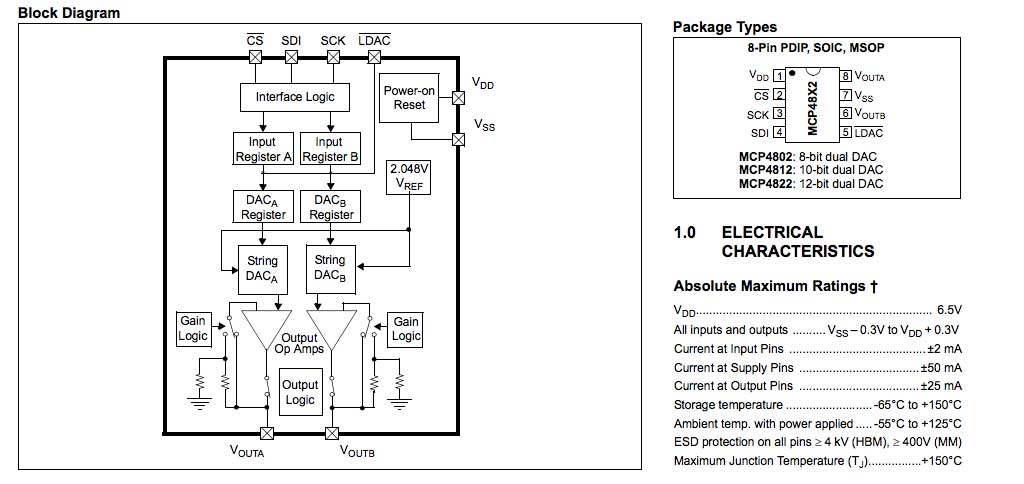
We will use a Microchip SPI DAC model MCP4822
 wired to the Aria G25 SOM in this way:
| MCP4822 | ARIA | SAM9G20 |
|---------|--------|--------------|
| 1 VDD | 3V3 | |
| 2 CS | S9 | PA14 - NPCS0 |
| 3 SCK | S10 | PA13 - SPCK |
| 4 SDI | S11 | PA12 - MOSI |
| 5 LDAC | GND | |
| 6 VOUTB | OUT B | |
| 7 VSS | GND | |
| 8 VOUTA | OUT A | |
with this C program we can set the VOUT A and VOUT B voltage in a range od 0 to 2 volt.
* [mcp4822.c](./mcp4822.c)
Save this program on Aria and compile it by typing
gcc mcp4822.c -std=c99 -o mcp4822
If the C compiler gcc is not found install it by typing:
apt-get install gcc
To set for example the VOUT A at 1.1 volt and the VOUT B at 1.5 volt type:
./mcp4822 1.1 1.7
wired to the Aria G25 SOM in this way:
| MCP4822 | ARIA | SAM9G20 |
|---------|--------|--------------|
| 1 VDD | 3V3 | |
| 2 CS | S9 | PA14 - NPCS0 |
| 3 SCK | S10 | PA13 - SPCK |
| 4 SDI | S11 | PA12 - MOSI |
| 5 LDAC | GND | |
| 6 VOUTB | OUT B | |
| 7 VSS | GND | |
| 8 VOUTA | OUT A | |
with this C program we can set the VOUT A and VOUT B voltage in a range od 0 to 2 volt.
* [mcp4822.c](./mcp4822.c)
Save this program on Aria and compile it by typing
gcc mcp4822.c -std=c99 -o mcp4822
If the C compiler gcc is not found install it by typing:
apt-get install gcc
To set for example the VOUT A at 1.1 volt and the VOUT B at 1.5 volt type:
./mcp4822 1.1 1.7
 ## Datasheets
* [AT91SAM9G25 datasheet](http://www.atmel.com/devices/SAM9G25.aspx) used on Aria G25 and Terra Board
* [Microchip MCP4822 device overview](https://www.microchip.com/wwwproducts/en/MCP4822)
* [Microchip MCP4822 datasheet](http://ww1.microchip.com/downloads/en/DeviceDoc/20002249B.pdf)
## Related links
* [Kernel documentation of spidev](http://www.kernel.org/doc/Documentation/spi/spidev)
* [Kernel documentation of SPI](http://www.kernel.org/doc/Documentation/spi/spi-summary)
* @article='spi_linux_26'
@include='bio_tanzilli'
Credits: Many thanks to Marcelo Roberto Jimenez for his contribute on this section
## Datasheets
* [AT91SAM9G25 datasheet](http://www.atmel.com/devices/SAM9G25.aspx) used on Aria G25 and Terra Board
* [Microchip MCP4822 device overview](https://www.microchip.com/wwwproducts/en/MCP4822)
* [Microchip MCP4822 datasheet](http://ww1.microchip.com/downloads/en/DeviceDoc/20002249B.pdf)
## Related links
* [Kernel documentation of spidev](http://www.kernel.org/doc/Documentation/spi/spidev)
* [Kernel documentation of SPI](http://www.kernel.org/doc/Documentation/spi/spi-summary)
* @article='spi_linux_26'
@include='bio_tanzilli'
Credits: Many thanks to Marcelo Roberto Jimenez for his contribute on this section