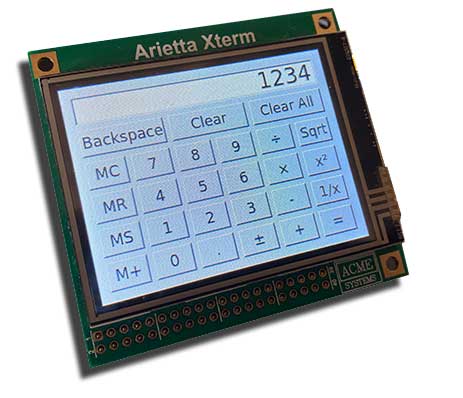
# Build a small QT5 WiFi terminal with Arietta G25 and XTERM-01

<abstract>
This article illustrates how to generate an image to create a small QT5 WiFi terminal
with Buildroot Linux using an Arietta G25 board and a XTERM-01 2.8 inch LCD with resistive touch
</abstract>

<img src="./xterm-01-qt5.jpg">

BuildRoot is a set of makefiles and patches that makes it easy to generate a complete 
and very small Embedded Linux System. 

Buildroot can generate the rootfs filesystem with a rich set of application, the kernel and bootloader image but
following this article it will generate just the rootfs contents.

To generate the booloader and Linux Kernel image please follow these two articles:

* [At91bootstrap](/at91bootstrap)
* [Linux Kernel 4.19.x](/arietta_compile_kernel_4_19)

The basic knowledge used on this article comes from Microchip Linux4sam site
on <https://www.linux4sam.org/bin/view/Linux4SAM/BuildRoot>.

## Notes

* This procedure was tested using a Linux PC with Ubuntu 18.04.4 64bit to cross compile the buildroot image 
* It is advisable to have a [Debug Port Interface](/DPI) or another serial adapter
* Hardware used: [Arietta board with 128 MByte of RAM](/arietta) and [XTERM-01 display](/XTERM-01)

## Building procedure

Install the mandatory package listed here:

* <http://buildroot.uclibc.org/downloads/manual/manual.html#requirement-mandatory>

Download BuildRoot and the Microchip external package from these repositories on GitHub:

	git clone https://github.com/linux4sam/buildroot-at91.git
	git clone https://github.com/linux4sam/buildroot-external-microchip.git

Select the right versions:


	cd buildroot-external-microchip
    git checkout linux4sam_6.2 -b buildroot-external-microchip-linux4sam_6.2

	cd ..
	cd buildroot-at91
	git checkout linux4sam_6.2 -b buildroot-at91-linux4sam_6.2

Download this patch file from GitHub:

	wget https://raw.githubusercontent.com/AcmeSystems/acmepatches/master/buildroot-at91-2020.02.patch

and apply it by typing:

	patch -p1 < buildroot-at91-2020.02.patch

Select the configuration for your hardware:

<table class="acmetable">
	<tr>
		<td>Arietta alone</td><td><code>make acme-arietta_defconfig</code></td>
	</tr>
	<tr>
		<td>Arietta + XTerm-01</td><td><code>make acme-xterm-01_defconfig</code></td>
	</tr>
</table>

Compile

	make

If everything goes well you will obtain this binary files in __output/images__ directory:

	rootfs.tar

Create two partitions on microSD using gparted:


|  Type |  Label | Size   |
|-------|--------|--------|
| fat32 | boot   | >8MB   |
| ext4  | rootfs | >128MB |


copy on the first partition the file generated following these two articles:

* [At91bootstrap](/at91bootstrap)
* [Linux Kernel 4.19.x](/arietta_compile_kernel_4_19)

on the second partition copy the __rootfs.tar__ using this command:

	sudo tar xvf output/images/rootfs.tar -C /media/$USER/rootfs

Unmount the microSD and boot.

At login and password prompt type:

* login: __root__
* password: __acmesystems__

## Try from binaries

Save this file in the first fat32 partition:

* [boot.bin](/download/microsd/xterm-buildroot/boot.bin)
* [acme-arietta.dtb](/download/microsd/xterm-buildroot/acme-arietta.dtb)
* [zImage](/download/microsd/xterm-buildroot/zImage)

Untar this file in the second ext4 partition:

* [rootfs.tar](/download/microsd/xterm-buildroot/rootfs.tar)

Defconfig and dts used:

* Kernel
  * [acme-xterm-01.dts](/download/microsd/xterm-buildroot/acme-xterm-01.dts)
  * [acme-xterm-01_defconfig](/download/microsd/xterm-buildroot/acme-xterm-01_defconfig)
* Buildroot
  * [buildroot_acme-xterm-01_defconfig](/download/microsd/xterm-buildroot/buildroot_acme-xterm-01_defconfig)
 

## WiFi access

Edit the file __/etc/wpa_supplicant/wpa_supplicant.conf__ to configure the access to your WiFi network
(it requires the [WIFI-2 adapter](/WIFI-2))

    network={
       ssid="your accesspoint name"
       psk="password"
    }
    
to generate this file automatically from the Buildroot environment edit this file

    buildroot-at91/board/acmesystems/arietta-xterm-01/rootfs_overlay/etc/wpa_supplicant/wpa_supplicant.conf

to create other file in the rootfs tree ad them in 

    buildroot-at91/board/acmesystems/arietta-xterm-01/rootfs_overlay/

## Try the QT5 examples

Set this environment variable

    export QT_QPA_EVDEV_TOUCHSCREEN_PARAMETERS="/dev/input/event0:rotate=180"

move inside the QT5 example directory

    cd /usr/lib/qt/examples
    
and try some examples:    
    
    widgets/widgets/calculator/calculator -platform linuxfb
    widgets/widgets/sliders/sliders -platform linuxfb

## Links

* [Linux4sam BuildRoot](https://www.linux4sam.org/bin/view/Linux4SAM/BuildRoot)
* [BuildRoot web page](http://www.buildroot.net/)
* [The BuildRoot user manual](http://buildroot.uclibc.org/downloads/manual/manual.html)
* [Browseable BuildRoot repository](http://git.buildroot.net/buildroot)

@include='bio_tanzilli'

##Buy

@shop='XTERM-01'
@shop='ARIETTA-G25-V'
@shop='ARIETTA-G25-256-V'
@shop='WIFI-2'
@shop='AN-WIFI-01'
@shop='MWS-01'
@shop='MWS-06'

