#Video streaming over IP
This article illustrates how make video streaming over httpd using a Microsoft HD-3000 USB webcam
and an Arietta G25
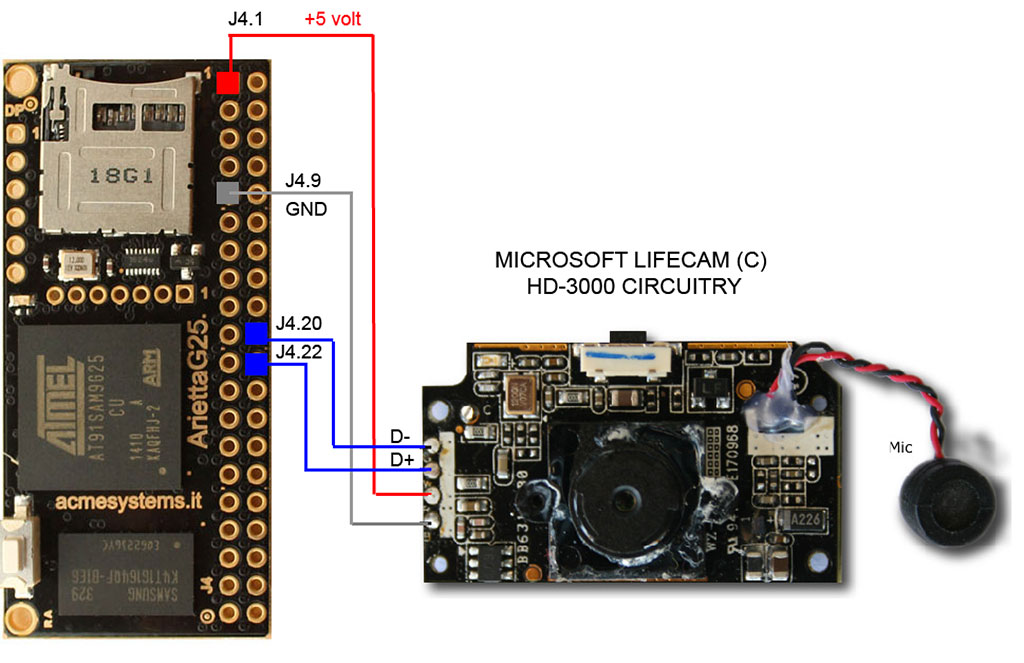
As illustrated below we dismounded the Microsoft webcam using just the internal circuitry
to reduce the size as small as possible. This is the wiring scheme:
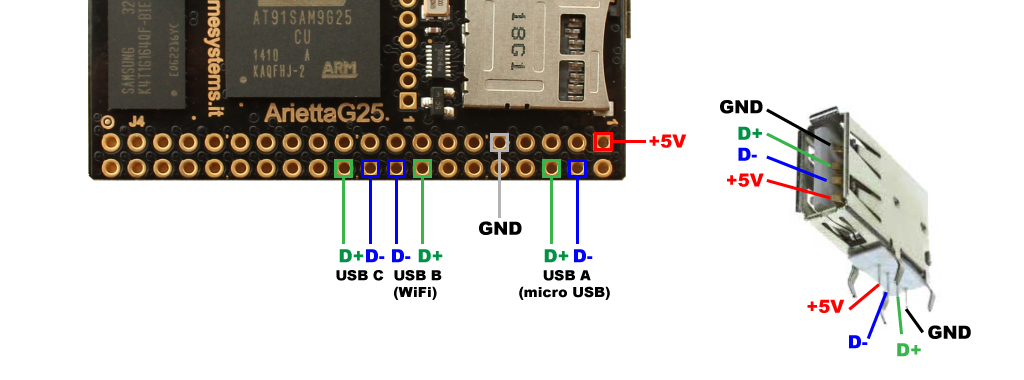
 Obviously it is possible to use the webcam as is using a hand soldered USB connector as shown below:
 * @article='arietta_wirings_usb'
We used a Microsoft HD-3000 but the same method is valid for any __UVC (USB Video device Class)__ webcam.
##Kernel configuration
Be sure that the UVC driver are enabled in your Kernel image:
* @article='arietta_wirings_usb'
We used a Microsoft HD-3000 but the same method is valid for any __UVC (USB Video device Class)__ webcam.
##Kernel configuration
Be sure that the UVC driver are enabled in your Kernel image:
Device Drivers  --->
	<*> Multimedia support  --->
		[*]   Cameras/video grabbers support
			[*]   Media USB Adapters  --->
				<*>   USB Video Class (UVC)
				[*]     UVC input events device support (NEW)
When a USB webcan is detected a new device will appear as /dev/videox
##Send the video stream over HTTP using cvlc
To generate the video stream we will youe cvlc, the command line version of the
famout video player VLC.
Install it by typing:
~# apt-get install vlc-nox
Install also the v4l-utils package:
~# apt-get install v4l-utils
Cvlc need to be run as a normal user, not root, so you have to add a new user or
if you are using a default Arietta microSD use the existing user acme
to the group video by typing:
~# usermod -a -G video acme
If you prefere to create a new user type:
~# useradd -G video myusername
The become the user by typing:
~# su myusername
Launch cvlc by typing:
~$ cvlc --no-audio v4l2:///dev/video0 --v4l2-chroma MJPG --sout '#standard{access=http,mux=mpjpeg,dst=:8080/}' -I dummy
##Receive the video streaming using VLC
to receive the video streaming launch VLC on your PC and open a network connection on: http://arietta_ip_address:8080.
If you are using aloha on your PC open http://arietta.local:8080
#Related links
* [USB Video Class Linux device driver home page](http://linux-uvc.berlios.de)
@shop='ARIETTA-G25'
@shop='WB-HD3000'