#Using the WIFI module on Arietta G25
Arietta has a placement for an IEE802.11 b/g/n, USB 2.0 OEM WiFi adapter.
This chip is fully supported on the latest Kernel Linux versions and can be used to work in Access Point mode.
### WiFi module placement
As shown below Arietta has a placement for 6 strip pitch 2mm where it is possible to place
a [WiFi module](/WIFI-5). The WiFi module has a 6 pin male strip already soldered on the bottom side.
On Arietta it is possible to place a female connector or to weld the WiFi module directly in case you don't
need to remove the module.
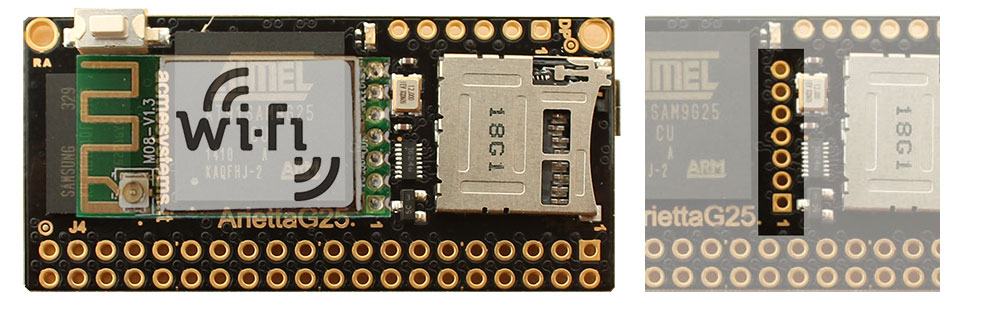 On this pad are presents the USB B host port signals, the power supply line at 3.3 volt DC,
and some GPIO used to manage some module function.
| Pin # | Signal | Dir | Description |
|-------|---------------|-----|-------------------------------------------------------|
| 7 | WPS | OUT | WSP function. Low level activated. Wired to PC16 |
| 6 | LED | N.C.| WiFi module activity led. Not used |
| 5 | GND | | Signal ground GND |
| 4 | USB B D+ | | USB Host B D+ |
| 3 | USB B D- | | USB Host B D- |
| 2 | VCC 3.3V DC | OUT | Output from the internal regulator from 5 to 3.3 volt |
| 1 | WiFi TXEN | OUT | RF on/off control. Low level activated to off. Wired to PC30 |
On this pad are presents the USB B host port signals, the power supply line at 3.3 volt DC,
and some GPIO used to manage some module function.
| Pin # | Signal | Dir | Description |
|-------|---------------|-----|-------------------------------------------------------|
| 7 | WPS | OUT | WSP function. Low level activated. Wired to PC16 |
| 6 | LED | N.C.| WiFi module activity led. Not used |
| 5 | GND | | Signal ground GND |
| 4 | USB B D+ | | USB Host B D+ |
| 3 | USB B D- | | USB Host B D- |
| 2 | VCC 3.3V DC | OUT | Output from the internal regulator from 5 to 3.3 volt |
| 1 | WiFi TXEN | OUT | RF on/off control. Low level activated to off. Wired to PC30 |
When the WiFi module is mounted the USB port B signals on J4.16 (D+) and J4.18 (D-) are not usable
for other purposes.
### Setting the WPS and TXEN lines
#### To activate the WPS mode
echo 80 > /sys/class/gpio/export
echo out > /sys/class/gpio/pioC16/direction
echo 0 > /sys/class/gpio/pioC16/value
#### To de-activate the WPS mode
echo 1 > /sys/class/gpio/pioC16/value
#### To turn off the WiFI TX
echo 94 > /sys/class/gpio/export
echo out > /sys/class/gpio/pioC30/direction
echo 0 > /sys/class/gpio/pioC30/value
#### To turn-on the WiFi TX
echo 1 > /sys/class/gpio/pioC30/value
### Kernel configuration
* [Kernel configuration](/WIFI-5)
### Links
* [About iw](https://wireless.wiki.kernel.org/en/users/documentation/iw)
* [WPA PSK (Raw Key) Generator](https://www.wireshark.org/tools/wpa-psk.html)