# 1-Wire interface
1-Wire is a device communications bus system designed by Dallas Semiconductor Corp.
This article explains how to use it on the CM3-HOME-B and CM3-HOME-F boards
What is a 1-wire bus ?
The most popular use of 1-wire bus is to use the Dallas DS18B20 temperature sensors. The image below
illustrates how to wire it on the screw terminals available on the CM3-Home board. It is possible to wire
more than one sensor.
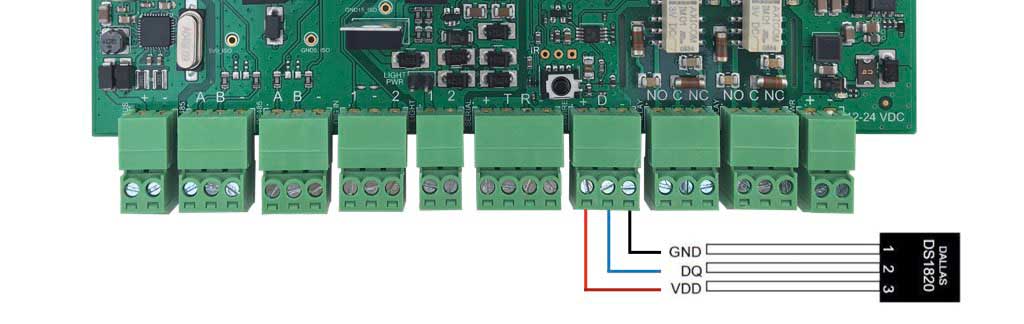 As depicted on the @article='CM3-HOME_schematic', the 1-wire data line is interfaced through a dedicated buffer in order to allow a more robust bus, therefore it doesn't require a pullup.
## Configuration
To use the 1-wire sensor port add this lines to __config.txt__ file and reboot:
# Enable the 1-wire bus
dtoverlay=w1-gpio,gpiopin=16
The sensor wired are automatically detected by the Linux Kernel and a new directory is created on the folder __/sys/bus/w1/devices__ for each of them.
$ ls /sys/bus/w1/devices/
28-000006c423d3
In this case a temperature sensor with id=28-000006c423d3 has been detected. To read the temperature value type:
$ cat /sys/bus/w1/devices/28-000006c423d3/w1_slave
a4 01 4b 46 7f ff 0c 10 da : crc=da YES
a4 01 4b 46 7f ff 0c 10 da t=26250
As depicted on the @article='CM3-HOME_schematic', the 1-wire data line is interfaced through a dedicated buffer in order to allow a more robust bus, therefore it doesn't require a pullup.
## Configuration
To use the 1-wire sensor port add this lines to __config.txt__ file and reboot:
# Enable the 1-wire bus
dtoverlay=w1-gpio,gpiopin=16
The sensor wired are automatically detected by the Linux Kernel and a new directory is created on the folder __/sys/bus/w1/devices__ for each of them.
$ ls /sys/bus/w1/devices/
28-000006c423d3
In this case a temperature sensor with id=28-000006c423d3 has been detected. To read the temperature value type:
$ cat /sys/bus/w1/devices/28-000006c423d3/w1_slave
a4 01 4b 46 7f ff 0c 10 da : crc=da YES
a4 01 4b 46 7f ff 0c 10 da t=26250