# DS3231 I2C Real Time Clock
This article illustrate how to use the Az-Delivery Real Time Clock RTC DS3231 I2C module with the CM-Home
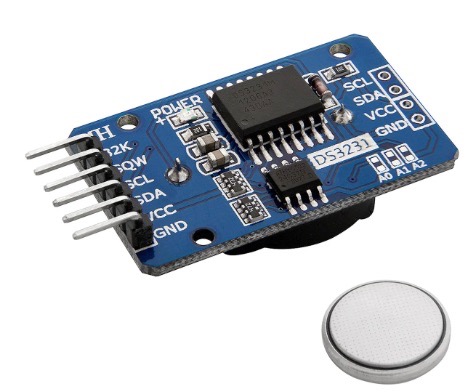 ## Wirings
These are the signal wirings between the AZ-Delivery Real Time Clock (RTC) DS3231 module and the Grove port on the CM-Home board.
| Home Pin # | Home signal | Az signal |
|-------|--------------|-----------|
| 1 | SCL (GPIO45) | SCL |
| 2 | SDA (GPIO44) | SDA |
| 3 | 3V3 | VCC |
| 4 | GND | GND |
## config.txt
Add these lines to __/boot/firmware/config.txt__ file:
# Set the I2C1 on GPIO 44 and GPIO 45 pins
dtoverlay=i2c1,pins_44_45
dtoverlay=i2c-rtc,ds3231
then reboot the Raspberry Pi.
Check if the kernel has detected the RTC chip:
$dmesg | grep -i rtc
[ 2.015759] rtc-ds1307 1-0068: registered as rtc0
[ 2.021607] rtc-ds1307 1-0068: setting system clock to 2025-03-24T23:53:18 UTC (1742860398)
Read the time from the RTC chip:
$ sudo hwclock --show
2025-03-25 01:01:36.704186+01:00
### Links
* @article='cmhome_grove'
* [Az-Delivery DS3231 eBook](https://cdn.shopify.com/s/files/1/1509/1638/files/AZ081_A_3-9_EN_B01M2B7HQB_07c22e20-7990-485f-aebb-edba5f1c47ff.pdf?v=1721038618)
* [Az-Delivery DS3231 product page](https://www.az-delivery.de/en/products/ds3231-real-time-clock)
*
## Wirings
These are the signal wirings between the AZ-Delivery Real Time Clock (RTC) DS3231 module and the Grove port on the CM-Home board.
| Home Pin # | Home signal | Az signal |
|-------|--------------|-----------|
| 1 | SCL (GPIO45) | SCL |
| 2 | SDA (GPIO44) | SDA |
| 3 | 3V3 | VCC |
| 4 | GND | GND |
## config.txt
Add these lines to __/boot/firmware/config.txt__ file:
# Set the I2C1 on GPIO 44 and GPIO 45 pins
dtoverlay=i2c1,pins_44_45
dtoverlay=i2c-rtc,ds3231
then reboot the Raspberry Pi.
Check if the kernel has detected the RTC chip:
$dmesg | grep -i rtc
[ 2.015759] rtc-ds1307 1-0068: registered as rtc0
[ 2.021607] rtc-ds1307 1-0068: setting system clock to 2025-03-24T23:53:18 UTC (1742860398)
Read the time from the RTC chip:
$ sudo hwclock --show
2025-03-25 01:01:36.704186+01:00
### Links
* @article='cmhome_grove'
* [Az-Delivery DS3231 eBook](https://cdn.shopify.com/s/files/1/1509/1638/files/AZ081_A_3-9_EN_B01M2B7HQB_07c22e20-7990-485f-aebb-edba5f1c47ff.pdf?v=1721038618)
* [Az-Delivery DS3231 product page](https://www.az-delivery.de/en/products/ds3231-real-time-clock)
*
@include='adv_cmpanel'