# Seeedstudio Grove interface
Grove is a modular, standardized connector prototyping system made
by the company Seeed studio.
* Grove Ecosystem Introduction
The Grove port only supports the I2C Grove modules. We have tested only a few modules, but this
should be the list of module compatible with this port.
* [Grove I2C modules](https://www.seeedstudio.com/catalogsearch/result/?q=grove%20i2c)
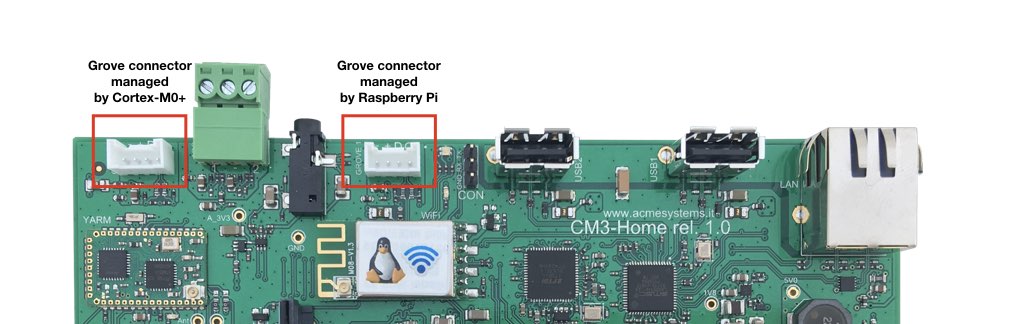 The GPIO port used for Grove are:
* GPIO 44 - SDA
* GPIO 45 - SCL
Install the
The GPIO port used for Grove are:
* GPIO 44 - SDA
* GPIO 45 - SCL
Install the i2c-tools package by typing:
$ sudo apt update
$ sudo apt install i2c-tools
then check if your module is detected on the I2C bus by using this command:
$ i2cdetect -y 1
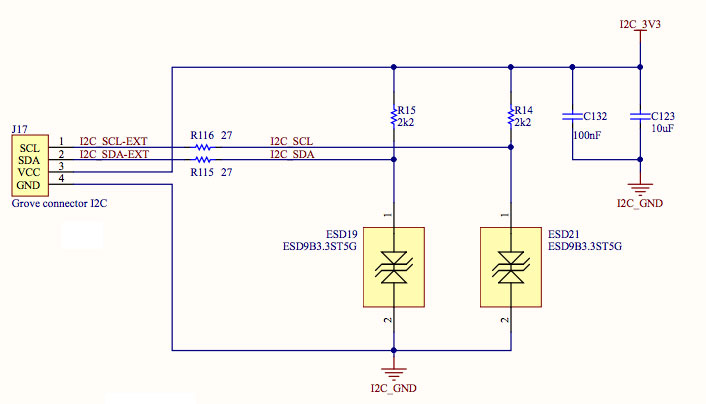
### Schematic
 ### config.txt definition
To use the GPIO 44 and GPIO 45 lines as I2C bus insert this line in
__/boot/config.txt__ and reboot the Raspberry Pi.
#Set the I2C1 interface on GPIO44 and 45
dtparam=i2c_arm=on
dtparam=i2c_arm_baudrate=400000
dtoverlay=i2c1-bcm2708,sda1_pin=44,scl1_pin=45,pin_func=6
*
### config.txt definition
To use the GPIO 44 and GPIO 45 lines as I2C bus insert this line in
__/boot/config.txt__ and reboot the Raspberry Pi.
#Set the I2C1 interface on GPIO44 and 45
dtparam=i2c_arm=on
dtparam=i2c_arm_baudrate=400000
dtoverlay=i2c1-bcm2708,sda1_pin=44,scl1_pin=45,pin_func=6
*
@include='adv_cmpanel'