# RGB LEDs
This article illustrates how to use the RGB LEDs available on the CM-Home board
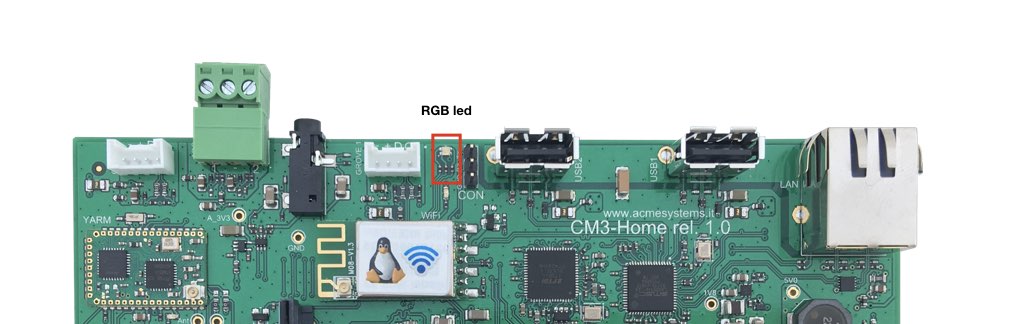 GPIO lines used:
* GPIO 36 Red 0=on
* GPIO 35 Green 0=on
* GPIO 34 Blue 0=on
## Python example
import RPi.GPIO as GPIO
import time
RED_LED=36
GREEN_LED=35
BLUE_LED=34
GPIO.setmode(GPIO.BCM)
GPIO.setwarnings(False)
GPIO.setup(RED_LED,GPIO.OUT)
GPIO.setup(GREEN_LED,GPIO.OUT)
GPIO.setup(BLUE_LED,GPIO.OUT)
for i in range(5):
GPIO.output(RED_LED,GPIO.LOW)
GPIO.output(GREEN_LED,GPIO.HIGH)
GPIO.output(BLUE_LED,GPIO.HIGH)
time.sleep(0.5)
GPIO.output(RED_LED,GPIO.HIGH)
GPIO.output(GREEN_LED,GPIO.LOW)
GPIO.output(BLUE_LED,GPIO.HIGH)
time.sleep(0.5)
GPIO.output(RED_LED,GPIO.HIGH)
GPIO.output(GREEN_LED,GPIO.HIGH)
GPIO.output(BLUE_LED,GPIO.LOW)
time.sleep(0.5)
GPIO.output(RED_LED,GPIO.HIGH)
GPIO.output(GREEN_LED,GPIO.HIGH)
GPIO.output(BLUE_LED,GPIO.HIGH)
## Define the LED behaviour with a dts overlay
Using a dts overlay and the Linux Kernel functions it is possible to define a set
of standard behaviour to each color of the on-board RGB led.
In this example we will define the following funcions;
* Green led = Heartbeat. The blink speed of this color depends from the CPU load
* Red led = MMC0. The red will blink on any writing access to the MicroSD
* Led blu = Simply off
Save this ASCII content on a file named cm3-home-leds.dts:
/dts-v1/;
/plugin/;
/ {
compatible = "brcm,bcm2708";
fragment@0 {
target = <&leds>;
__overlay__ {
rgb_red: rgb_red {
label = "rgb_red";
gpios = <&gpio 36 1>;
linux,default-trigger = "mmc0";
};
rgb_green: rgb_green {
label = "rgb_green";
gpios = <&gpio 35 1>;
linux,default-trigger = "heartbeat";
};
rgb_blue: rgb_blue {
label = "rgb_blue";
gpios = <&gpio 34 1>;
linux,default-trigger = "none";
};
};
};
};
Instead of "none" in __linux,default-trigger = "none";__ you can use one of these other triggers:
[none] kbd-scrolllock kbd-numlock kbd-capslock kbd-kanalock kbd-shiftlock kbd-altgrlock kbd-ctrllock kbd-altlock kbd-shiftllock kbd-shiftrlock kbd-ctrlllock kbd-ctrlrlock timer oneshot heartbeat backlight gpio cpu0 cpu1 cpu2 cpu3 default-on input panic mmc0
Compile the DTS overlay:
sudo apt-get update
sudo apt-get install device-tree-compiler
sudo dtc -@ -I dts -O dtb -o /boot/overlays/cm-home-leds.dtbo cm-home-leds.dts
Ad it in /boot/config.txt:
#CM3-Home led definition
dtoverlay=cm-home-leds
Reboot then check if the overlay has been loaded by typing:
sudo vcdbg log msg
The following directories should be present:
$ ls -al /sys/class/leds/rgb*
lrwxrwxrwx 1 root root 0 Oct 5 12:59 /sys/class/leds/rgb_blue -> ../../devices/platform/leds/leds/rgb_blue
lrwxrwxrwx 1 root root 0 Oct 5 12:59 /sys/class/leds/rgb_green -> ../../devices/platform/leds/leds/rgb_green
lrwxrwxrwx 1 root root 0 Oct 5 12:59 /sys/class/leds/rgb_red -> ../../devices/platform/leds/leds/rgb_red
## Greetings
Many thanks to Mauro Soligo for his contribute.
## Links
*
GPIO lines used:
* GPIO 36 Red 0=on
* GPIO 35 Green 0=on
* GPIO 34 Blue 0=on
## Python example
import RPi.GPIO as GPIO
import time
RED_LED=36
GREEN_LED=35
BLUE_LED=34
GPIO.setmode(GPIO.BCM)
GPIO.setwarnings(False)
GPIO.setup(RED_LED,GPIO.OUT)
GPIO.setup(GREEN_LED,GPIO.OUT)
GPIO.setup(BLUE_LED,GPIO.OUT)
for i in range(5):
GPIO.output(RED_LED,GPIO.LOW)
GPIO.output(GREEN_LED,GPIO.HIGH)
GPIO.output(BLUE_LED,GPIO.HIGH)
time.sleep(0.5)
GPIO.output(RED_LED,GPIO.HIGH)
GPIO.output(GREEN_LED,GPIO.LOW)
GPIO.output(BLUE_LED,GPIO.HIGH)
time.sleep(0.5)
GPIO.output(RED_LED,GPIO.HIGH)
GPIO.output(GREEN_LED,GPIO.HIGH)
GPIO.output(BLUE_LED,GPIO.LOW)
time.sleep(0.5)
GPIO.output(RED_LED,GPIO.HIGH)
GPIO.output(GREEN_LED,GPIO.HIGH)
GPIO.output(BLUE_LED,GPIO.HIGH)
## Define the LED behaviour with a dts overlay
Using a dts overlay and the Linux Kernel functions it is possible to define a set
of standard behaviour to each color of the on-board RGB led.
In this example we will define the following funcions;
* Green led = Heartbeat. The blink speed of this color depends from the CPU load
* Red led = MMC0. The red will blink on any writing access to the MicroSD
* Led blu = Simply off
Save this ASCII content on a file named cm3-home-leds.dts:
/dts-v1/;
/plugin/;
/ {
compatible = "brcm,bcm2708";
fragment@0 {
target = <&leds>;
__overlay__ {
rgb_red: rgb_red {
label = "rgb_red";
gpios = <&gpio 36 1>;
linux,default-trigger = "mmc0";
};
rgb_green: rgb_green {
label = "rgb_green";
gpios = <&gpio 35 1>;
linux,default-trigger = "heartbeat";
};
rgb_blue: rgb_blue {
label = "rgb_blue";
gpios = <&gpio 34 1>;
linux,default-trigger = "none";
};
};
};
};
Instead of "none" in __linux,default-trigger = "none";__ you can use one of these other triggers:
[none] kbd-scrolllock kbd-numlock kbd-capslock kbd-kanalock kbd-shiftlock kbd-altgrlock kbd-ctrllock kbd-altlock kbd-shiftllock kbd-shiftrlock kbd-ctrlllock kbd-ctrlrlock timer oneshot heartbeat backlight gpio cpu0 cpu1 cpu2 cpu3 default-on input panic mmc0
Compile the DTS overlay:
sudo apt-get update
sudo apt-get install device-tree-compiler
sudo dtc -@ -I dts -O dtb -o /boot/overlays/cm-home-leds.dtbo cm-home-leds.dts
Ad it in /boot/config.txt:
#CM3-Home led definition
dtoverlay=cm-home-leds
Reboot then check if the overlay has been loaded by typing:
sudo vcdbg log msg
The following directories should be present:
$ ls -al /sys/class/leds/rgb*
lrwxrwxrwx 1 root root 0 Oct 5 12:59 /sys/class/leds/rgb_blue -> ../../devices/platform/leds/leds/rgb_blue
lrwxrwxrwx 1 root root 0 Oct 5 12:59 /sys/class/leds/rgb_green -> ../../devices/platform/leds/leds/rgb_green
lrwxrwxrwx 1 root root 0 Oct 5 12:59 /sys/class/leds/rgb_red -> ../../devices/platform/leds/leds/rgb_red
## Greetings
Many thanks to Mauro Soligo for his contribute.
## Links
*
@include='adv_cmpanel'