# Serial port interface
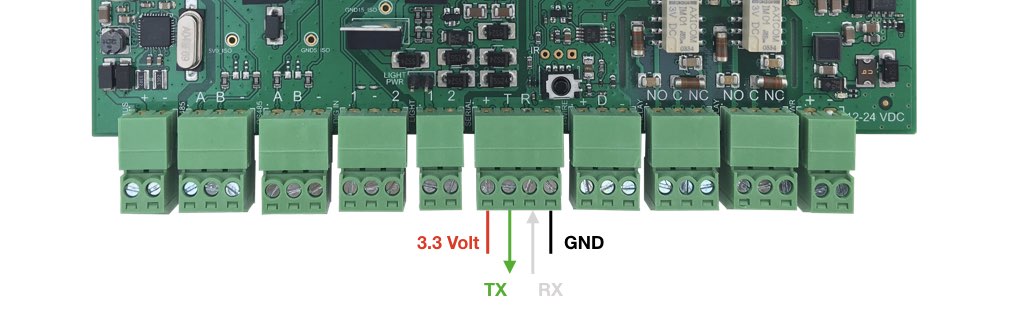
A serial port interface at 3.3 volt is available on the CM-Home to connect external microcontrollers like Arduino or ESP8266.
The signals are available on screw terminals as visible below and are at 3.3 volt level.
These lines are not tolerant to 5 volt .
 ### Using the serial port
This port is visible in Linux as
### Using the serial port
This port is visible in Linux as /dev/ttyUSB3 device.
### Example in Python
Install the Python serial library:
sudo apt-get update
sudo apt-get install python3-serial
This example sends a string on the serial port each 1 second at 115200,N,8,1 and checks
if any character is received from a remote serial terminal.
#!/usr/bin/python
import serial
import time
ser = serial.Serial(
port='/dev/ttyUSB3',
baudrate=115200,
timeout=1,
parity=serial.PARITY_NONE,
stopbits=serial.STOPBITS_ONE,
bytesize=serial.EIGHTBITS
)
ser.flushOutput()
ser.flushInput()
rx_counter=0
tx_counter=0
while True:
tx_counter=tx_counter+1
ser.write("Tx counter = %d | Rx counter = %d\n\r".encode('utf-8') % (tx_counter,rx_counter))
print("Tx counter = %d | Rx counter = %d" % (tx_counter,rx_counter))
a=ser.read(1)
if a:
rx_counter=rx_counter+1
ser.write("Tx counter = %d | Rx counter = %d | Received: %s %02x\n\r".encode('utf-8') % (tx_counter,rx_counter,a,ord(a)))
print("Tx counter = %d | Rx counter = %d | Received: %s %02x" % (tx_counter,rx_counter,a,ord(a)))
### Listing ports
This command print the available serial ports.
$ python -m serial.tools.list_ports
/dev/ttyAMA0
/dev/ttyUSB0
/dev/ttyUSB1
/dev/ttyUSB2
/dev/ttyUSB3
## Links
* [Python serial doc](http://pythonhosted.org/pyserial/)
@include='adv_cmpanel'