# RFID reader (PN532)
This article illustrates how to connect a PN532 RFID reader to a CM-Panel basic and how
to manage it
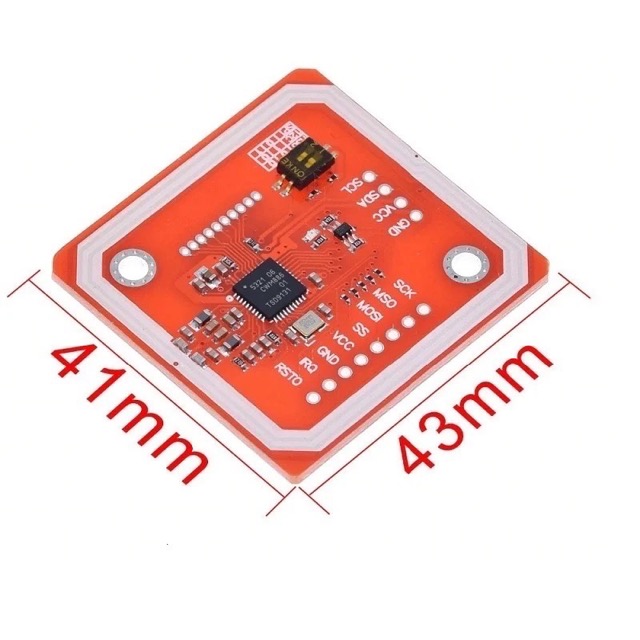 We will use the SPI bus to talk with the PN532 board. Wire this lines:
| PN532 | EXP-1 |
|-------|-------------------|
| VCC | 3V3 |
| GND | GND |
| SCK | 39 SPI0_SCLK |
| MSO | 37 SPI0_MISO |
| MOSI | 38 SPI0_MOSI |
| SS | 36 SPI0_CE0 |
and insert these lines in /boot/config.txt to enable the SPI interface and move it on
the pin 35-39 used by teh CM3-Panel:
dtparam=spi=on
dtoverlay=spi-gpio35-39
Set the dipswitch on the PN532 board to enable the SPI bus instead of I2C
Install Node-RED:
*
Install this node inside Node-RED :
* [node-red-contrib-pn532](https://flows.nodered.org/node/node-red-contrib-pn532)
And this software from the command line:
sudo apt update
sudo apt install python-pip
sudo pip install RPi.GPIO
sudo pip install spidev
## Links
* [PN532 NFC RFID Module User Guide](http://www.elechouse.com/elechouse/images/product/PN532_module_V3/PN532_%20Manual_V3.pdf)
*
*
*
## Read a NFC card in Python
Install the NFC tools:
sudo apt update
sudo apt install libnfc5 libnfc-bin libnfc-examples
Configure the NFC tool editing this file:
sudo nano /etc/nfc/libnfc.conf
and adding on it these two lines:
device.name = "_PN532_SPI"
device.connstring = "pn532_spi:/dev/spidev0.0:280000"
List connected NFC readers:
nfc-scan-device -v
nfc-scan-device uses libnfc 1.7.1
1 NFC device(s) found:
- pn532_i2c:/dev/i2c-1:
pn532_i2c:/dev/i2c-1
chip: PN532 v1.6
initator mode modulations: ISO/IEC 14443A (106 kbps), FeliCa (424 kbps, 212 kbps), ISO/IEC 14443-4B (106 kbps), Innovision Jewel (106 kbps), D.E.P. (424 kbps, 212 kbps, 106 kbps)
target mode modulations: ISO/IEC 14443A (106 kbps), FeliCa (424 kbps, 212 kbps), D.E.P. (424 kbps, 212 kbps, 106 kbps)
Read a card or tag by first starting nfc-poll then physically holding a NFC/RFID tag or card
in front of the reader:
nfc-poll
nfc-poll uses libnfc 1.7.1
NFC reader: pn532_i2c:/dev/i2c-1 opened
NFC device will poll during 30000 ms (20 pollings of 300 ms for 5 modulations)
ISO/IEC 14443A (106 kbps) target:
ATQA (SENS_RES): 00 04
UID (NFCID1): 77 d3 d1 ad
SAK (SEL_RES): 08
nfc_initiator_target_is_present: Target Released
Waiting for card removing...done.
Install git on your CM3-Panel:
sudo apt install git
Then clode this Python library:
git clone https://github.com/HubCityLabs/py532lib.git
move inside the directory:
cd py532lib
and edit this Python3 program in a file called readcard.py:
from py532lib.i2c import *
from time import sleep
pn532=Pn532_i2c()
pn532.SAMconfigure()
while True:
data=pn532.read_mifare().get_data()
if len(data)==11:
uid="%02X%02X%02X%02X" % (data[7],data[8],data[9],data[10])
print(uid)
sleep(1)
else:
sleep(1)
run it by typing:
python3 readcard.py
## Links
* [Setting up a PN532 NFC module on a Raspberry Pi using I2C](https://blog.stigok.com/2017/10/12/setting-up-a-pn532-nfc-module-on-a-raspberry-pi-using-i2c.html)
* [Python3 py532lib](https://github.com/HubCityLabs/py532lib)
@include='adv_cmpanel'
We will use the SPI bus to talk with the PN532 board. Wire this lines:
| PN532 | EXP-1 |
|-------|-------------------|
| VCC | 3V3 |
| GND | GND |
| SCK | 39 SPI0_SCLK |
| MSO | 37 SPI0_MISO |
| MOSI | 38 SPI0_MOSI |
| SS | 36 SPI0_CE0 |
and insert these lines in /boot/config.txt to enable the SPI interface and move it on
the pin 35-39 used by teh CM3-Panel:
dtparam=spi=on
dtoverlay=spi-gpio35-39
Set the dipswitch on the PN532 board to enable the SPI bus instead of I2C
Install Node-RED:
*
Install this node inside Node-RED :
* [node-red-contrib-pn532](https://flows.nodered.org/node/node-red-contrib-pn532)
And this software from the command line:
sudo apt update
sudo apt install python-pip
sudo pip install RPi.GPIO
sudo pip install spidev
## Links
* [PN532 NFC RFID Module User Guide](http://www.elechouse.com/elechouse/images/product/PN532_module_V3/PN532_%20Manual_V3.pdf)
*
*
*
## Read a NFC card in Python
Install the NFC tools:
sudo apt update
sudo apt install libnfc5 libnfc-bin libnfc-examples
Configure the NFC tool editing this file:
sudo nano /etc/nfc/libnfc.conf
and adding on it these two lines:
device.name = "_PN532_SPI"
device.connstring = "pn532_spi:/dev/spidev0.0:280000"
List connected NFC readers:
nfc-scan-device -v
nfc-scan-device uses libnfc 1.7.1
1 NFC device(s) found:
- pn532_i2c:/dev/i2c-1:
pn532_i2c:/dev/i2c-1
chip: PN532 v1.6
initator mode modulations: ISO/IEC 14443A (106 kbps), FeliCa (424 kbps, 212 kbps), ISO/IEC 14443-4B (106 kbps), Innovision Jewel (106 kbps), D.E.P. (424 kbps, 212 kbps, 106 kbps)
target mode modulations: ISO/IEC 14443A (106 kbps), FeliCa (424 kbps, 212 kbps), D.E.P. (424 kbps, 212 kbps, 106 kbps)
Read a card or tag by first starting nfc-poll then physically holding a NFC/RFID tag or card
in front of the reader:
nfc-poll
nfc-poll uses libnfc 1.7.1
NFC reader: pn532_i2c:/dev/i2c-1 opened
NFC device will poll during 30000 ms (20 pollings of 300 ms for 5 modulations)
ISO/IEC 14443A (106 kbps) target:
ATQA (SENS_RES): 00 04
UID (NFCID1): 77 d3 d1 ad
SAK (SEL_RES): 08
nfc_initiator_target_is_present: Target Released
Waiting for card removing...done.
Install git on your CM3-Panel:
sudo apt install git
Then clode this Python library:
git clone https://github.com/HubCityLabs/py532lib.git
move inside the directory:
cd py532lib
and edit this Python3 program in a file called readcard.py:
from py532lib.i2c import *
from time import sleep
pn532=Pn532_i2c()
pn532.SAMconfigure()
while True:
data=pn532.read_mifare().get_data()
if len(data)==11:
uid="%02X%02X%02X%02X" % (data[7],data[8],data[9],data[10])
print(uid)
sleep(1)
else:
sleep(1)
run it by typing:
python3 readcard.py
## Links
* [Setting up a PN532 NFC module on a Raspberry Pi using I2C](https://blog.stigok.com/2017/10/12/setting-up-a-pn532-nfc-module-on-a-raspberry-pi-using-i2c.html)
* [Python3 py532lib](https://github.com/HubCityLabs/py532lib)
@include='adv_cmpanel'