# Add a LAN port using the SPI bus
How to wire and configure an SPI Ethernet adapter based on the [Microchip ENC28J60](http://ww1.microchip.com/downloads/en/DeviceDoc/39662e.pdf)
like the [Mikroe ETH click board](https://www.mikroe.com/eth-click) or [TZT ethernet adapter](https://it.aliexpress.com/item/1pcs-lot-ENC28J60-SPI-interface-network-Ethernet-module-mini-version-raspberry-lcd-raspberri-pi-zero-2/32804747718.html?src=google&albslr=222200202&isdl=y&aff_short_key=UneMJZVf&source=%7Bifdyn:dyn%7D%7Bifpla:pla%7D%7Bifdbm:DBM&albch=DID%7D&src=google&albch=shopping&acnt=494-037-6276&isdl=y&albcp=664365055&albag=32654331814&slnk=&trgt=61865531738&plac=&crea=it32804747718&netw=g&device=c&mtctp=&aff_platform=google&gclid=CjwKCAjwt5DXBRAtEiwAa3vyEmJLtMchDLF8ycyXVAUbc_BtXhalOVtikoZLryrh47zfTbupClwMoxoCTtsQAvD_BwE&gclsrc=aw.ds).
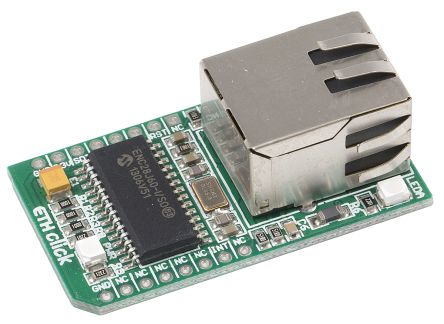 [Mikroe ETH click board](https://www.mikroe.com/eth-click)
### Wirings
ENC28J60 | CM3-Panel
----------|-----------------
RST# | NC
INT# | GPIO40
CS# | SPI0_CE0 (GPIO36)
SCK | SPI0_SCLK (GPIO39)
SDO | SPI0_MISO (GPIO37)
SDI | SPI0_MOSI (GPIO38)
3V3 | 3V3
GND | GND
Save this file in __/boot/overlays/enc28j60-cm3panel.dts__:
// Overlay for the Microchip ENC28J60 Ethernet Controller
// Acme Systems CM3-Panel
// http://www.acmesystems.it/CM3-PANEL
/dts-v1/;
/plugin/;
/ {
compatible = "brcm,bcm2708";
fragment@0 {
target = <&spi0>;
__overlay__ {
/* needed to avoid dtc warning */
#address-cells = <1>;
#size-cells = <0>;
status = "okay";
eth1: enc28j60@0{
compatible = "microchip,enc28j60";
reg = <0>; /* CE0 */
pinctrl-names = "default";
pinctrl-0 = <ð1_pins>;
interrupt-parent = <&gpio>;
interrupts = <40 0x2>; /* falling edge */
spi-max-frequency = <12000000>;
status = "okay";
};
};
};
fragment@1 {
target = <&spidev0>;
__overlay__ {
status = "disabled";
};
};
fragment@2 {
target = <&gpio>;
__overlay__ {
eth1_pins: eth1_pins {
brcm,pins = <40>;
brcm,function = <0>; /* in */
brcm,pull = <0>; /* none */
};
};
};
__overrides__ {
int_pin = <ð1>, "interrupts:0",
<ð1_pins>, "brcm,pins:0";
speed = <ð1>, "spi-max-frequency:0";
};
};
Compile it by typing:
sudo dtc -@ -I dts -O dtb -o /boot/overlays/enc28j60-cm3panel.dtbo /boot/overlays/enc28j60-cm3panel.dts
Add this line in __/boot/config.txt__ and reboot:
dtoverlay=spi-gpio35-39
dtoverlay=enc28j60-cm3panel
### Disadvantages of this solution
The Microchip ENC28J60 doesn't have a MAC address so you have to configure it by software. To avoid this problem
the right chip is [ENC424J600](https://www.microchip.com/wwwproducts/en/en542414).
@include='bio_tanzilli'
[Mikroe ETH click board](https://www.mikroe.com/eth-click)
### Wirings
ENC28J60 | CM3-Panel
----------|-----------------
RST# | NC
INT# | GPIO40
CS# | SPI0_CE0 (GPIO36)
SCK | SPI0_SCLK (GPIO39)
SDO | SPI0_MISO (GPIO37)
SDI | SPI0_MOSI (GPIO38)
3V3 | 3V3
GND | GND
Save this file in __/boot/overlays/enc28j60-cm3panel.dts__:
// Overlay for the Microchip ENC28J60 Ethernet Controller
// Acme Systems CM3-Panel
// http://www.acmesystems.it/CM3-PANEL
/dts-v1/;
/plugin/;
/ {
compatible = "brcm,bcm2708";
fragment@0 {
target = <&spi0>;
__overlay__ {
/* needed to avoid dtc warning */
#address-cells = <1>;
#size-cells = <0>;
status = "okay";
eth1: enc28j60@0{
compatible = "microchip,enc28j60";
reg = <0>; /* CE0 */
pinctrl-names = "default";
pinctrl-0 = <ð1_pins>;
interrupt-parent = <&gpio>;
interrupts = <40 0x2>; /* falling edge */
spi-max-frequency = <12000000>;
status = "okay";
};
};
};
fragment@1 {
target = <&spidev0>;
__overlay__ {
status = "disabled";
};
};
fragment@2 {
target = <&gpio>;
__overlay__ {
eth1_pins: eth1_pins {
brcm,pins = <40>;
brcm,function = <0>; /* in */
brcm,pull = <0>; /* none */
};
};
};
__overrides__ {
int_pin = <ð1>, "interrupts:0",
<ð1_pins>, "brcm,pins:0";
speed = <ð1>, "spi-max-frequency:0";
};
};
Compile it by typing:
sudo dtc -@ -I dts -O dtb -o /boot/overlays/enc28j60-cm3panel.dtbo /boot/overlays/enc28j60-cm3panel.dts
Add this line in __/boot/config.txt__ and reboot:
dtoverlay=spi-gpio35-39
dtoverlay=enc28j60-cm3panel
### Disadvantages of this solution
The Microchip ENC28J60 doesn't have a MAC address so you have to configure it by software. To avoid this problem
the right chip is [ENC424J600](https://www.microchip.com/wwwproducts/en/en542414).
@include='bio_tanzilli'