# CM-Panel POE getting started
This article explains how to get started with the CM-Panel POE terminal
## 1) Prepare the microSD with Raspbian OS image:
Create a microSD following this article:
* @article='cmpanel-poe_microsd'
## 2) Turn-on
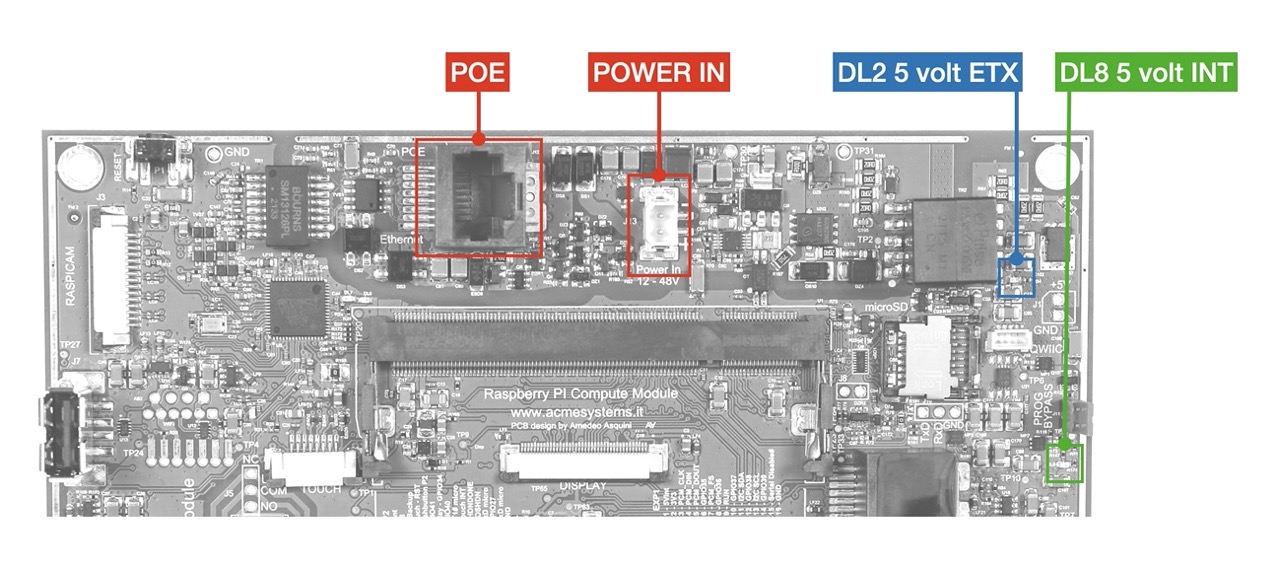
There are two ways to Provide the main power supply to the CM-Panel POE:
1) Using the POE (Power Over Ethernet connector)
* Up to 48 volts in Mode A or B is supported
* The negotiation for POE can take up to 8 seconds.
2) Using the POWER IN connector
* The power range is from 12 to 48 VDC
The two systems are alternatives to each other but never use them together.
The board will power on, and the boot messages will be visible directly on the LCD screen.
DL2 blue led will indicate that the POE negotiation has ended
DL8 green led will indicate that power is provided to the Raspberry CM4S module
After a few seconds, you should be able to start interacting with your Raspberry Pi CM4S.
 ## 3) Turn-off
By default the CM-panel POE is configured to ensure that the system shutdown is always correct in order to avoid microSD corruption.
This feature is implemented using:
* a custom power circuitry, a SuperCAP and an ATTiny co-processor
* a custom firmware running on the ATTiny co-processor
* a set of scripts and configuration files on Linux side
More info are available on this article:
* @article='cmpanel-poe_safe_shutdown'
here we will see only the practical use.
### Operation with power safe enabled
* Be sure to leave open the
## 3) Turn-off
By default the CM-panel POE is configured to ensure that the system shutdown is always correct in order to avoid microSD corruption.
This feature is implemented using:
* a custom power circuitry, a SuperCAP and an ATTiny co-processor
* a custom firmware running on the ATTiny co-processor
* a set of scripts and configuration files on Linux side
More info are available on this article:
* @article='cmpanel-poe_safe_shutdown'
here we will see only the practical use.
### Operation with power safe enabled
* Be sure to leave open the J11 PROG BYPASS jumper
* Be shure to close the J17 CHG/DCHG jumper in the CHG position.
Press and hold for 2 sec the P2 push button. This operation will send the shutdown signal to Raspberry by setting low the GPIO25 line.
To manage this event insert this line in /boot/config.txt file:
dtoverlay=gpio-shutdown,gpio_pin=25,active_low=1,gpio_pull=up
To turn-off the power supply set by software the GPIO25 line to zero. This can be done also just using adding line in config.txt:
dtoverlay=gpio-poweroff,gpio_pin=26,active_low=1
### Operation without power safe enabled
By default the power-safe is enabled but it is possible to disable it by holding down the P2 button
and resetting the co-processor by pressing the P3 reset button.
* Two green blinks of STATUS led after the reset will indicate that the power safe is enable
* Two red blinks of STATUS led after the reset will indicate that the power safe is disable
When the power safe is disabled the CM-Panel POE will work as a normal Rasberry Pi
## Links
* @article='cmpanel-poe_safe_shutdown'
@include='adv_cmpanel'