# Safe shutdown
The CM-Panel POE has original power supply circuitry that ensures high reliability due to the wide adoption of hardware protections, combined with the capability to provide enough energy to perform an orderly shutdown in the event of a power failure.
A Microchip ATTiny co-processor is used to manage the safe shutdown procedure.
The source code of its firmware is available under open source licence to be personalized to your needs:
* @article='cmpanel-poe_attiny'
A Supercap will provide the energy for few seconds to allow a correct shutdown sequence.
Open the J11 PROG BYPASS jumper and place the J17 CHG/DCHG jumper in the CHG position.
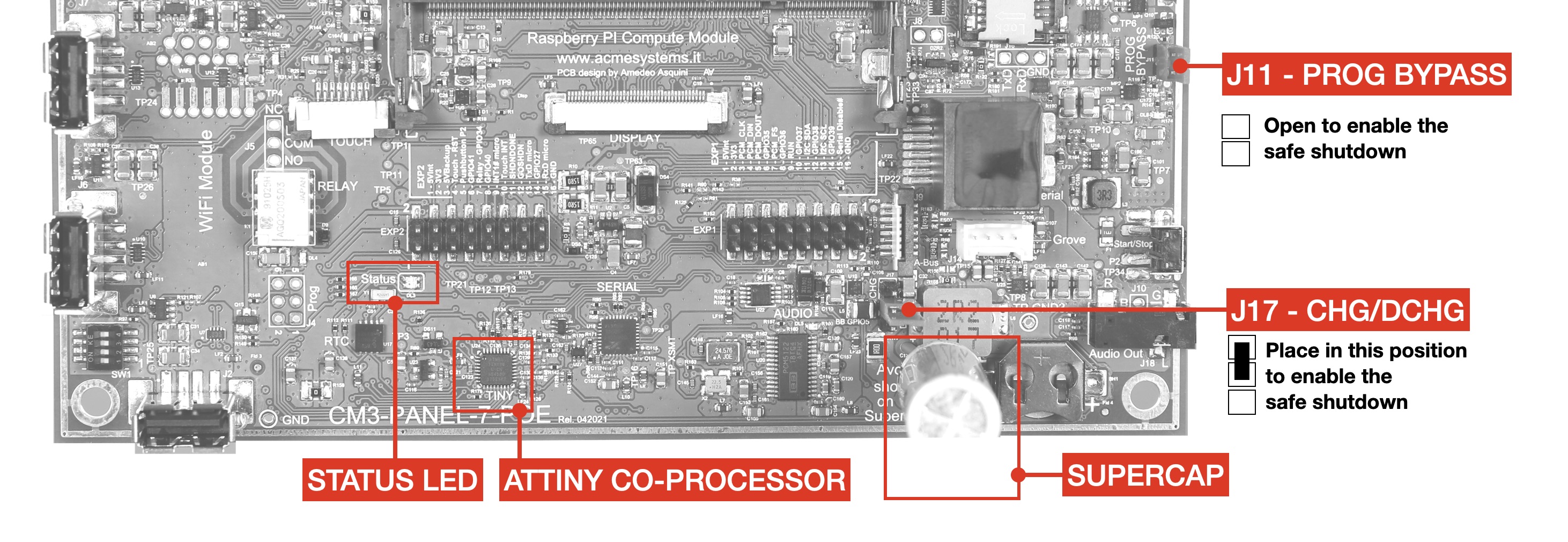 The
The STATUS LED will indicated the charging status using these colors:
| COLOR | LEVEL |
|---------|-------|
| RED | █ |
| BLUE | █ █ |
| GREEN | █ █ █ |
This is what happen when the main power falls:
* the power supply hardware will turn-off the display to limitate the power consumption
* the co-processor will inform the Raspberry Pi module trought the GPIO25 (Active low) that the power is down.
* The Raspberry Pi will start the shudown proceure usually by launch the command shutdown -h now
* The Supercap will mantain the power for about 30 seconds but in case is possible to tun-off the power by place to LOW the GPIO26 line.
## How to manage the Power fall alert from ATTiny on the Raspberry side
By defaut the power fall alert is managed by this line in /boot/config.txt file:
dtoverlay=gpio-shutdown,gpio_pin=25,active_low=1,gpio_pull=up
with this definition when the GPIO25 goes down by the ATTiny co-processor the Linux shutdown.
Another line can be added to turn-off the power circuitry when the shutdown ends.
dtoverlay=gpio-poweroff,gpio_pin=26,active_low=1
but is seem to be instable.
In case you like to manage the shutdown by yourself you could comment these lines and use a simple Python script like this:
This is an example of code to manage written in Python:
#!/usr/bin/python
import RPi.GPIO as GPIO
import time
import os
i=0
GPIO.setmode(GPIO.BCM)
# On GPIO25 input become the low signal from ATTiny in case of power fall
GPIO.setup(25, GPIO.IN, pull_up_down=GPIO.PUD_UP)
# On GPIO26 output we will ask to ATTiny to power-off the 5 volt line tu turn-off the Raspberry module
GPIO.setup(26, GPIO.OUT)
GPIO.output(26, GPIO.HIGH)
try:
while True:
# Check the state of GPIO25
input_state=GPIO.input(25)
if input_state==0:
# If low lauch the power down sequence
print("Power fall received")
print("Send shutdown command to Linux")
os.system("sudo shutdown -h now")
quit()
time.sleep(1)
finally:
GPIO.cleanup()
@include='adv_cmpanel'