
This article illustrates how to build an Debian Wheezy root filesystem for
the all the Acme Systems boards based on Atmel MCU
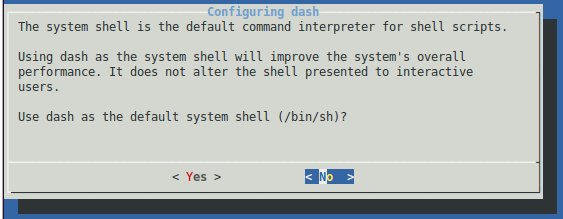 Reply with **< No >**.
Some other prompt will appear during the configuration. Reply to them as you like.
When finished the target rootfs will be almost ready to be moved on the
target microSD but it still needs some last extra configuration file before using it.
Based on type board you are using select one of these script to create the the
right configuration files:
* Roadrunner [roadrunner.sh](./roadrunner.sh)
* Acqua [acqua.sh](./acqua.sh)
* Aria [aria.sh](./aria.sh)
* Arietta [arietta.sh](./arietta.sh)
* FOX board G20 [fox.sh](./fox.sh)
launch the script:
chmod +x roadrunner.sh
sudo ./roadrunner.sh
create now the target root login password:
sudo chroot target-rootfs passwd
Enter new UNIX password: [type your password]
Retype new UNIX password: [type your password again]
passwd: password updated successfully
If you want to take a look to the packages installed type:
sudo chroot target-rootfs dpkg --get-selections | more
Check the Debian version:
cat target-rootfs/etc/debian_version
Add more packages if needed by typing:
sudo LC_ALL=C LANGUAGE=C LANG=C chroot target-rootfs apt-get install [packagename]
Please note that will be possible to add packages also directly on the target board. In than case the
command will be simply:
apt-get install packagename
then remove the **qemu-arm-static** executable:
sudo rm target-rootfs/usr/bin/qemu-arm-static
##Copy the rootfs contents on microSD
[Format a new microSD](/microsd_format).
Mount the microSD on your Ubuntu Linux PC
and copy all the target-rootfs contents in the second microSD partition mounted
on **/media/$USER/rootfs**.
sudo rsync -axHAX --progress target-rootfs/ /media/$USER/rootfs/
Unmount the microSD, insert it in your board, insert the [DPI cable](/DPI) to see the Kernel bootstrap
messages and boot.
##Related links
* [Multistrap](http://wiki.debian.org/Multistrap)
* [Multistrap man page](http://wiki.debian.org/MultistrapManPage)
* [Building a small Debian root filesystem with Multistrap](http://free-electrons.com/blog/embdebian-with-multistrap/)
* [QEMU User Emulation](http://wiki.debian.org/QemuUserEmulation)
* [Debian mailing list](http://lists.debian.org/debian-embedded/)
* [foreign debian bootstrapping without root priviliges](http://blog.mister-muffin.de/2011/04/02/foreign-debian-bootstrapping-without-root-priviliges-with-fakeroot,-fakechroot-and-qemu-user-emulation/)
* [Changing your locale on Linux and UNIX systems](http://publib.boulder.ibm.com/infocenter/wmbhelp/v7r0m0/index.jsp?topic=%2Fcom.ibm.etools.mft.doc%2Fae19494_.htm)
* [Locale](http://en.wikipedia.org/wiki/Locale)
Reply with **< No >**.
Some other prompt will appear during the configuration. Reply to them as you like.
When finished the target rootfs will be almost ready to be moved on the
target microSD but it still needs some last extra configuration file before using it.
Based on type board you are using select one of these script to create the the
right configuration files:
* Roadrunner [roadrunner.sh](./roadrunner.sh)
* Acqua [acqua.sh](./acqua.sh)
* Aria [aria.sh](./aria.sh)
* Arietta [arietta.sh](./arietta.sh)
* FOX board G20 [fox.sh](./fox.sh)
launch the script:
chmod +x roadrunner.sh
sudo ./roadrunner.sh
create now the target root login password:
sudo chroot target-rootfs passwd
Enter new UNIX password: [type your password]
Retype new UNIX password: [type your password again]
passwd: password updated successfully
If you want to take a look to the packages installed type:
sudo chroot target-rootfs dpkg --get-selections | more
Check the Debian version:
cat target-rootfs/etc/debian_version
Add more packages if needed by typing:
sudo LC_ALL=C LANGUAGE=C LANG=C chroot target-rootfs apt-get install [packagename]
Please note that will be possible to add packages also directly on the target board. In than case the
command will be simply:
apt-get install packagename
then remove the **qemu-arm-static** executable:
sudo rm target-rootfs/usr/bin/qemu-arm-static
##Copy the rootfs contents on microSD
[Format a new microSD](/microsd_format).
Mount the microSD on your Ubuntu Linux PC
and copy all the target-rootfs contents in the second microSD partition mounted
on **/media/$USER/rootfs**.
sudo rsync -axHAX --progress target-rootfs/ /media/$USER/rootfs/
Unmount the microSD, insert it in your board, insert the [DPI cable](/DPI) to see the Kernel bootstrap
messages and boot.
##Related links
* [Multistrap](http://wiki.debian.org/Multistrap)
* [Multistrap man page](http://wiki.debian.org/MultistrapManPage)
* [Building a small Debian root filesystem with Multistrap](http://free-electrons.com/blog/embdebian-with-multistrap/)
* [QEMU User Emulation](http://wiki.debian.org/QemuUserEmulation)
* [Debian mailing list](http://lists.debian.org/debian-embedded/)
* [foreign debian bootstrapping without root priviliges](http://blog.mister-muffin.de/2011/04/02/foreign-debian-bootstrapping-without-root-priviliges-with-fakeroot,-fakechroot-and-qemu-user-emulation/)
* [Changing your locale on Linux and UNIX systems](http://publib.boulder.ibm.com/infocenter/wmbhelp/v7r0m0/index.jsp?topic=%2Fcom.ibm.etools.mft.doc%2Fae19494_.htm)
* [Locale](http://en.wikipedia.org/wiki/Locale)