# Download the MicroSD binary images for CM3-PANEL-7-POE
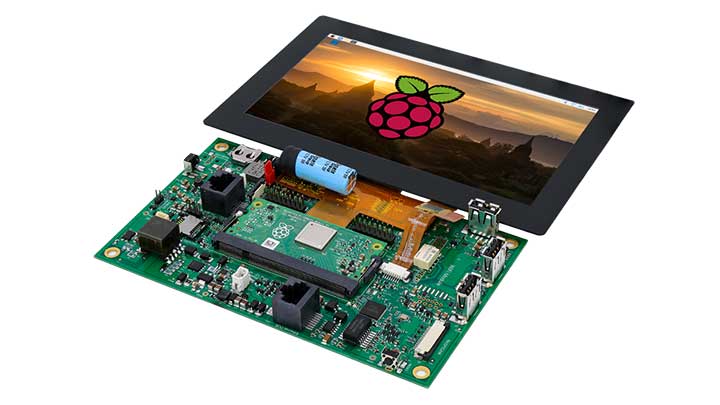
The CM3-Panel-7-poe is a device designed around the Raspberry Pi Compute Module 3 lite.
Is needs an operating system to work and here you can download a ready-to-use image
derivated from the original microSD images released by Raspberrt Pi. Alternatively
it is possible to follow, step by step, the procedure to adapt an original image to
works with the CM3-Panel
* [Method 1 - Use the Acme ready-to-use image](/download_cm3panel7poe#method1)
* [Method 2 - Start from the original Raspberry microSD image](/CM3-PANEL-7-POE_microsd)
 ## Use the Acme ready-to-use image
Download Balena Etcher to generate a microSD with this image:
*
Download the version you need:
* Raspbian Lite version 13 feb 2020:
## Use the Acme ready-to-use image
Download Balena Etcher to generate a microSD with this image:
*
Download the version you need:
* Raspbian Lite version 13 feb 2020:
[acme-2020-02-13-raspbian-buster-lite.zip](https://images.acmesystems.it/cm3panel7poe/acme-2020-02-13-raspbian-buster-lite.zip)
* Raspbian Desktop version 13 feb 2020:
Link is coming soon
## Notes about this image
Login data
Login: pi
Password: raspberry
Image version: 2020-02-13
Use microSD size >4GB
For example if you use a 16 gb SD, at the first start the rootfs partition will be automatically
extended for the entire size of the SD.
After reboot run this command and reboot (sudo reboot):
$ sudo raspi-config --expand-rootfs
Welcome to fdisk (util-linux 2.33.1).
Changes will remain in memory only, until you decide to write them.
Be careful before using the write command.
Command (m for help): Disk /dev/mmcblk0: 7.4 GiB, 7948206080 bytes, 15523840 sectors
Units: sectors of 1 * 512 = 512 bytes
Sector size (logical/physical): 512 bytes / 512 bytes
I/O size (minimum/optimal): 512 bytes / 512 bytes
Disklabel type: dos
Disk identifier: 0x738a4d67
Device Boot Start End Sectors Size Id Type
/dev/mmcblk0p1 2048 526335 524288 256M c W95 FAT32 (LBA)
/dev/mmcblk0p2 526336 15523839 14997504 7.2G 83 Linux
Command (m for help): Partition number (1,2, default 2):
Partition 2 has been deleted.
Command (m for help): Partition type
p primary (1 primary, 0 extended, 3 free)
e extended (container for logical partitions)
Select (default p): Partition number (2-4, default 2): First sector (526336-15523839, default 526336): Last sector, +/-
Created a new partition 2 of type 'Linux' and of size 7.2 GiB.
Partition #2 contains a ext4 signature.
Command (m for help):
Disk /dev/mmcblk0: 7.4 GiB, 7948206080 bytes, 15523840 sectors
Units: sectors of 1 * 512 = 512 bytes
Sector size (logical/physical): 512 bytes / 512 bytes
I/O size (minimum/optimal): 512 bytes / 512 bytes
Disklabel type: dos
Disk identifier: 0x738a4d67
Device Boot Start End Sectors Size Id Type
/dev/mmcblk0p1 2048 526335 524288 256M c W95 FAT32 (LBA)
/dev/mmcblk0p2 526336 15523839 14997504 7.2G 83 Linux
Command (m for help): The partition table has been altered.
Syncing disks.
Please reboot
## Preconfigured settings:
* Display Touch
* Real time clock
* Bus 3 I2C
* Chip Audio
* GPIO from microprocessor and microcontroller ATTiny
* Power Safe
* WiFi Mediatek driver
* Chip Audio driver
## Software installed:
* python-pip
* pyserial
* python-smbus
* i2c-tools
* python-flask
* python-picamera
* git
* avrdude
* sqlite3
* Chromium-browser
* xorg
* mplayer
* nodered
* nodejs
*
NodeJs Node Red & packages:
* node-red-dashboard
* node-red-contrib-admin
* node-red-contrib-arp
* node-red-contrib-config
* node-red-contrib-contextbrowser
* node-red-contrib-cpu
* node-red-contrib-cron
* node-red-contrib-dashboard-average-bars
* node-red-contrib-dashboard-bar-chart-data
* node-red-contrib-dashboard-sum-bars
* node-red-contrib-device-stats
* node-red-contrib-file-function
* node-red-contrib-file-upload
* node-red-contrib-influxdb
* node-red-contrib-maps
* node-red-contrib-md5
* node-red-contrib-mqtt-broker
* node-red-contrib-msg-queue
* node-red-contrib-os
* node-red-contrib-python-function
* node-red-contrib-pythonshell
* node-red-contrib-rsync
* node-red-contrib-smb
* node-red-contrib-splitter
* node-red-contrib-string
* node-red-contrib-ui-contextmenu
* node-red-contrib-ui-led
* node-red-contrib-ui-level
* node-red-contrib-ui-statechart
* node-red-node-mysql
* node-red-node-sqlite
* node-red-node-ui-lineargauge
* node-red-node-ui-list
* node-red-node-ui-table
* node-red-contrib-bme280-rpi
* node-red-contrib-serial-modbus
* node-red-contrib-modbus
* node-red-contrib-ds18b20
* node-red-node-pi-gpiod
* node-red-contrib-os
Python script demo on /home/pi/app
MP3 Audio directory on /home/pi/app/audio
## Links
* [CM3-Panel 7 POE - Panel PC based on Raspberry Compute Module 3+](/CM3-PANEL-7-POE)