#FOX Board G20 1-wire wirings

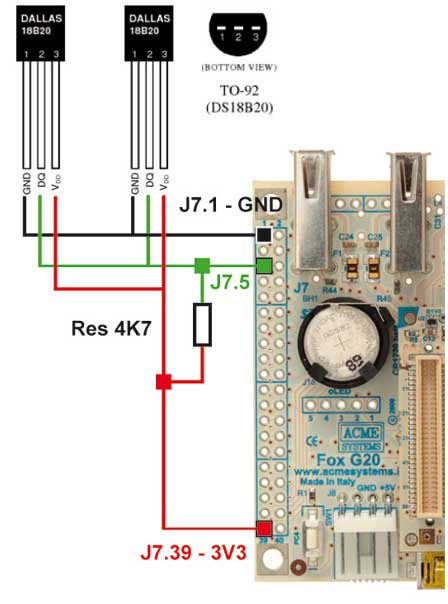
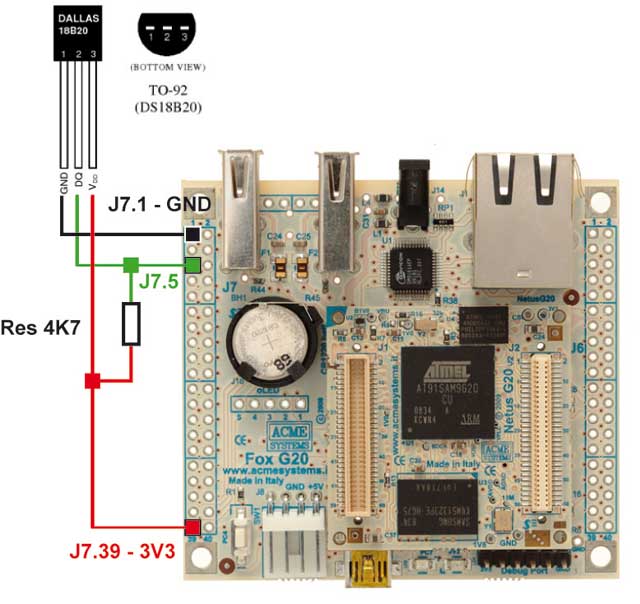
Following is an example on how to wire a DS18B20 thermal sensor to the FOX Board G20. 
The resistor used to pull-up the 1-wire bus is a 4,7 KOhm.

<img src="ds18b20_wiring.jpg"/>

It is possible to link more than one sensor. I tried up to five. The driver will automatically acknowledge the sensors wired.

<img src="multi_ds18b20_wiring.jpg"/>

<div class="alert">
@note This example will not work using the default microSD bought from Acme after October 25, 2011 or using the R18 version 
available on the @article='foxg20_binary_repository'. 
<br/>
Please use the following uImage where the 1-wire bus has been moved back to J7.5 pin (PB16) as it was when I wrote this article.
<br/>
<br/>
<ul>
<li><a href="uImage">Download uImage file</a> with 1-wire on J7.5 (MD5: fdcdd314ecf6d9985d4af58dba2cfc60)</li>
</ul>  
</div>

##Changing the 1-wire bus GPIO line

It is possible to use any GPIO line of the FOX Board because the 1-wire is not implemented in hardware 
but is provided by the software bit banging Linux driver called 
[w1-gpio.c](http://lxr.linux.no/linux+v2.6.38/drivers/w1/masters/w1-gpio.c). 

To select which GPIO line to use for 1-wire bus service you have to configure it by changing the board initialization
code inside the Linux Kernel. The source code is [board-foxg20.c](http://lxr.linux.no/linux+v2.6.38/arch/arm/mach-at91/board-foxg20.c)
and the line to change is [# 215](http://lxr.linux.no/linux+v2.6.38/arch/arm/mach-at91/board-foxg20.c#L215).

To get the Linux sources and compile your own Kernel image follow this article: @article='compile_linux_2_6_38'.

@shop='FOXG20'
@shop='DS18B20'