#Datalogic Barcode Scanner
This article illustrates how to use an USB Barcode Scanner with the FOX Board G20
 For this article we used a
Datalogic Gryphon GD4130
general purpose corded handheld linear imager bar code reader but probably
it will also work with other models from Datalogic or Symbol.
When plugged on the FOX Board G20 USB host port the USB
driver will detect it showing these messages:
For this article we used a
Datalogic Gryphon GD4130
general purpose corded handheld linear imager bar code reader but probably
it will also work with other models from Datalogic or Symbol.
When plugged on the FOX Board G20 USB host port the USB
driver will detect it showing these messages:
usb 1-2: new full speed USB device using at91_ohci and
address 2
usb 1-2: New USB device found, idVendor=05f9, idProduct=2206
usb 1-2: New USB device strings: Mfr=1, Product=2, SerialNumber=3
usb 1-2: Product: Handheld Barcode Scanner
usb 1-2: Manufacturer: Datalogic Scanning, Inc.
usb 1-2: SerialNumber: S/N E09M05215
usb 1-2: configuration #1 chosen from 1 choice
input: Datalogic Scanning, Inc. Handheld Barcode Scanner as
/devices/platform/at91_ohci/usb1/1-2/1-2:1.0/input/input1
generic-usb 0003:05F9:2206.0001: input,hidraw0: USB HID v1.10 Keyboard
[Datalogic Scanning, Inc. Handheld Barcode Scanner] on usb-a0
The USB HID is associated to this driver and a /dev/input/eventx
interface will appear.
Using this interface it is possible to read the barcode content read
by the scanner using the following example code.
## Example in C
This is a working example written by Andy Stewart I found on this mailing list
http://www.mail-archive.com/linux-usb-devel@lists.sourceforge.net/msg54578.html
Code example: @pg='c/bar.c'
It is possible to download the this code with a single git command following this
article: @article='playground'.
The move into the examples directory and compile it using the in-board GNU C compiler:
debarm:~# cd playground
debarm:~# cd c
debarm:~# gcc bar.c -o bar
...
Now launch the example program:
debarm:~# ./bar
Go ahead and scan something - press ctrl_C when finished.
Look for printouts which say: Input from Scanner
Ignore other printouts
Input from Scanner: "FOXBOARDG20"
and try to read any barcode you found. It also reads the barcode on video,
try on the fly reading this barcode:
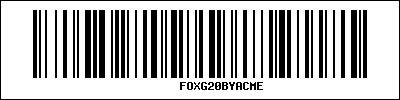 or using this free on-line barcode generators linked below.
## Related links
* Free on-line barcode generatorby BarcodesInc
* Free on-line barcode generator by Morovia
* Symbol Barcode Scanner Reader Software written by Andy Stewart
* Linux Kernel input driver documentation
or using this free on-line barcode generators linked below.
## Related links
* Free on-line barcode generatorby BarcodesInc
* Free on-line barcode generator by Morovia
* Symbol Barcode Scanner Reader Software written by Andy Stewart
* Linux Kernel input driver documentation