# Multi I2C Hat for Raspberry Pi and Acme Sensor boards
This article explains how to use the Multi I2C multiplex HAT for Raspberry Pi designed to connect up to 8 Acme Sensors
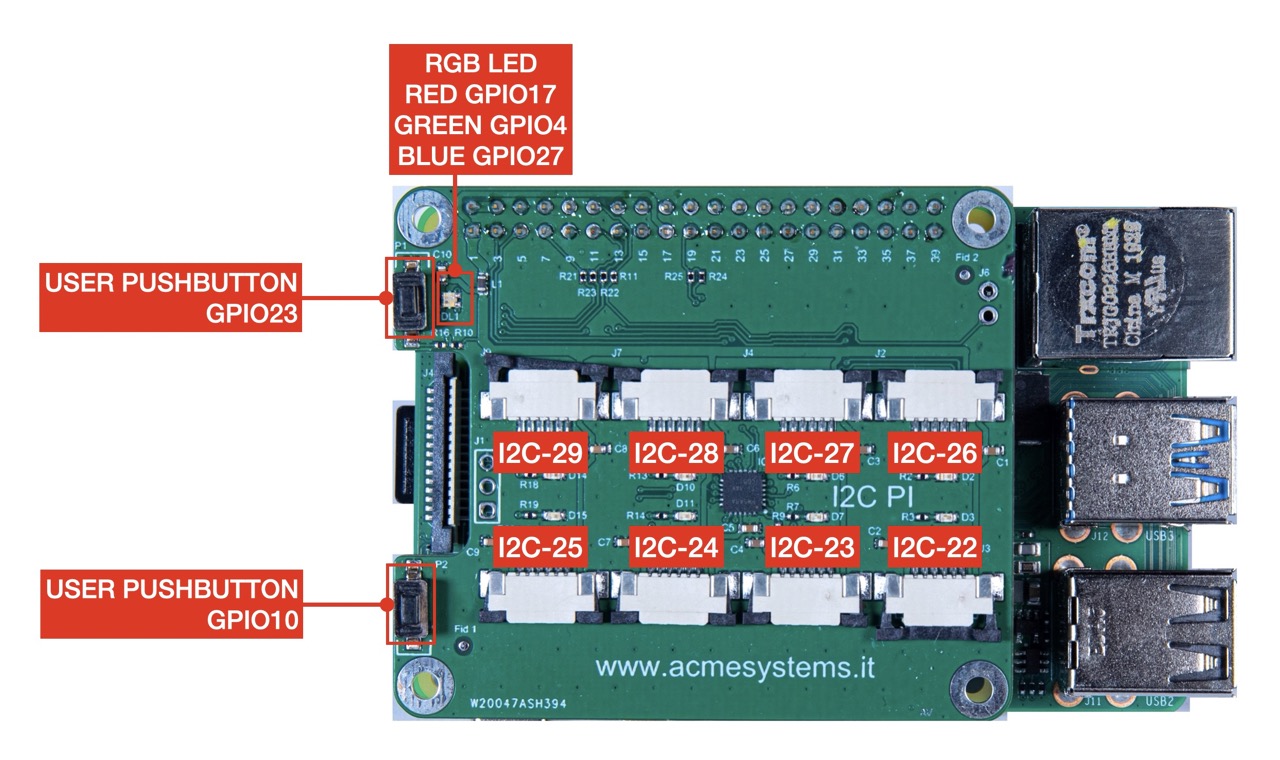 Create a Raspbian OS microSD with the latest lite version:
* Check this article for example: @article='cmpanel-poe_microsd'
Insert this line inside the
Create a Raspbian OS microSD with the latest lite version:
* Check this article for example: @article='cmpanel-poe_microsd'
Insert this line inside the /boot/config.txt file.
# Uncomment some or all of these to enable the optional hardware interfaces
#dtparam=i2c_arm=on
#dtparam=i2s=on
#dtparam=spi=on
dtoverlay=i2c-mux,pca9548=1
Is not requested to enable the I2C using raspi-config
Install the i2c-tools to check the I2C bus from user space.
$ sudo apt update
$ sudo apt -y install i2c-tools
Check the i2c devices available by typing:
$ i2cdetect -l
i2c-1 i2c bcm2835 (i2c@7e804000) I2C adapter
i2c-20 i2c fef04500.i2c I2C adapter
i2c-21 i2c fef09500.i2c I2C adapter
i2c-22 i2c i2c-1-mux (chan_id 0) I2C adapter
i2c-23 i2c i2c-1-mux (chan_id 1) I2C adapter
i2c-24 i2c i2c-1-mux (chan_id 2) I2C adapter
i2c-25 i2c i2c-1-mux (chan_id 3) I2C adapter
i2c-26 i2c i2c-1-mux (chan_id 4) I2C adapter
i2c-27 i2c i2c-1-mux (chan_id 5) I2C adapter
i2c-28 i2c i2c-1-mux (chan_id 6) I2C adapter
i2c-29 i2c i2c-1-mux (chan_id 7) I2C adapter
Insert an Acme Sensor on I2C-22 connector and type:
$ i2cdetect -y 22
0 1 2 3 4 5 6 7 8 9 a b c d e f
00: -- -- -- -- -- -- -- --
10: -- -- -- -- -- -- -- -- -- -- -- -- -- -- -- --
20: -- -- -- -- -- -- -- -- -- -- -- -- -- -- -- --
30: -- -- -- -- -- -- -- -- -- -- -- -- -- -- -- --
40: -- -- -- -- 44 -- -- -- -- -- -- -- -- -- -- --
50: -- -- -- -- -- -- -- -- -- -- -- -- -- -- -- --
60: -- -- -- -- -- -- -- -- -- -- -- -- -- -- -- --
70: UU -- -- -- -- -- -- --
* UU ad address 0x70 is the address of TCA9548A mux used by the i2c-mux driver so non available to be managed
by user space
* 44 ad address 0x44 is the address of the Acme Sensor plugged on I2C-22 Acme Sensor connector
## Schematic
* [Schematic](.//multi-i2c-schematic.pdf)
## Links
* [TCA9548A Low-Voltage 8-Channel I 2C Switch with Reset - Datasheet](https://www.ti.com/lit/ds/symlink/tca9548a.pdf)
* [Raspberry Pi overlays Doc](https://github.com/raspberrypi/firmware/blob/master/boot/overlays/README)