# Class D amplifier on RoadRunner SOM
This article illustrates how to enable the Class D amplifier integrated inside the SAMA5D27 and how to use it on Linux
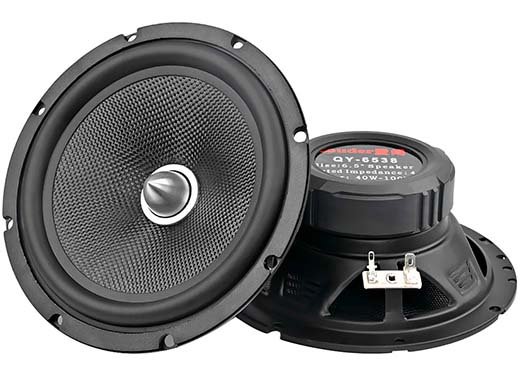 The Audio Class D Amplifier (CLASSD) is a digital input, Pulse Width Modulated (PWM) output stereo Class D
amplifier. It features a high-quality interpolation filter embedding a digitally-controlled gain, an equalizer and a deemphasis
filter.
Embedded Characteristics
* PWM Class D Amplifier
* 16-bit Audio Data
* DSP Clocks: 12.288 and 11.2896 MHz
* Input Sampling Rates: 8, 16, 32, 48, 96, 22.05, 44.1, 88.2 kHz
* 3-band Equalizer
* De-emphasis Filter
* Digital Volume Control
* Differential or Single-ended Outputs
* Non-overlapping Circuit to Control External MOSFETs
* Supports DMA
### Kernel setup
To enable the Class D driver laubch the kernel menuconfig ([read how...](/roadrunner_compile_kernel_4_19)) and enable these drivers:
Device Drivers >
Sound card support >
Advanced Linux Sound Architecture >
ALSA for SoC audio support
<*> SoC Audio for the Atmel System-on-Chip
<*> Atmel ASoC driver for boards using CLASSD
### Device tree bindings
Definition to insert inside the __apb__ section:
classd: classd@fc048000 {
pinctrl-names = "default";
pinctrl-0 = <&pinctrl_classd_default>;
/*atmel,pwm-type = "diff";*/
atmel,pwm-type = "single";
atmel,non-overlap-time = <0>;
status = "okay";
};
Definition to insert inside the __pinctrl@fc038000__ section if you are using the MMC1 bus to wire the
MicroSD. In this case it is possible to use just the right channel:
pinctrl_classd_default: classd_default {
pinmux = ,
,
,
;
bias-pull-up;
};
Definition to insert inside the __pinctrl@fc038000__ section if you are using the MMC0 bus to wire the
MicroSD. In this case is possible to use both channels:
pinctrl_classd_default: classd_default {
pinmux = ,
,
,
,
,
,
,
;
bias-pull-up;
};
## Hardware
To know how to implements the hardware interfaces please read the Microchip Datasheet starting from __page 1328__:
* [Microchip SAMA5D27 MCU Datasheet](http://www.microchip.com/wwwproducts/en/ATSAMA5D27)
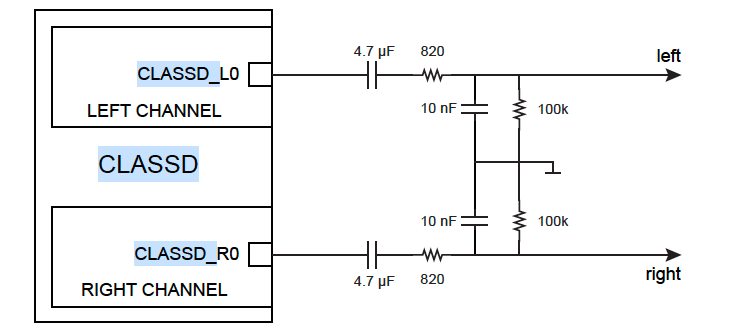
This is the simpler solution available:
The Audio Class D Amplifier (CLASSD) is a digital input, Pulse Width Modulated (PWM) output stereo Class D
amplifier. It features a high-quality interpolation filter embedding a digitally-controlled gain, an equalizer and a deemphasis
filter.
Embedded Characteristics
* PWM Class D Amplifier
* 16-bit Audio Data
* DSP Clocks: 12.288 and 11.2896 MHz
* Input Sampling Rates: 8, 16, 32, 48, 96, 22.05, 44.1, 88.2 kHz
* 3-band Equalizer
* De-emphasis Filter
* Digital Volume Control
* Differential or Single-ended Outputs
* Non-overlapping Circuit to Control External MOSFETs
* Supports DMA
### Kernel setup
To enable the Class D driver laubch the kernel menuconfig ([read how...](/roadrunner_compile_kernel_4_19)) and enable these drivers:
Device Drivers >
Sound card support >
Advanced Linux Sound Architecture >
ALSA for SoC audio support
<*> SoC Audio for the Atmel System-on-Chip
<*> Atmel ASoC driver for boards using CLASSD
### Device tree bindings
Definition to insert inside the __apb__ section:
classd: classd@fc048000 {
pinctrl-names = "default";
pinctrl-0 = <&pinctrl_classd_default>;
/*atmel,pwm-type = "diff";*/
atmel,pwm-type = "single";
atmel,non-overlap-time = <0>;
status = "okay";
};
Definition to insert inside the __pinctrl@fc038000__ section if you are using the MMC1 bus to wire the
MicroSD. In this case it is possible to use just the right channel:
pinctrl_classd_default: classd_default {
pinmux = ,
,
,
;
bias-pull-up;
};
Definition to insert inside the __pinctrl@fc038000__ section if you are using the MMC0 bus to wire the
MicroSD. In this case is possible to use both channels:
pinctrl_classd_default: classd_default {
pinmux = ,
,
,
,
,
,
,
;
bias-pull-up;
};
## Hardware
To know how to implements the hardware interfaces please read the Microchip Datasheet starting from __page 1328__:
* [Microchip SAMA5D27 MCU Datasheet](http://www.microchip.com/wwwproducts/en/ATSAMA5D27)
This is the simpler solution available:
 ### Test files
* [1kHz.wav](./1kHz.wav)
## Links
* [Getting Started with the SAMA5D2 Audio Subsystem](http://ww1.microchip.com/downloads/en/AppNotes/Atmel-44079-32-bit-ARM-Getting-Started-with-the-SAMA5D2-Audio-Subsystem_ApplicationNote.pdf)
* [Microchip SAMA5D27 MCU Datasheet](http://www.microchip.com/wwwproducts/en/ATSAMA5D27)
@include='adv_roadrunner'
### Test files
* [1kHz.wav](./1kHz.wav)
## Links
* [Getting Started with the SAMA5D2 Audio Subsystem](http://ww1.microchip.com/downloads/en/AppNotes/Atmel-44079-32-bit-ARM-Getting-Started-with-the-SAMA5D2-Audio-Subsystem_ApplicationNote.pdf)
* [Microchip SAMA5D27 MCU Datasheet](http://www.microchip.com/wwwproducts/en/ATSAMA5D27)
@include='adv_roadrunner'