# ISC Image Sensor Controller (Camera)
This page describes how to configure and use of the ISC port on Roadrunner SOM.
Tested on Linux Kernel 5.15
## Hardware used
Omnivision OV5640 camera
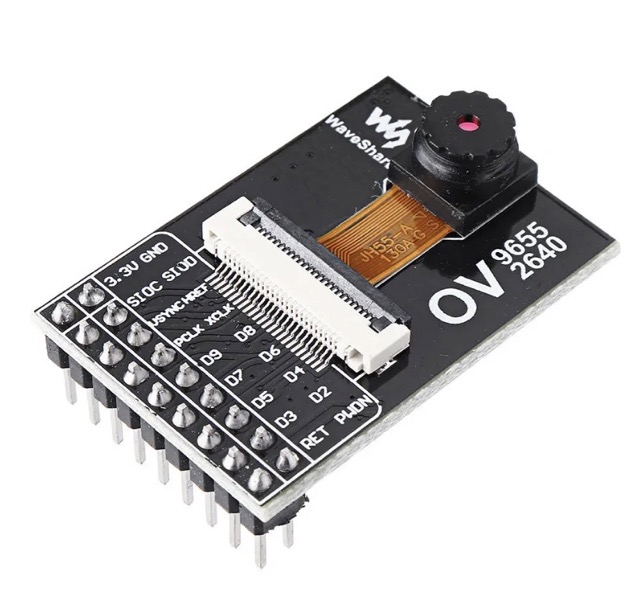 ## Wirings
| Signal | SAMA5D2 pin | Camera pin
|-----------|-------------|------------
| ISC_D4 | PB30 | D2
| ISC_D5 | PB31 | D3
| ISC_D6 | PC0 | D4
| ISC_D7 | PC1 | D5
| ISC_D8 | PC2 | D6
| ISC_D9 | PC3 | D7
| ISC_D10 | PB24 | D8
| ISC_D11 | PB25 | D9
| ISC_VSYNC | PC5 | VSYNC OUT Active High Frame Valid; indicates active frame
| ISC_HSYNC | PC6 | HREF OUT Active High: Line/Data Valid; indicates active pixels
| ISC_MCK | PC7 | XCLK INP Master Clock into Sensor
| ISC_PCK | PC4 | PCLK OUT Pixel Clock output from sensor
| TWCK1 | PD5 | SIOC I2C Clock
| TWD1 | PD4 | SIOD I2C Data
| PB11 | PB11 | RST INP Sensor reset signal, active low
| PB12 | PB12 | PWON INP Power down input, active high
| 3V | | 3.3V
| GND | | GND
## Linux driver
Device Drivers --->
<*> Multimedia support --->
Media drivers --->
[*] V4L platform devices --->
<*> ATMEL Image Sensor Controller (ISC) support
<*> ATMEL eXtended Image Sensor Controller (XISC) support
<*> ATMEL Image Sensor Interface (ISI) support
Media ancillary drivers --->
<*> OmniVision OV5640 sensor support
## Device tree and defconfig
definitions inside apb section:
//********************
// Camera ISC Port
//********************
/* Omnivision OV5640 (5Mpixel) */
i2c1: i2c@fc028000 {
#address-cells = <1>;
#size-cells = <0>;
pinctrl-names = "default","gpio";
//pinctrl-names = "default";
pinctrl-0 = <&pinctrl_i2c1_default>;
pinctrl-1 = <&pinctrl_i2c1_gpio>;
i2c-analog-filter;
i2c-digital-filter;
i2c-digital-filter-width-ns = <35>;
sda-gpios = <&pioA PIN_PD4 GPIO_ACTIVE_HIGH>;
scl-gpios = <&pioA PIN_PD5 (GPIO_ACTIVE_HIGH | GPIO_OPEN_DRAIN)>;
status = "okay";
ov5640: camera@3c {
compatible = "ovti,ov5640";
reg = <0x3c>;
pinctrl-names = "default";
pinctrl-0 = <&pinctrl_sensor_power &pinctrl_sensor_reset>;
reset-gpios = <&pioA PIN_PB11 GPIO_ACTIVE_LOW>;
powerdown-gpios = <&pioA PIN_PB12 GPIO_ACTIVE_HIGH>;
clocks = <&isc>;
clock-names = "xclk";
assigned-clocks = <&isc>;
assigned-clock-rates = <25000000>;
status = "okay";
port {
ov5640_0: endpoint {
remote-endpoint = <&isc_0>;
bus-width = <8>;
data-shift = <2>;
hsync-active = <1>;
vsync-active = <1>;
pclk-sample = <1>;
};
};
};
};
isc: isc@f0008000 {
pinctrl-names = "default";
pinctrl-0 = <&pinctrl_isc_base &pinctrl_isc_data_8bit>;
status = "okay";
port {
isc_0: endpoint@0 {
remote-endpoint = <&ov5640_0>;
bus-width = <8>;
data-shift = <2>;
hsync-active = <0>;
vsync-active = <0>;
pclk-sample = <1>;
};
};
};
definitions inside pinctrl@fc038000 section:
pinctrl_isc_base: isc_base {
pinmux = ,
,
,
;
bias-disable;
};
pinctrl_isc_data_8bit: isc_data_8bit {
pinmux = ,
,
,
,
,
,
,
;
bias-disable;
};
pinctrl_sensor_power: sensor_power {
pinmux = ;
bias-pull-up;
};
pinctrl_sensor_reset: sensor_reset {
pinmux = ;
bias-pull-up;
};
## Use the camera from user space
### Test the v4l2 API compliance of the ISC driver
sudo v4l2-compliance
### Display all information available
sudo v4l2-ctl --all
### Use the Microchip script to capture
Configure the media controller pipeline
sudo media-ctl -d /dev/media0 --set-v4l2 '4:0[fmt:SRGGB8_1X8/1920x1080@1/30 field:none colorspace:srgb]'
sudo media-ctl -d /dev/media0 --set-v4l2 '"atmel_isc_scaler":0[fmt:SRGGB8_1X8/1920x1080 field:none colorspace:srgb]'
sudo v4l2-ctl -d /dev/video0 -v pixelformat=RGBP,height=1080,width=1920
Capture an image:
sudo fswebcam -d /dev/video0 -i 0 -p BAYER -r 1920x1080 /var/www/html/out.jpg
## Links
* [Linux4Sam: UsingISC (Image Sensor Controller)](https://www.linux4sam.org/bin/view/Linux4SAM/UsingISC)
* [GitHub - Video Capture AT91](https://github.com/linux4sam/video-capture-at91)
* [Datasheet Omnivision OV5640](./OV5640.pdf)
* [5MP: OV5640](https://www.arducam.com/products/camera-breakout-board/5mp-ov5640/)
* [ov5640.dtso](https://github.com/linux4sam/dt-overlay-at91/blob/master/sama5d2_xplained/sama5d2_xplained_ov5640.dtso)
@include='adv_roadrunner'
## Wirings
| Signal | SAMA5D2 pin | Camera pin
|-----------|-------------|------------
| ISC_D4 | PB30 | D2
| ISC_D5 | PB31 | D3
| ISC_D6 | PC0 | D4
| ISC_D7 | PC1 | D5
| ISC_D8 | PC2 | D6
| ISC_D9 | PC3 | D7
| ISC_D10 | PB24 | D8
| ISC_D11 | PB25 | D9
| ISC_VSYNC | PC5 | VSYNC OUT Active High Frame Valid; indicates active frame
| ISC_HSYNC | PC6 | HREF OUT Active High: Line/Data Valid; indicates active pixels
| ISC_MCK | PC7 | XCLK INP Master Clock into Sensor
| ISC_PCK | PC4 | PCLK OUT Pixel Clock output from sensor
| TWCK1 | PD5 | SIOC I2C Clock
| TWD1 | PD4 | SIOD I2C Data
| PB11 | PB11 | RST INP Sensor reset signal, active low
| PB12 | PB12 | PWON INP Power down input, active high
| 3V | | 3.3V
| GND | | GND
## Linux driver
Device Drivers --->
<*> Multimedia support --->
Media drivers --->
[*] V4L platform devices --->
<*> ATMEL Image Sensor Controller (ISC) support
<*> ATMEL eXtended Image Sensor Controller (XISC) support
<*> ATMEL Image Sensor Interface (ISI) support
Media ancillary drivers --->
<*> OmniVision OV5640 sensor support
## Device tree and defconfig
definitions inside apb section:
//********************
// Camera ISC Port
//********************
/* Omnivision OV5640 (5Mpixel) */
i2c1: i2c@fc028000 {
#address-cells = <1>;
#size-cells = <0>;
pinctrl-names = "default","gpio";
//pinctrl-names = "default";
pinctrl-0 = <&pinctrl_i2c1_default>;
pinctrl-1 = <&pinctrl_i2c1_gpio>;
i2c-analog-filter;
i2c-digital-filter;
i2c-digital-filter-width-ns = <35>;
sda-gpios = <&pioA PIN_PD4 GPIO_ACTIVE_HIGH>;
scl-gpios = <&pioA PIN_PD5 (GPIO_ACTIVE_HIGH | GPIO_OPEN_DRAIN)>;
status = "okay";
ov5640: camera@3c {
compatible = "ovti,ov5640";
reg = <0x3c>;
pinctrl-names = "default";
pinctrl-0 = <&pinctrl_sensor_power &pinctrl_sensor_reset>;
reset-gpios = <&pioA PIN_PB11 GPIO_ACTIVE_LOW>;
powerdown-gpios = <&pioA PIN_PB12 GPIO_ACTIVE_HIGH>;
clocks = <&isc>;
clock-names = "xclk";
assigned-clocks = <&isc>;
assigned-clock-rates = <25000000>;
status = "okay";
port {
ov5640_0: endpoint {
remote-endpoint = <&isc_0>;
bus-width = <8>;
data-shift = <2>;
hsync-active = <1>;
vsync-active = <1>;
pclk-sample = <1>;
};
};
};
};
isc: isc@f0008000 {
pinctrl-names = "default";
pinctrl-0 = <&pinctrl_isc_base &pinctrl_isc_data_8bit>;
status = "okay";
port {
isc_0: endpoint@0 {
remote-endpoint = <&ov5640_0>;
bus-width = <8>;
data-shift = <2>;
hsync-active = <0>;
vsync-active = <0>;
pclk-sample = <1>;
};
};
};
definitions inside pinctrl@fc038000 section:
pinctrl_isc_base: isc_base {
pinmux = ,
,
,
;
bias-disable;
};
pinctrl_isc_data_8bit: isc_data_8bit {
pinmux = ,
,
,
,
,
,
,
;
bias-disable;
};
pinctrl_sensor_power: sensor_power {
pinmux = ;
bias-pull-up;
};
pinctrl_sensor_reset: sensor_reset {
pinmux = ;
bias-pull-up;
};
## Use the camera from user space
### Test the v4l2 API compliance of the ISC driver
sudo v4l2-compliance
### Display all information available
sudo v4l2-ctl --all
### Use the Microchip script to capture
Configure the media controller pipeline
sudo media-ctl -d /dev/media0 --set-v4l2 '4:0[fmt:SRGGB8_1X8/1920x1080@1/30 field:none colorspace:srgb]'
sudo media-ctl -d /dev/media0 --set-v4l2 '"atmel_isc_scaler":0[fmt:SRGGB8_1X8/1920x1080 field:none colorspace:srgb]'
sudo v4l2-ctl -d /dev/video0 -v pixelformat=RGBP,height=1080,width=1920
Capture an image:
sudo fswebcam -d /dev/video0 -i 0 -p BAYER -r 1920x1080 /var/www/html/out.jpg
## Links
* [Linux4Sam: UsingISC (Image Sensor Controller)](https://www.linux4sam.org/bin/view/Linux4SAM/UsingISC)
* [GitHub - Video Capture AT91](https://github.com/linux4sam/video-capture-at91)
* [Datasheet Omnivision OV5640](./OV5640.pdf)
* [5MP: OV5640](https://www.arducam.com/products/camera-breakout-board/5mp-ov5640/)
* [ov5640.dtso](https://github.com/linux4sam/dt-overlay-at91/blob/master/sama5d2_xplained/sama5d2_xplained_ov5640.dtso)
@include='adv_roadrunner'