# How to use the 1-WIRE bus on RoadRunner
This article illustrates how to enable one o more bit banging 1-wire bus on any RoadRunner GPIO pin
This article was written using Linux Kernel 4.19.x
1-Wire is a device communications bus system designed by Dallas Semiconductor
that provides low-speed data, signaling, and power over a single signal. 1-Wire is similar in concept to I2C,
but with lower data rates and longer range. It is typically used to communicate with small inexpensive devices
such as digital thermometers and weather instruments.
##Dallas/Maxim DS18B20 thermal sensor
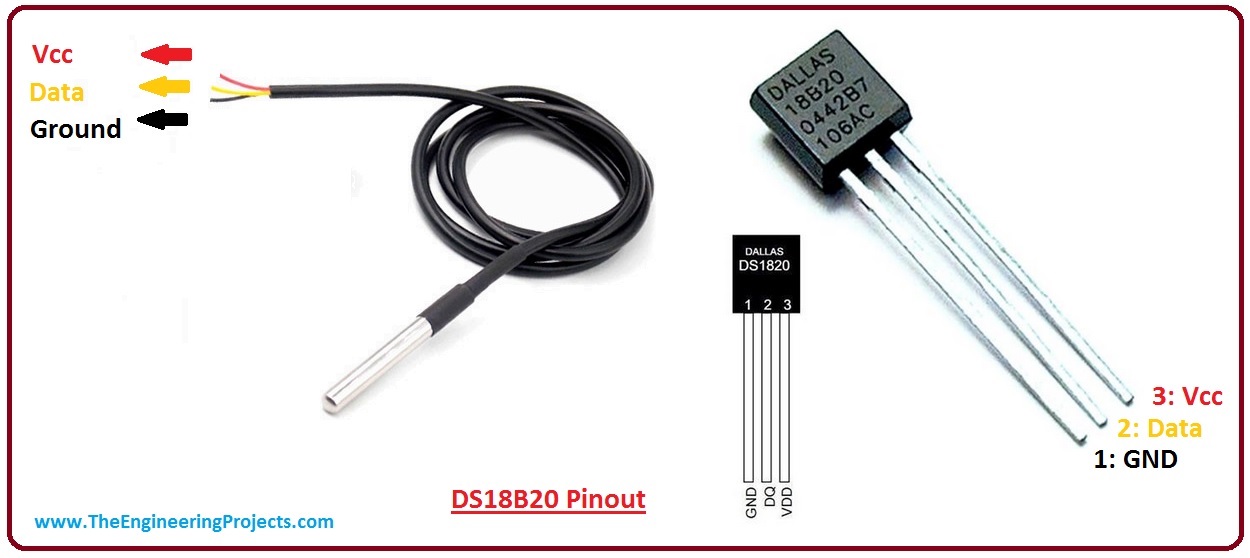 The DS18B20 digital thermometer provides 9-bit to 12-bit Celsius temperature measurements.
It communicates over a 1-Wire bus that by definition requires only one data line (and ground)
for communication with a central microprocessor.
It has an operating temperature range of -55°C to +125°C and is accurate to ±0.5°C over
the range of °10°C to +85°C. ([read more on datasheet](https://datasheets.maximintegrated.com/en/ds/DS18B20-PAR.pdf)).
## Pinout of 1-wire
The 1-wire bus is managed in bit banging so anu GPIO can be used as 1-wire bus. The pin used depends from
the device tree definition
## Enable the Linux Kernel 1-wire driver
Follow this tutorial: @h1='compile_linux_kernel_4_19' to know how to cross compile the Linux Kernel
and how to configure the drivers to enable inside it.
Enable the Dallas's 1-wire support and the Thermal family implementation as shown below:
Device Drivers --->
<*> Dallas's 1-wire support
1-wire Bus Masters --->
<*> GPIO 1-wire busmaster
1-wire Slaves --->
<*> Thermal family implementation
## Configuring the device tree
Edit the device tree source of your board and add in __apb__section these lines (change PC25 with the GPIO you intend to use):
apb {
onewire_0: onewire_0 {
compatible = "w1-gpio";
gpios = <&pioA PIN_PC25 0>;
pinctrl-names = "default";
pinctrl-0 = <&pinctrl_onewire_0_default>;
status = "okay";
};
...
then add also these lines in the section __pinctrl@fc038000__:
pinctrl@fc038000 {
pinctrl_onewire_0_default: onewire_0_default {
pinmux = ;
bias-pull-up;
};
Changing the gpio parameter you can chaneg the GPIO to use as 1-wire bus
## Read the temperature
The 1-wire driver automatically scans every 10 seconds if new sensors are plugged on the 1-wire bus.
For each 1-wire device detected a new directory is created on /sys/bus/w1/devices/w1 bus master.
Type:
ls -l /sys/bus/w1/devices
lrwxrwxrwx 1 root root 0 Mar 6 13:08 28-000006c4bf0b -> ../../../devices/w1_bus_master1/28-000006c4bf0b
lrwxrwxrwx 1 root root 0 Mar 6 13:08 28-000006dbee58 -> ../../../devices/w1_bus_master1/28-000006dbee58
lrwxrwxrwx 1 root root 0 Mar 6 13:08 w1_bus_master1 -> ../../../devices/w1_bus_master1
The two directories 28-xxxx indicate that two thermal sensors are probed on the bus (28 is the family ID) and their
unique IDs are 000006c4bf0b and 000006dbee58.
To read the temperature from each sensor type:
cat /sys/bus/w1/devices/28-000006c4bf0b/w1_slave
68 01 4b 46 7f ff 08 10 05 : crc=05 YES
68 01 4b 46 7f ff 08 10 05 t=22500
t=22500 indicates that the temperature read is 22.500 °C
## Configuring two GPIO to set two 1-wire bus master
It is possible to add GPIO lines to set up more 1-wire busses:
apb {
onewire_0: onewire_0 {
compatible = "w1-gpio";
gpios = <&pioA PIN_PC25 0>;
pinctrl-names = "default";
pinctrl-0 = <&pinctrl_onewire_0_default>;
status = "okay";
};
onewire_1: onewire_1 {
compatible = "w1-gpio";
gpios = <&pioA PIN_PC26 0>;
pinctrl-names = "default";
pinctrl-0 = <&pinctrl_onewire_1_default>;
status = "okay";
};
...
then add also these lines in the section __pinctrl@fc038000__:
pinctrl@fc038000 {
pinctrl_onewire_0_default: onewire_0_default {
pinmux = ;
bias-pull-up;
};
pinctrl_onewire_1_default: onewire_1_default {
pinmux = ;
bias-pull-up;
};
In this case the result is:
ls -l /sys/bus/w1/devices
lrwxrwxrwx 1 root root 0 Mar 6 13:19 28-000006c4bf0b -> ../../../devices/w1_bus_master1/28-000006c4bf0b
lrwxrwxrwx 1 root root 0 Mar 6 13:19 28-000006dbee58 -> ../../../devices/w1_bus_master2/28-000006dbee58
lrwxrwxrwx 1 root root 0 Mar 6 13:19 w1_bus_master1 -> ../../../devices/w1_bus_master1
lrwxrwxrwx 1 root root 0 Mar 6 13:19 w1_bus_master2 -> ../../../devices/w1_bus_master2
## Buy
@shop='DS18B20'
##Links
* [DS18B20 datasheet](https://datasheets.maximintegrated.com/en/ds/DS18B20-PAR.pdf)
* [Wikipedia 1-Wire definition](http://en.wikipedia.org/wiki/1-Wire)
@include='adv_roadrunner'
The DS18B20 digital thermometer provides 9-bit to 12-bit Celsius temperature measurements.
It communicates over a 1-Wire bus that by definition requires only one data line (and ground)
for communication with a central microprocessor.
It has an operating temperature range of -55°C to +125°C and is accurate to ±0.5°C over
the range of °10°C to +85°C. ([read more on datasheet](https://datasheets.maximintegrated.com/en/ds/DS18B20-PAR.pdf)).
## Pinout of 1-wire
The 1-wire bus is managed in bit banging so anu GPIO can be used as 1-wire bus. The pin used depends from
the device tree definition
## Enable the Linux Kernel 1-wire driver
Follow this tutorial: @h1='compile_linux_kernel_4_19' to know how to cross compile the Linux Kernel
and how to configure the drivers to enable inside it.
Enable the Dallas's 1-wire support and the Thermal family implementation as shown below:
Device Drivers --->
<*> Dallas's 1-wire support
1-wire Bus Masters --->
<*> GPIO 1-wire busmaster
1-wire Slaves --->
<*> Thermal family implementation
## Configuring the device tree
Edit the device tree source of your board and add in __apb__section these lines (change PC25 with the GPIO you intend to use):
apb {
onewire_0: onewire_0 {
compatible = "w1-gpio";
gpios = <&pioA PIN_PC25 0>;
pinctrl-names = "default";
pinctrl-0 = <&pinctrl_onewire_0_default>;
status = "okay";
};
...
then add also these lines in the section __pinctrl@fc038000__:
pinctrl@fc038000 {
pinctrl_onewire_0_default: onewire_0_default {
pinmux = ;
bias-pull-up;
};
Changing the gpio parameter you can chaneg the GPIO to use as 1-wire bus
## Read the temperature
The 1-wire driver automatically scans every 10 seconds if new sensors are plugged on the 1-wire bus.
For each 1-wire device detected a new directory is created on /sys/bus/w1/devices/w1 bus master.
Type:
ls -l /sys/bus/w1/devices
lrwxrwxrwx 1 root root 0 Mar 6 13:08 28-000006c4bf0b -> ../../../devices/w1_bus_master1/28-000006c4bf0b
lrwxrwxrwx 1 root root 0 Mar 6 13:08 28-000006dbee58 -> ../../../devices/w1_bus_master1/28-000006dbee58
lrwxrwxrwx 1 root root 0 Mar 6 13:08 w1_bus_master1 -> ../../../devices/w1_bus_master1
The two directories 28-xxxx indicate that two thermal sensors are probed on the bus (28 is the family ID) and their
unique IDs are 000006c4bf0b and 000006dbee58.
To read the temperature from each sensor type:
cat /sys/bus/w1/devices/28-000006c4bf0b/w1_slave
68 01 4b 46 7f ff 08 10 05 : crc=05 YES
68 01 4b 46 7f ff 08 10 05 t=22500
t=22500 indicates that the temperature read is 22.500 °C
## Configuring two GPIO to set two 1-wire bus master
It is possible to add GPIO lines to set up more 1-wire busses:
apb {
onewire_0: onewire_0 {
compatible = "w1-gpio";
gpios = <&pioA PIN_PC25 0>;
pinctrl-names = "default";
pinctrl-0 = <&pinctrl_onewire_0_default>;
status = "okay";
};
onewire_1: onewire_1 {
compatible = "w1-gpio";
gpios = <&pioA PIN_PC26 0>;
pinctrl-names = "default";
pinctrl-0 = <&pinctrl_onewire_1_default>;
status = "okay";
};
...
then add also these lines in the section __pinctrl@fc038000__:
pinctrl@fc038000 {
pinctrl_onewire_0_default: onewire_0_default {
pinmux = ;
bias-pull-up;
};
pinctrl_onewire_1_default: onewire_1_default {
pinmux = ;
bias-pull-up;
};
In this case the result is:
ls -l /sys/bus/w1/devices
lrwxrwxrwx 1 root root 0 Mar 6 13:19 28-000006c4bf0b -> ../../../devices/w1_bus_master1/28-000006c4bf0b
lrwxrwxrwx 1 root root 0 Mar 6 13:19 28-000006dbee58 -> ../../../devices/w1_bus_master2/28-000006dbee58
lrwxrwxrwx 1 root root 0 Mar 6 13:19 w1_bus_master1 -> ../../../devices/w1_bus_master1
lrwxrwxrwx 1 root root 0 Mar 6 13:19 w1_bus_master2 -> ../../../devices/w1_bus_master2
## Buy
@shop='DS18B20'
##Links
* [DS18B20 datasheet](https://datasheets.maximintegrated.com/en/ds/DS18B20-PAR.pdf)
* [Wikipedia 1-Wire definition](http://en.wikipedia.org/wiki/1-Wire)
@include='adv_roadrunner'