# How to use MEMS digital PDMIC on RoadRunner SOM
This article illustrates how to enable the PDMIC interface integrated inside the SAMA5D27 and how to use it on Linux
The Pulse Density Modulation Interface Controller (PDMIC) is a PDM interface controller and decoder that support
mono PDM format. It integrates a clock generator driving the PDM microphone and embeds filters which decimate
the incoming bitstream to obtain most common audio rates.
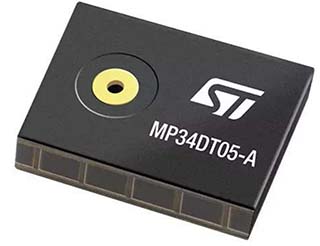 The MEMS microphone used in this article is the [ST MP34DT05-A](https://www.st.com/resource/en/datasheet/mp34dt05-a.pdf).
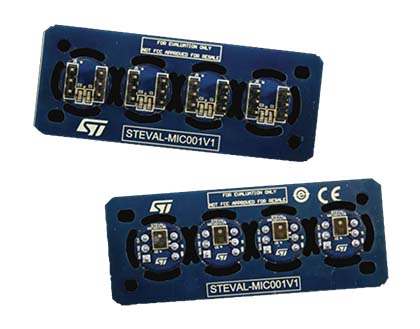
An evalution kit called [STEVAL-MIC001V1](https://www.st.com/en/evaluation-tools/steval-mic001v1.html) is available from ST to manage easily this very small components:
The MEMS microphone used in this article is the [ST MP34DT05-A](https://www.st.com/resource/en/datasheet/mp34dt05-a.pdf).
An evalution kit called [STEVAL-MIC001V1](https://www.st.com/en/evaluation-tools/steval-mic001v1.html) is available from ST to manage easily this very small components:
 Embedded Characteristics
* 16-bit Resolution
* DMA Controller Support
* Up to 4 Conversions Stored
* PDM Clock Source can be Independent from Core Clock
* Register Write Protection
## Wirings
Up to 2 mics (left and right) can be wired to the RoadRunner pins:
| Signal | Berta D2 | MP34DT05-A |
|------------|----------|------------|
| | 3V | 1 - VDD |
| | 3V | 2 - LR |
| PDMIC_CLK | PB27 | 3 - CLK |
| PDMIC_DAT | PB26 | 4 - DOUT |
| | GND | 5 - GND |
Regarding the signale __LR__ (Left/Right) doesn't matter if you wire it
on 3V3 or on GND the PDMIC interface is mono send the voice just on one channel
## Kernel setup
To enable the PDMIC driver launch the kernel menuconfig ([read how...](/roadrunner_compile_kernel_4_19)) and enable these drivers:
Device Drivers >
Sound card support >
Advanced Linux Sound Architecture >
ALSA for SoC audio support
<*> SoC Audio for the Atmel System-on-Chip
<*> Atmel ASoC driver for boards using PDMIC
## Device tree bindings
Definition to insert inside the __apb__ section:
pdmic@f8018000 {
pinctrl-names = "default";
pinctrl-0 = <&pinctrl_pdmic_default>;
atmel,model = "PDMIC @ RoadRunner";
atmel,mic-min-freq = <1000000>;
atmel,mic-max-freq = <3246000>;
atmel,mic-offset = <0x0>;
status = "okay";
};
Definition to insert inside the __pinctrl@fc038000__ section:
pinctrl_pdmic_default: pdmic_default {
pinmux = ,
;
bias-disable;
};
## Using the PDMIC from user space
cat /proc/asound/pcm
00-00: CLASSD PCM atmel-classd-hifi-0 : CLASSD PCM atmel-classd-hifi-0 : playback 1
01-00: PDMIC PCM atmel-pdmic-hifi-0 : PDMIC PCM atmel-pdmic-hifi-0 : capture 1
cat /proc/asound/devices
0: [ 0] : control
16: [ 0- 0]: digital audio playback
32: [ 1] : control
33: : timer
56: [ 1- 0]: digital audio capture
sudo arecord -D hw:1,0 -d 10 -f S16_LE -c1 -r48000 p48000.wav
sudo arecord -D hw:1,0 -d 10 -f cd -c1 -r48000 p48000.wav
sudo arecord -D hw:1,0 -d 10 -f cd -c2 -r48000 p48000.wav
## Links
* [Datasheet ST PDMIC MP34DT05-A](https://www.st.com/resource/en/datasheet/mp34dt05-a.pdf)
* [Microchip SAMA5D27 MCU Datasheet](http://www.microchip.com/wwwproducts/en/ATSAMA5D27)
* [How to use record audio stream with PDMIC](https://www.linux4sam.org/bin/view/Linux4SAM/PDMICAudioRecord)
@include='adv_roadrunner'
Embedded Characteristics
* 16-bit Resolution
* DMA Controller Support
* Up to 4 Conversions Stored
* PDM Clock Source can be Independent from Core Clock
* Register Write Protection
## Wirings
Up to 2 mics (left and right) can be wired to the RoadRunner pins:
| Signal | Berta D2 | MP34DT05-A |
|------------|----------|------------|
| | 3V | 1 - VDD |
| | 3V | 2 - LR |
| PDMIC_CLK | PB27 | 3 - CLK |
| PDMIC_DAT | PB26 | 4 - DOUT |
| | GND | 5 - GND |
Regarding the signale __LR__ (Left/Right) doesn't matter if you wire it
on 3V3 or on GND the PDMIC interface is mono send the voice just on one channel
## Kernel setup
To enable the PDMIC driver launch the kernel menuconfig ([read how...](/roadrunner_compile_kernel_4_19)) and enable these drivers:
Device Drivers >
Sound card support >
Advanced Linux Sound Architecture >
ALSA for SoC audio support
<*> SoC Audio for the Atmel System-on-Chip
<*> Atmel ASoC driver for boards using PDMIC
## Device tree bindings
Definition to insert inside the __apb__ section:
pdmic@f8018000 {
pinctrl-names = "default";
pinctrl-0 = <&pinctrl_pdmic_default>;
atmel,model = "PDMIC @ RoadRunner";
atmel,mic-min-freq = <1000000>;
atmel,mic-max-freq = <3246000>;
atmel,mic-offset = <0x0>;
status = "okay";
};
Definition to insert inside the __pinctrl@fc038000__ section:
pinctrl_pdmic_default: pdmic_default {
pinmux = ,
;
bias-disable;
};
## Using the PDMIC from user space
cat /proc/asound/pcm
00-00: CLASSD PCM atmel-classd-hifi-0 : CLASSD PCM atmel-classd-hifi-0 : playback 1
01-00: PDMIC PCM atmel-pdmic-hifi-0 : PDMIC PCM atmel-pdmic-hifi-0 : capture 1
cat /proc/asound/devices
0: [ 0] : control
16: [ 0- 0]: digital audio playback
32: [ 1] : control
33: : timer
56: [ 1- 0]: digital audio capture
sudo arecord -D hw:1,0 -d 10 -f S16_LE -c1 -r48000 p48000.wav
sudo arecord -D hw:1,0 -d 10 -f cd -c1 -r48000 p48000.wav
sudo arecord -D hw:1,0 -d 10 -f cd -c2 -r48000 p48000.wav
## Links
* [Datasheet ST PDMIC MP34DT05-A](https://www.st.com/resource/en/datasheet/mp34dt05-a.pdf)
* [Microchip SAMA5D27 MCU Datasheet](http://www.microchip.com/wwwproducts/en/ATSAMA5D27)
* [How to use record audio stream with PDMIC](https://www.linux4sam.org/bin/view/Linux4SAM/PDMICAudioRecord)
@include='adv_roadrunner'