# Rotary encoder (KY-040)
This article illustrates how to use the KY-040 Rotary Encode Module on a CM-Panel
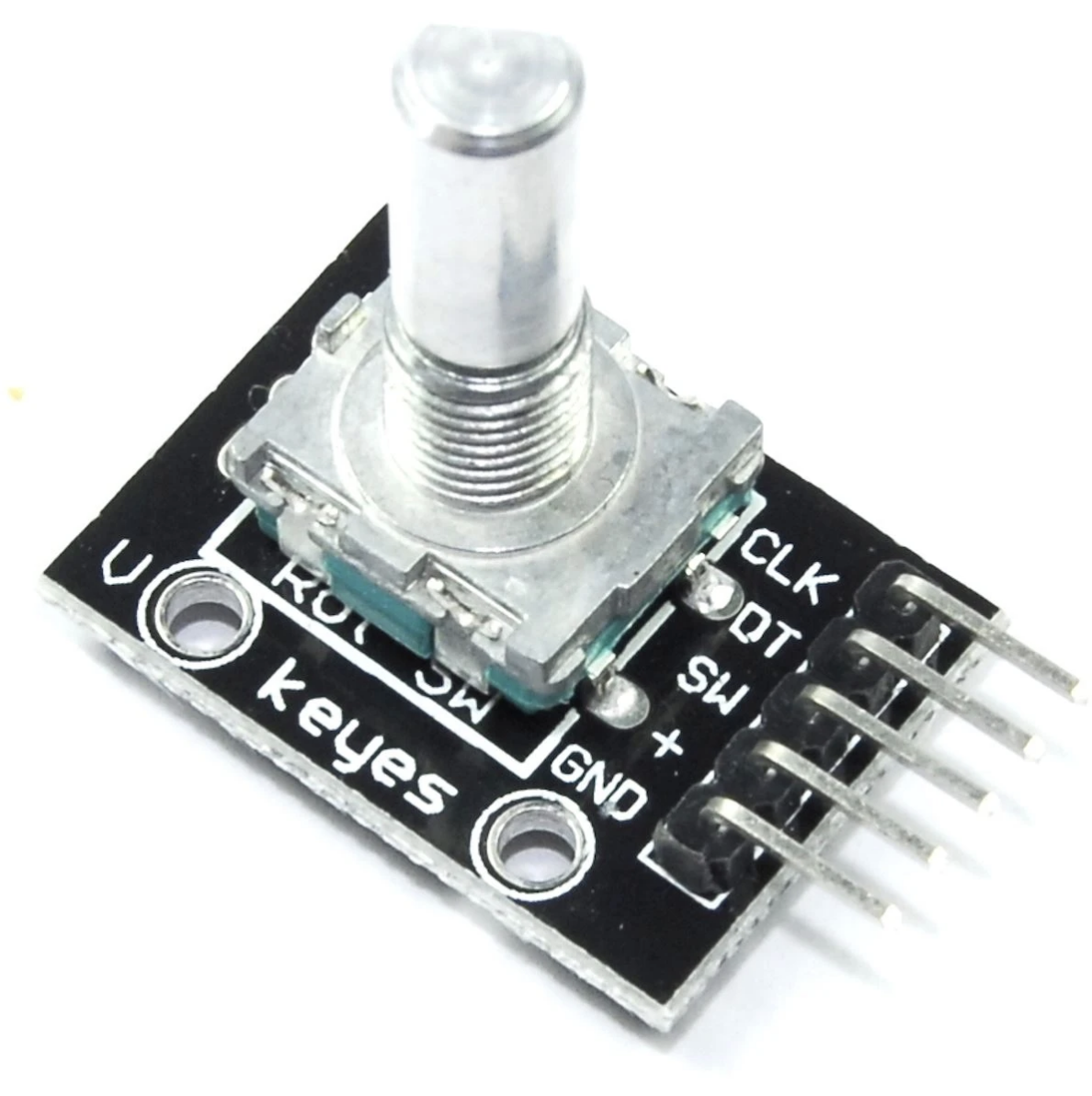 The KY-040 rotary ancoder is a very cheap module useful to simulate a potentiometers or to implements an easy to use human interface.
It is available at very low price on Amazon
*
and can be wired to a Raspberry Pi using just 3 GPIO
| KY040 | Pi |
|-------|----------|
| CLK | GPIO23 |
| DT | GPIO24 |
| SW | GPIO22 |
| + | 3V3 |
| GND | GND |
See the [KY-040 datasheet](https://www.rcscomponents.kiev.ua/datasheets/ky-040-datasheet.pdf) for more details
## Activate the Linux Kernel Driver
Insert these two lines inside the __/boot/config.txt__ file and reboot to activate the Kernel driver
dtoverlay=rotary-encoder,pin_a=23,pin_b=24,relative_axis=1
dtoverlay=gpio-key,gpio=22,keycode=28,label="ENTER"
after rebooting two new /dev/input/eventX driver will appear
ls /dev/input/event*
To do a quickly test install evtest package:
sudo apt update
sudo apt install evtest
Then check the rotary movements
evtest /dev/input/event4
and the key pressing
evtest /dev/input/event3
## Python example
Here is a simple Python simple example. Install evdev library for Python3 (or python 2):
sudo apt update
sudo apt install python3-evdev
Create a file called rotary.py with Python code:
# -*- encoding: utf-8 -*-
from __future__ import print_function
import evdev
import select
devices = [evdev.InputDevice(fn) for fn in evdev.list_devices()]
devices = {dev.fd: dev for dev in devices}
value = 1
print("Value: {0}".format(value))
done = False
while not done:
r, w, x = select.select(devices, [], [])
for fd in r:
for event in devices[fd].read():
event = evdev.util.categorize(event)
if isinstance(event, evdev.events.RelEvent):
value = value + event.event.value
print("Value: {0}".format(value))
elif isinstance(event, evdev.events.KeyEvent):
if event.keycode == "KEY_ENTER" and event.keystate == event.key_up:
done = True
break
Launch it by typing:
python3 rotary.py
The KY-040 rotary ancoder is a very cheap module useful to simulate a potentiometers or to implements an easy to use human interface.
It is available at very low price on Amazon
*
and can be wired to a Raspberry Pi using just 3 GPIO
| KY040 | Pi |
|-------|----------|
| CLK | GPIO23 |
| DT | GPIO24 |
| SW | GPIO22 |
| + | 3V3 |
| GND | GND |
See the [KY-040 datasheet](https://www.rcscomponents.kiev.ua/datasheets/ky-040-datasheet.pdf) for more details
## Activate the Linux Kernel Driver
Insert these two lines inside the __/boot/config.txt__ file and reboot to activate the Kernel driver
dtoverlay=rotary-encoder,pin_a=23,pin_b=24,relative_axis=1
dtoverlay=gpio-key,gpio=22,keycode=28,label="ENTER"
after rebooting two new /dev/input/eventX driver will appear
ls /dev/input/event*
To do a quickly test install evtest package:
sudo apt update
sudo apt install evtest
Then check the rotary movements
evtest /dev/input/event4
and the key pressing
evtest /dev/input/event3
## Python example
Here is a simple Python simple example. Install evdev library for Python3 (or python 2):
sudo apt update
sudo apt install python3-evdev
Create a file called rotary.py with Python code:
# -*- encoding: utf-8 -*-
from __future__ import print_function
import evdev
import select
devices = [evdev.InputDevice(fn) for fn in evdev.list_devices()]
devices = {dev.fd: dev for dev in devices}
value = 1
print("Value: {0}".format(value))
done = False
while not done:
r, w, x = select.select(devices, [], [])
for fd in r:
for event in devices[fd].read():
event = evdev.util.categorize(event)
if isinstance(event, evdev.events.RelEvent):
value = value + event.event.value
print("Value: {0}".format(value))
elif isinstance(event, evdev.events.KeyEvent):
if event.keycode == "KEY_ENTER" and event.keystate == event.key_up:
done = True
break
Launch it by typing:
python3 rotary.py
 ## Links
* [KY-040 datasheet](https://www.rcscomponents.kiev.ua/datasheets/ky-040-datasheet.pdf)
* [KY-040 Rotary Encoder with Linux on the Raspberry Pi](https://blog.ploetzli.ch/2018/ky-040-rotary-encoder-linux-raspberry-pi/)
* [Linux Kernel rotary encoder driver doc](https://www.kernel.org/doc/Documentation/input/rotary-encoder.txt)
*
## MQTT
This part is still under construction...
sudo apt update
sudo apt install python3-paho-mqtt
## Links
* [KY-040 datasheet](https://www.rcscomponents.kiev.ua/datasheets/ky-040-datasheet.pdf)
* [KY-040 Rotary Encoder with Linux on the Raspberry Pi](https://blog.ploetzli.ch/2018/ky-040-rotary-encoder-linux-raspberry-pi/)
* [Linux Kernel rotary encoder driver doc](https://www.kernel.org/doc/Documentation/input/rotary-encoder.txt)
*
## MQTT
This part is still under construction...
sudo apt update
sudo apt install python3-paho-mqtt