#Remote control using Python, OSC and TouchOSC App
This tutorial explains how to make a smartphone based remote control using the App TouchOSC to create
the control panel and the library pyOSC to receive the command from your smartphone
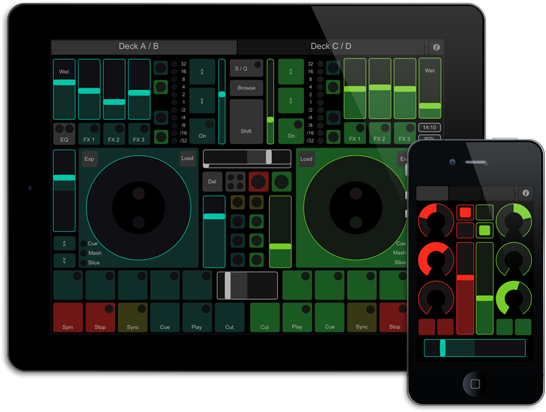
TouchOSC is a modular OSC and MIDI control surface for iPhone,iPod Touch, iPad and Android made by Hexler.
It supports sending and receiving Open Sound Control and MIDI messages over Wi-Fi and CoreMIDI inter-app
* [TouchOSC main page](http://hexler.net/software/touchosc).
Open Sound Control or OSC is Open Sound Control (OSC) is a protocol for networking sound synthesizers,
computers, and other multimedia devices for purposes such as musical performance or show control.
OSC's advantages include interoperability, accuracy, flexibility and enhanced organization and documentation.
* [OSC Wikipedia definition](https://en.wikipedia.org/wiki/Open_Sound_Control)
 ##Installing pyOSC
pyOSC is a a simple [OpenSoundControl](http://opensoundcontrol.org/) implementation in Python providing support
for OSC-bundles, a simple OSC-client, a simple OSC-server, threading & forking OSC-servers.
To install pyOSC type:
##Installing pyOSC
pyOSC is a a simple [OpenSoundControl](http://opensoundcontrol.org/) implementation in Python providing support
for OSC-bundles, a simple OSC-client, a simple OSC-server, threading & forking OSC-servers.
To install pyOSC type:
~# git clone git://github.com/tanzilli/pyOSC
~# cd pyOSC/
~/pyOSC# python setup.py install
##Install and configure TouchOSC on your smartphone
Touch OSC is available on Apple store or Google Play:
 * [Apple store](https://itunes.apple.com/it/app/touchosc/id288120394?mt=8)
* [Google play](https://play.google.com/store/apps/details?id=net.hexler.touchosc_a&hl=it)
##Control a [Daisy-11](/DAISY-11) strip of led module:
The following python example shows how to control some GPIO lines from touchOS. We use a [Daisy-11](/DAISY-11)
led module plugged on a [Terra board](/terra).
Run this program an Aria G25:
* @pg='python/touchosc/tapled.py'
On the smartphone open the TouchOSC app configuration, then the **CONNECTIONS-->OSC** screen and fill the **Host**
field with board IP address.
* [Apple store](https://itunes.apple.com/it/app/touchosc/id288120394?mt=8)
* [Google play](https://play.google.com/store/apps/details?id=net.hexler.touchosc_a&hl=it)
##Control a [Daisy-11](/DAISY-11) strip of led module:
The following python example shows how to control some GPIO lines from touchOS. We use a [Daisy-11](/DAISY-11)
led module plugged on a [Terra board](/terra).
Run this program an Aria G25:
* @pg='python/touchosc/tapled.py'
On the smartphone open the TouchOSC app configuration, then the **CONNECTIONS-->OSC** screen and fill the **Host**
field with board IP address.
From the **LAYOUT** section select **LiveControl** then press **Done**.
Inside the TouchOSC panel select tha **Pads** tab then touch some buttons.
##Related links
* [pyOSC web site](https://trac.v2.nl/wiki/pyOSC)
* [Open Sound Control web site](http://opensoundcontrol.org/)
* [TouchOSC web page on Hexler.net](https://hexler.net/software/touchosc)
* [TouchOSC layouts editor on Hexler.net](http://hexler.net/docs/touchosc-editor)
@include='bio_tanzilli'