#include "thread.h"
#include "xtimer.h"
#include "od.h"
#include "msg.h"
#include "ringbuffer.h"
#include "board.h"
#define ENABLE_DEBUG (0)
#include "debug.h"
// ===========================================================
// =
// UART : INCLUDES, DEFINES, STRUCTS, VARIABLES, FUNCTIONS =
// =
// ===========================================================
#include "periph/uart.h"
#include "periph/gpio.h"
#define UART_PORT UART_DEV(0)
#define UART_SPEED 115200UL
// Uart buffer depth
#define UART_BUF_SIZE (128U)
// Uart buffer type
typedef struct {
char rx_mem[UART_BUF_SIZE];
ringbuffer_t rx_buf;
} uart_ctx_t;
// Uart buffer
static uart_ctx_t u_ctx;
// Uart rx callback, pushes incoming data into uart ringbuffer
static void rx_cb(void *arg, uint8_t data)
{
(void)arg;
ringbuffer_add_one(&u_ctx.rx_buf, data);
}
// Enables pullups on Uart pins.
void b_init(void)
{
// add pullups to UART0 pins
PORT->Group[PA].PINCFG[22].bit.PULLEN = 1;
PORT->Group[PA].PINCFG[23].bit.PULLEN = 1;
}
// ===========================================================
// -----------------------------------------------------------
// -
// RADIO : INCLUDES, DEFINES, STRUCTS, VARIABLES, FUNCTIONS -
// -
// -----------------------------------------------------------
#include "ata8510_params.h"
#include "ata8510.h"
#include "ata8510_internals.h"
static ata8510_t dev;
// Radio buffer depth
#define RADIO_BUF_SIZE (128U)
// Radio buffer type
typedef struct {
char rx_mem[RADIO_BUF_SIZE];
ringbuffer_t rx_buf;
} radio_ctx_t;
// Radio buffer
static radio_ctx_t r_ctx;
// Transmits data over the radio channel
void send(uint8_t *buffer, size_t len)
{
printf("SENDING %d bytes\n", len);
od_hex_dump(buffer, len, 0);
ata8510_send_frame(&dev, buffer, len);
}
// Radio rx callback, pushes incoming data into radio ringbuffer
void recv(uint8_t *buffer, int len, int dbm)
{
printf("RECEIVED %d bytes, dBm=%d\n", len, dbm);
ringbuffer_add(&r_ctx.rx_buf, (char *)buffer, len);
free(buffer);
}
// -----------------------------------------------------------
// +++++++++++++++++++++++++++++++++++++++++++++++++++++++++++
// +
// Main function +
// +
// +++++++++++++++++++++++++++++++++++++++++++++++++++++++++++
int main(void)
{
char sermsg[100];
int cnt=0;
uint8_t counter=0;
int c;
int res;
// Initial delay, gives time to the USB RIOT device to be detected by terminal OS.
xtimer_sleep(3);
// Welcome Msg
printf("YARM kiss radiolink! "__DATE__" "__TIME__);
//
// Radio chanel setup
//
// ATA8510 Init with error handling
switch (ata8510_init(&dev, &ata8510_params[0]))
{
case -ATA8510_ERR_MALLOC:
puts("[Error] Cannot allocate memory.");
return -1;
case -ATA8510_ERR_SIGNATURE:
puts("[Error] Wrong device signature found.");
return -1;
case -ATA8510_ERR_SPI:
puts("[Error] An error occurred when initializing SPI bus.");
return -1;
case -ATA8510_ERR_GPIO_INT:
puts("[Error] An error occurred when initializing interrupt pin.");
return -1;
case -ATA8510_ERR_GPIO_POWER:
puts("[Error] An error occurred when initializing poweron pin.");
return -1;
case -ATA8510_ERR_GPIO_RESET:
puts("[Error] An error occurred when initializing reset- pin.");
return -1;
}
// Define radio rx callback function
dev.receive_cb = recv;
// Power on radio device
ata8510_poweron(&dev);
// Select radio service and channel
ata8510_set_radio_service_channel(&dev, ATA8510_SERVICE_2, ATA8510_CHANNEL_0);
// Wait radio setup
xtimer_sleep(1);
// Radio device in Rx mode
ata8510_set_mode(&dev, ATA8510_MODE_RX);
// Wait radio setup
xtimer_sleep(1);
// Init radio rx ringbuffer
ringbuffer_init(&r_ctx.rx_buf, r_ctx.rx_mem, RADIO_BUF_SIZE);
//
// Uart setup
//
// Init uart rx ringbuffer
ringbuffer_init(&u_ctx.rx_buf, u_ctx.rx_mem, UART_BUF_SIZE);
// Init uart, with error handling
res = uart_init(UART_PORT, UART_SPEED, rx_cb, NULL);
if (res == UART_NOBAUD)
{
printf("Error: Give baudrate (%lu) not possible\n", UART_SPEED);
return 1;
}else{
if (res != UART_OK)
{
puts("Error: Unable to initialize UART device");
return 1;
}
}
b_init();
printf("Success: Initialized UART at BAUD %lu\n", UART_SPEED);
printf("Initialization OK.");
//
// Main loop
//
while(1)
{
// Check incoming data from Uart
c = ringbuffer_peek_one(&u_ctx.rx_buf);
if ((c == -1))
{
// No incomingdata from Uart
// Check incoming data from Radio
c = ringbuffer_peek_one(&r_ctx.rx_buf);
if ((c == -1))
{
// Neither Radio nor Uart incoming data available
counter=(counter+1)%10;
// Take a nap...
xtimer_sleep(1);
}else{
// Data available on Radio, send to Uart
c = ringbuffer_get_one(&r_ctx.rx_buf);
cnt =0;
memset(sermsg, 0, sizeof(sermsg));
while(c>0)
{
sermsg[cnt]=c;
c = ringbuffer_get_one(&r_ctx.rx_buf);
cnt++;
}
printf("Radio To Uart %s", sermsg);
uart_write(UART_PORT,(uint8_t *)sermsg, cnt);
}
}else{
// Data available on Uart, send to Radio
c = ringbuffer_get_one(&u_ctx.rx_buf);
cnt =0;
memset(sermsg, 0, sizeof(sermsg));
while(c>0)
{
sermsg[cnt]=c;
c = ringbuffer_get_one(&u_ctx.rx_buf);
cnt++;
}
printf("Uart To Radio %s", sermsg);
send((uint8_t *)sermsg, cnt);
}
}
return 0;
}
##Development setup
###Install RIOT
Install RIOT as from * @article='yarm_getting_started_riot'
###Create the project subfolder
cd~
cd workspace
mkdir yarm_kiss_radiolink
cd yarm_kiss_radiolink
###Create and save this Makefile
APPLICATION = yarm_kiss_radiolink
BOARD = yarm
RIOTBASE = /home/$(USER)/RIOT
QUIET ?= 1
DEVHELP ?= 1
USEMODULE += ata8510
USEMODULE += od_string
USEMODULE += xtimer
FEATURES_REQUIRED += periph_uart
CFLAGS += -DCONFIG_USBUS_CDC_ACM_STDIO_BUF_SIZE_EXP=12
CFLAGS += -DTHREAD_STACKSIZE_IDLE=THREAD_STACKSIZE_DEFAULT
include $(RIOTBASE)/Makefile.include
###Create c source code file
Copy the c sorce code in a new file named yarm_kiss_radiolink.c in the project subfolder
###Compile and Flash
Compile the program, then flash both YARM-DEV boards.
make all flash
##Testing
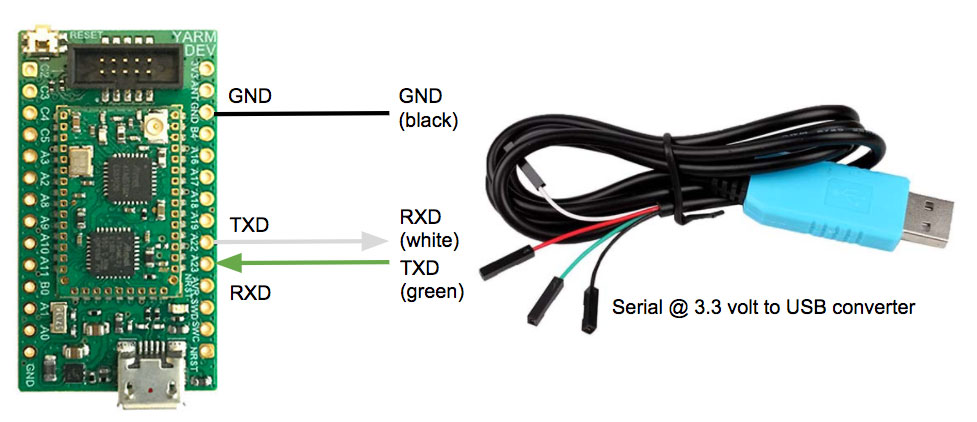
* Connect each YARM-DEV Serial port to a PC USB port by means of the USB to Serial cable (Comm Port).
* Open a serial terminal application on the PC connected to Serial port associated to the YARM-DEV UART
* Connect each YARM-DEV USB port to a PC USB port (Debug Port).
* Open a serial terminal application on the PC connected to Serial port associated to the YARM-DEV USB
##Running Output
Run a terminal program on YARM-DEV A Debug Port :
make term
Run a terminal program on YARM-DEV B Debug Port :
make term PORT=/dev/ttyACM1
YARM-DEV A debug output
2023-06-06 14:52:23,614 # Connect to serial port /dev/ttyACM0
Welcome to pyterm!
Type '/exit' to exit.
2023-06-06 15:10:25,695 # Uart To Radio Transmit Test : A->B
2023-06-06 15:10:25,695 # SENDING 21 bytes
2023-06-06 15:10:25,696 # 00000000 54 72 61 6E 73 6D 74 20 54 65 73 74 20 3A 20 Transmit Test :
2023-06-06 15:10:25,696 # 00000010 41 2D 3E 42 0A A->B.
2023-06-06 15:10:40,588 # RECEIVED 21 bytes, dBm=-103
2023-06-06 15:10:40,725 # Radio To Uart Transmit Test : B->A
YARM-DEV B debug output
2023-06-06 14:52:24,637 # Connect to serial port /dev/ttyACM1
Welcome to pyterm!
Type '/exit' to exit.
2023-06-06 15:10:26,519 # Radio To Uart Transmit Test : A->B
2023-06-06 15:10:40,553 # Uart To Radio Transmit Test : B->A
2023-06-06 15:10:40,553 # SENDING 21 bytes
2023-06-06 15:10:40,555 # 00000000 54 72 61 6E 73 6D 69 74 20 54 65 73 74 20 3A 20 Transmit Test :
2023-06-06 15:10:40,555 # 00000010 42 2D 3E 41 0A B->A.
Connect the PCs to the Comm Serial Port of both YARM-DEV A and YARM-DEV B, then
* Send a string from YARM-DEV A to YARM-DEV B
* Send a string from YARM-DEV B to YARM-DEV A
In the previous terminal outputs it is clearly shown that a "Transmit Test : A->B" was first sent from YARM-DEV A to YARM-DEV B,
then a "Transmit Test : B->A" was sent from YARM-DEV B to YARM-DEV A.
## Conclusion
This is a very simple example to show how, with few code lines, it is easy to implement a radio link with two YARM devices.
It is, however, a good starting point to develop more complex applications.
## Reference
* @article='yarm_getting_started_riot'
* Xtimer
* Uart
* Uart
* Ringbuffer
@include='adv_yarm'
@include='bio_rinalduzzi'
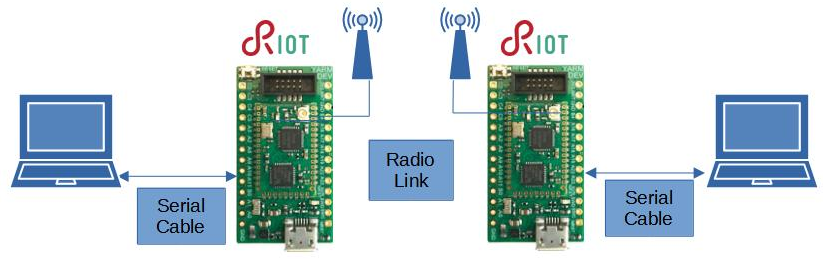 This tutorial implements a radio link based on RIOT, running on Yarm devices.
 Implementing this application, some interesting features of RIOT will be used :
* Xtimer API, with initialization and sleep.
* Uart API, with initialization, handling and callback.
* ATA8510 API, with initialization, handling and callback.
* Ringbuffer API, with initialization, peek, read, write
##Application Start
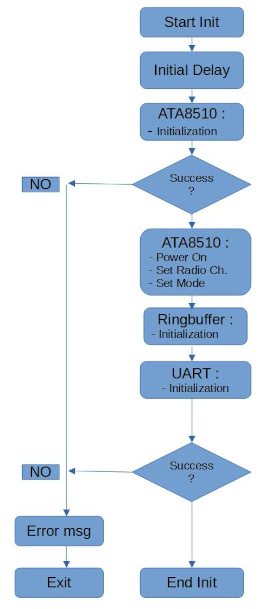
The following flow chart describes the operations performed at application start up.
Implementing this application, some interesting features of RIOT will be used :
* Xtimer API, with initialization and sleep.
* Uart API, with initialization, handling and callback.
* ATA8510 API, with initialization, handling and callback.
* Ringbuffer API, with initialization, peek, read, write
##Application Start
The following flow chart describes the operations performed at application start up.
 ##Application Main loop
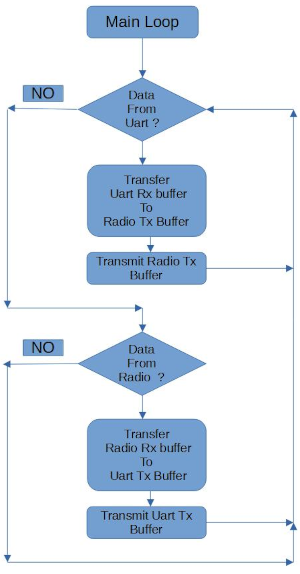
This is the main loop flow chart
##Application Main loop
This is the main loop flow chart
 ##Application c source code
//
// yarm_kiss_radiolink.c
//
#include
##Application c source code
//
// yarm_kiss_radiolink.c
//
#include