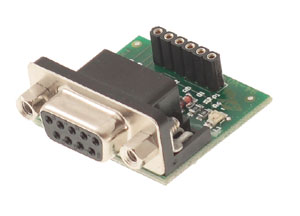
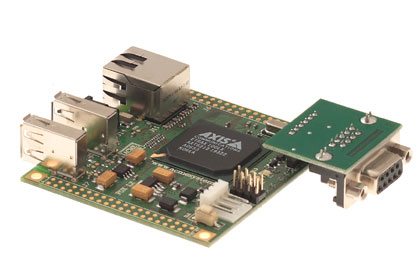
The FOX Board has a serial console port on its J10 connector. By connecting this port to a RS232 port of a PC through Fox Console and a straight cable (not null modem) you can have direct access to the Linux console allocated by default to the Fox device /dev/ttyS0.
Default baud rate and parity parameters for the PC serial port are: 115200,n,8,1. Flow Control=OFF.
Zoom image |
|
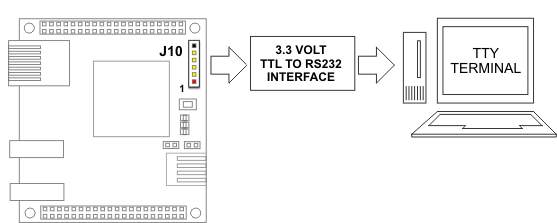
Link between the J10 console port and an RS232 PC port |
|
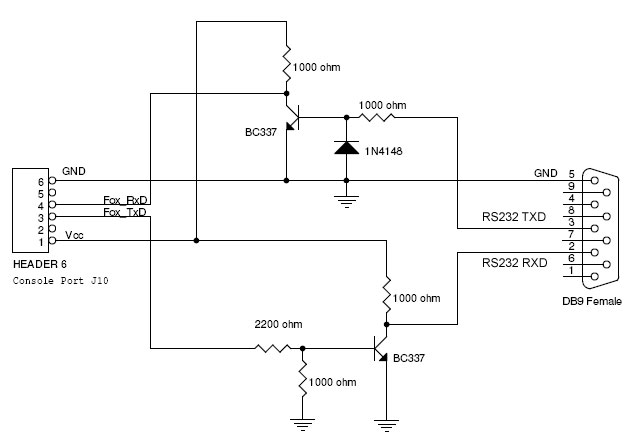
FOX Console schematic

|
|
Atmel© Certified Partner |
Documentation Terms of Use
Acme Systems provides this documentation "as is" without warranty or guarantees of any kind.
The mantainer of this site (Sergio Tanzilli), has gone to a great deal
of effort into making this documentation as correct as possible.
Acme Systems doesn't provide any direct support for the Open Source preinstalled software but provides, through
these pages and forum posts, all the information required to obtain the sources, install, use and update the
Open Source softwares runnable on the FOX Board, NetusG20, AriaG25 and Terra platforms.
Please note that all the preinstalled softwares, used on the Acme Systems products, are Open Source and you will
have to check the license terms provided (usually the GPL) by each author before using it in any commercial or non-commercial
product, by yourself.
Before sending emails or calling the Acme staff here are our contacts
please note that WE ARE MAINLY HARDWARE DESIGNERS and NOT LINUX GURUS so could be better to post
your questions directly to the forum listed below to be sure that all the contributors of this site and
the large software developers community will read and reply to your questions.
This work is licensed under a Creative Commons Attribution-NonCommercial-ShareAlike 3.0 Unported License.