Using serial ports in C
In this article we will show how to interface the TTL serial ports /dev/ttyS2 and /dev/ttyS3 available on the J6 connector with real RS232 devices
The FOX Board has two serial port on its J6 connector. These port pins come directly from the Axis MCM ETRAX 100LX processor pins, so the electrical levels are TTL compatible, with levels between ground and +3.3 Volts. This means that is NOT possible to connect directly the console port of the FOX with simple wires to the serial port of a PC. You need to interpose a simple circuit based, for example, on a MAXIM MAX3232 for level translation and inversion as shown below:
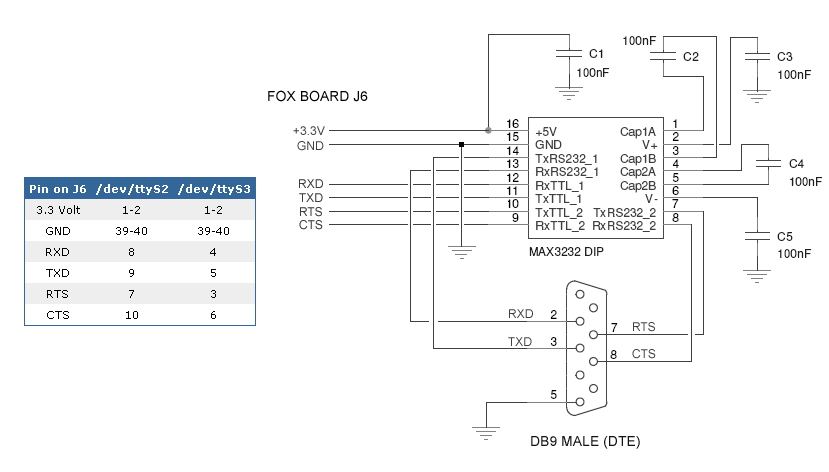
Schematic of a RS232 interface with a MAX3232 (3.3v to RS232)
The Axis MCM Etrax100LX processor is +5Volts tolerant, so it is possible to connect also an electrical RS232 translation circuit externally powered at +5Volts.
How to try the serial ports
Use a null modem cable connect the FOX Board to an RS232 port of your PC:
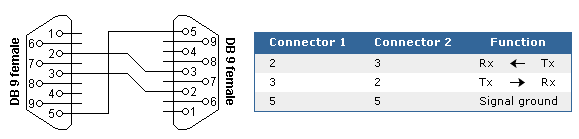
RS232 cross cable
Run on your PC a terminal emulator (ie. Hyper Terminal or Minicom) and set a baudrate (i.e. 19200,N,8,1) . Copy serial_test utility available at the download section of this article into your FOX Board and make it executable.
chmod +x serial_test
Setup the same baudrate of your terminal to your FOX serial interface (i.e. /dev/ttyS2):
stty -F /dev/ttyS2 19200run serial_test:
./serial_test /dev/ttyS2Every character you will press on the console will send to the serial port in this form:
TX: hexvalue [ascii char]Every character you will on the serial terminal will send to the console in this form:
RX: hexvalue [ascii char]
Download
- serial_test.c source code. You can compile it directly with the Acme WebCompiler.
- Datasheet of Maxim MAX3232 http://www.maxim-ic.com/quick_view2.cfm/qv_pk/1068
Related articles
Related links
- Bies, RS232 serial cables pinout http://www.lammertbies.nl/comm/cable/RS-232.html|Lammert
- stty manual page http://maconlinux.net/linux-man-pages/en/stty.1.html|stty
- C Doc: Low-Level Input/Output http://www.gnu.org/software/libc/manual/html_node/Low_002dLevel-I_002fO.html#Low_002dLevel-I_002fO|GNU
