#Getting started with Terra Board
This article illustrates how to get started with the Terra Board
## Requirements
In order to get started with the Terra Board you need:
* a [Terra Board](/terra)
* a bootable microSD (you can it buy from our catalog or make it by yourself following this article)
* a PS12V2A-EU 12V wall adapter power supply
* an ethernet cable to wire the Terra to your LAN
* an active DHCP server on your LAN
* a PC with Linux or Windows wired on the same LAN
* a DPI debug port interface
[TERRACOMBO](/TERRACOMBO) (no-modem) and [TERRACOMBO-M](/TERRACOMBO) start kit which contain all you need to follow this article are available on the [Acme eShop](/catalog_terra). Each single part is also available.
## Step-by-step guide
* Insert the bootable Linux microSD into the microSD holder.
* Plug in the LAN cable
* Insert the power supply cable
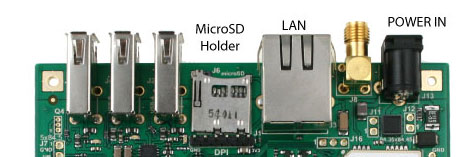
Terra Board has not power switches on-board so when the power is plugged in, it turns on immediately
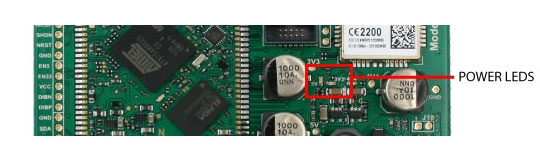
and the green leds labelled **5V** and **3V3** lights up.
If you are using the Debug Port Interface, you will see the boot sequence on your terminal emulator.
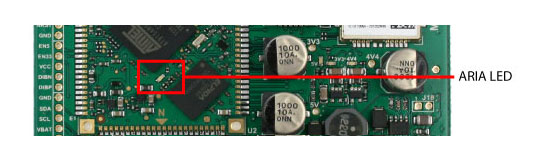
After about 1 second the green led on Aria module will start to blink in this way:
SHORT ON - SHORT ON - PAUSE
this means that the Linux Kernel is loading.
If the Aria doesn't blink it hasn't found a valid Linux Kernel image on microSD or the microSD is not inserted.
After about 30 seconds Linux will be on and you will reach it via LAN.
The Terra Board gets its IP address from your DCHP server so in order to know what this IP is, read @article='ip_discovering'.
Knowing the IP address, it is possible to communicate with the Terra Board using:
* a Web browser like Internet Explorer, Firefox, Safari, Google Chrome to have access to the Terra Board web page (@article='web_access')
* a SSH client like **Putty** on Windows or **SSH** on Linux to have access to the command line prompt (@article='ssh')
* a SCP client like **WINSCP** on Windows or **SCP** on Linux to move the file between your PC and the file systems on the Terra microSD (@article='scp')
* a Serial Terminal Emulator like **Putty**, **Hyperterminal** on Windows or **Minicom** on Linux using the serial debug port and the DPI interface (@article='DPI')
@include='bio_tanzilli'
#Buy
*