# Download binary images for Aria

<img src="./debian_microsd.jpg" width="240px"/>
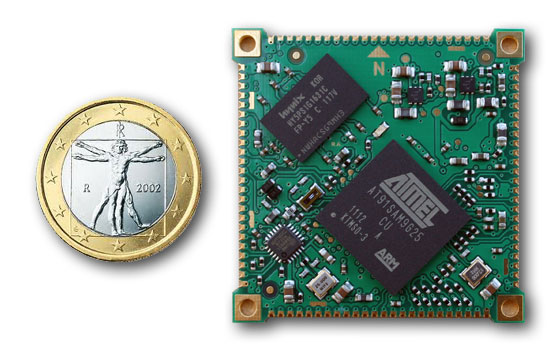
<img src="./aria.jpg" width="240px"/>

## Linux Kernel 5.15.68 - Debian Bullseye 11.5 - At91Bootstrap 3.10.4

Version: 13-oct-2022

* [MicroSD image debian-bullseye-aria.img.xz](/download/microsd/aria-13oct2022/debian-bullseye-aria.img.xz)

Use balenaEtcher to generate a microSD with this image:

* <https://www.balena.io/etcher/> 
###Login data

* Login: <code>acme</code> Password: <code>acmesystems</code>

Check the Linux version by typing:

	uname -r
	5.15.68
	
Check the Debian version by typing:	

	cat /etc/debian_version
	11.5

By default the root password is not defined. To set it	login as acme user and type:

	sudo passwd

To extend the rootfs partition to fill the whole microSD space available type:

	sudo growpart /dev/mmcblk0 2
	sudo resize2fs /dev/mmcblk0p2 

Note if you have a board with 256MB change in the cmdline.txt on the first
partition from:

	128M
	
in: 

	256M	


<hr/>
<a name="previous"></a>

## Kernel Linux 4.19.128 - Debian Buster 10

Version: 5-oct-2022

* [MicroSD image debian-buster-aria.img.xz](/download/microsd/aria-05oct2022/debian-buster-aria.img.xz)

Use balenaEtcher to generate a microSD with this image:

* <https://www.balena.io/etcher/> 

### Login data

The login data on this image both from debug port or ssh is:

* Login: <i>acme</i> 
* Password: <i>acmesystems</i>

### Extends the rootfs partition

At the first boot the rootfs size is limited to few megabytes. Check it by typing:

	df
	Filesystem     1K-blocks   Used Available Use% Mounted on
	/dev/root         848684 372712    415644  48% /
	devtmpfs          124592      0    124592   0% /dev
	tmpfs             125104      0    125104   0% /dev/shm
	tmpfs             125104    176    124928   1% /run
	tmpfs               5120      0      5120   0% /run/lock
	tmpfs             125104      0    125104   0% /sys/fs/cgroup
	/dev/mmcblk0p1     97446   4070     93376   5% /boot	


In this example I've used an 8GB microSD and the space used is 48%. 
Type this two commands to use all the microSD space available:
	
	sudo growpart /dev/mmcblk0 2
	sudo resize2fs /dev/mmcblk0p2 

and check again: 
	
	df
	Filesystem     1K-blocks   Used Available Use% Mounted on
	/dev/root        7531440 433020   6768232   7% /
	devtmpfs          124592      0    124592   0% /dev
	tmpfs             125104      0    125104   0% /dev/shm
	tmpfs             125104    176    124928   1% /run
	tmpfs               5120      0      5120   0% /run/lock
	tmpfs             125104      0    125104   0% /sys/fs/cgroup
	/dev/mmcblk0p1     97446   4070     93376   5% /boot

the space used now is just 7%:

### To generate this binaries from sources follow these articles

* @article='at91bootstrap'
* @article='aria_compile_kernel_4_19'
* @article='aria_debos'

### Kernel configuration and device tree used

* [acme-aria_defconfig](/download/microsd/aria-05oct2022/acme-aria_defconfig)
* [acme-aria.dts](/download/microsd/aria-05oct2022/acme-aria.dts)


### Enable the remote SSH access as root

To enable the ssh as root change __/etc/ssh/sshd_config__ using nano

	sudo nano /etc/ssh/sshd_config
	
set this line:

	PermitRootLogin yes

and restart sshd by typing:

	sudo systemctl restart ssh

<hr>

# Previous images

<div class="row">
	<div class="col-md-3">
		<img src="/images/debian_microsd.jpg" class="img-thumbnail"/>
	</div>
	<div class="col-md-9">
		<div class="panel panel-default">
			<div class="panel-heading">
				<h3 class="panel-title"><b>Aria G25</b> - Kernel Linux 4.4.9 - Debian Jessie 8.4</h3>
				MicroSD contents for Aria G25 with: Python, Wi-Fi
				<br/>
				<small>Version: 08-may-2016</small>
			</div>
			<div class="panel-body">
				<div>
					<h3>Create a bootable microSD </h3>

					A Linux PC is required to follow this procedure:

						<ul>
							<li>Format a microSD with <b>gparted</b> following <a href="/microsd_format">this article</a></li>
							<li>Mount the two new partitions <b>boot</b> and <b>rootfs</b> just clicking from the file explorer window
							<li>Download the archive with the first microSD partition contents:
								<a href="https://www.acmesystems.it/download/microsd/Aria-08may2016/boot.tar.bz2">boot.tar.bz2</a></li>
							<li>Download the archive with the second microSD partition contents:
								<a href="https://www.acmesystems.it/download/microsd/Aria-08may2016/rootfs.tar.bz2">rootfs.tar.bz2</a></li>
							<li>Untar the archives to the microSD partitions using the following commands:
								<ul>
									<li><b>tar -xvjpSf boot.tar.bz2 -C /media/$USER/boot </b></li>
									<li><b>sudo tar -xvjpSf rootfs.tar.bz2 -C /media/$USER/rootfs</b></li>
								</ul>	
							</li>
							<li>The kernel command line parameters are passed by the dts file. 
							<li>Unmount the microSD and use it to boot on Aria G25</li>
							<li>Open a <a href="/ssh">SSH session</a> or use the <a href="/DPI">DPI adapter</a> to get the access to the console</li>
							</li>	
							<li>The login data are:
								<ul>
									<li>User: <b>root</b> Password: <b>acmesystems</b></li>
								</ul>
							</li>		
						</ul>
				</div>
		
				<p>
					Read the <a href="/tutorials">tutorials page</a> to know how to do create the microSD contents starting from sources.
				</p>

				<h3>Defconfig and device tree used</h3>

				<ul>
					<li><a href="https://www.acmesystems.it/download/microsd/Aria-08may2016/acme-aria.dts">acme-aria.dts</a></li>
					<li><a href="https://www.acmesystems.it/download/microsd/Aria-08may2016/acme-aria_defconfig">acme-aria_defconfig</a></li>
				</ul>

			</div>
		</div>
	</div>
	
</div>
<!-- *************************************************************** -->
<!-- *************************************************************** -->
<!-- *************************************************************** -->


<div class="row">
	<div class="col-md-2">
		<h2>Aria G25</h2>
		<img src="/images/icon_microsd_image.jpg" class="img-thumbnail"/>
		<img src="aria.jpg" class="img-thumbnail"/>
	</div>
	<div class="col-md-10">

		<br/>

		<div class="panel panel-default">
			<div class="panel-heading">
				<h3 class="panel-title">Kernel Linux 4.2.5 - Debian Jessie 8.2</h3>
				<small>Version: 7-nov-2015</small>
				<br/>
				MicroSD contents for Aria G25 with the minimal packages to access open a SSH session via LAN.
			</div>
			<div class="panel-body" markdown="1">

###Binaries

* First microSD partition files: [boot.tar.bz2](https://www.acmesystems.it/download/microsd/Aria-07nov2015/boot.tar.bz2)
* Second microSD partition files: [rootfs.tar.bz2](https://www.acmesystems.it/download/microsd/Aria-07nov2015/rootfs.tar.bz2)

###How-to create a bootable microSD
<small>A Linux Ubuntu PC is required</small>

* Format a microSD with gparted ([read more](/microsd_format)) and mount it
* Download the binaries
* Uncompress the binaries to the microSD with the following commands:
<pre class="terminal">
$ tar -xvjpSf boot.tar.bz2 -C /media/$USER/boot 
$ sudo tar -xvjpSf rootfs.tar.bz2 -C /media/$USER/rootfs 
</pre>
* unmount the microsd and try it on your Aria

###Login data

* Login: <b>root</b> Password: <b>acmesystems</b>

###Create the binaries from sources

* [Bootloader](/compile_at91bootstrap)
* [Kernel](/compile_linux_4_2)
* [Rootfs](/debian_jessie)

###Defconfig and device tree used

* [at91-ariag25.dts](./Aria-07nov2015/at91-ariag25.dts)
* [at91-ariag25_defconfig](./Aria-07nov2015/at91-ariag25_defconfig)

			</div>
		</div>

		<div class="panel panel-default">
			<div class="panel-heading">
				<h3 class="panel-title">Kernel Linux 3.16.1 - Debian Wheezy 3.16.1</h3>
				<small>Version: 24-nov-2014</small>
				<br/>
				MicroSD contents for Aria G25 to run Debian Jessie 8.2 and Linux Kernel 4.2.5. 
				It contains the minimal packages to access open a SSH session via LAN.
			</div>
			<div class="panel-body" markdown="1">

###Versions:
* AT91bootstrap 3.5.3
* Kernel Linux 3.16.1
* Debian 'Wheezy' 7.7
  
###How to generate a bootable microSD from binaries

* [Format a new microSD](/microsd_format)
* Insert the new microSD in your PC reader and check that the partition __kernel__ and __rootfs__ are mounted
* Download from [here](https://www.acmesystems.it/download/microsd/Aria-24nov2014) these files:
  * kernel.tar.bz2
  * rootfs.tar.bz2
* Extract the tar file contents inside the first and second microSD partition by typing these commands:
<pre class="minicom">
$ <b>sudo tar -xvjpSf kernel.tar.bz2 -C /media/$USER/KERNEL</b>
$ <b>sudo tar -xvjpSf rootfs.tar.bz2 -C /media/$USER/rootfs</b>
</pre>
* If you have a a Aria G25 with 128 MByte copy boot128.bin on boot.bin. 
* Unmount the microSD and use it to boot your Acme Board.
* At login use this account:
<pre class="minicom">
login: <b>root</b>
password: <b>acmesystems</b>
</pre>

###How to create the binaries from scratch

The instruction to obtain these executable files from sources are available on:

* @article='compile_at91bootstrap'
* [Kernel](/compile_linux_3_16)
* [Rootfs](/debian_wheezy)

			</div>
		</div>
	</div>
</div>	
