@include='pubblicita'
#BEE Board
BEE Board is a 40x40mm low-cost CPU board that matches the popular Open Hardware Arduino architecture with the Daisy fast prototyping systems versatility.
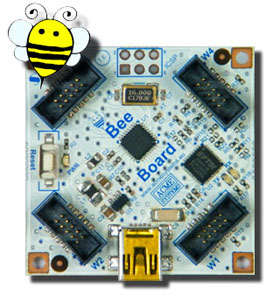 The main advantage of the BEE Board is that you can build your Arduino applications
with a minimal use of welding, wires, breadboards, etc and give a professional look
to your devices.
Like the Arduino, the BEE Board is an Open Hardware and Software project too.
**Features**
The BEE Board has 12 I/O signal, PWM, two interrupt signals, I2C bus, SPI bus and 4 line analog to digital converter distributed on 4 Daisy compatible connectors. MiniUSB for Power and for the serial programming on board with the FTDI chip. 3.3V step down voltage regulator on board.
* Fully Stand-Alone
* Arduino compatible Atmega328 microcontroller @ 16MHz
* 32KB Flash Memory, 2KB SRAM, 1KB EEPROM
* DC Current I/O Pin : 40 mA
* Powered via the mini USB connector
* Provided with FTDI Chip on board
* 3.3 V voltage regulator step-down on board, up to 1A
* Directly programmabled from the [FOX Board G20](/FOXG20) or from any PC with Arduino IDE
* Size: 40x40mm
The BEE Board can work either in stand-alone mode using Daisy modules to interface the real world or as a co-processor for the FOX Board G20 Linux Embedded SBC like the Daisy modules by itself.
That is the origin of its name: Bees fly on Daisies :-)
# Technical documentation
Here you will find tutorials, examples, schematics, news, articles, links, forums, etc.
related to the hardware and software aspects that will help you to design your own BEE Board
embedded applications.
## Getting started
* Installing and setup of Arduino Development Software to use it with the BEE Board
* Add the libraries to manage the Daisy modules
* Code playground
## Application examples with Daisy peripherals
* Control RGB strip LED with BEE Board and DAISY-19
* GSM and SMS examples
* Leds and Buttons modules
* Relay module
* Stepper Motor module
* I2C expander
* IMU and GPS
## Using External peripherals
* Dallas DS18B20 1-Wire thermal sensor
* SD Card
## Advanced
* Install the Arduino dev environment on FOX Board G20
* Write Any value to internal EEPROM
* BEE Board and Matlab Technical Computing
## Hardware reference
* BEE Board Pinout
* BEE Board Schematic
* Atmega328 Datasheet (567pag)
* Atmega328 Datasheet (35pag)
The main advantage of the BEE Board is that you can build your Arduino applications
with a minimal use of welding, wires, breadboards, etc and give a professional look
to your devices.
Like the Arduino, the BEE Board is an Open Hardware and Software project too.
**Features**
The BEE Board has 12 I/O signal, PWM, two interrupt signals, I2C bus, SPI bus and 4 line analog to digital converter distributed on 4 Daisy compatible connectors. MiniUSB for Power and for the serial programming on board with the FTDI chip. 3.3V step down voltage regulator on board.
* Fully Stand-Alone
* Arduino compatible Atmega328 microcontroller @ 16MHz
* 32KB Flash Memory, 2KB SRAM, 1KB EEPROM
* DC Current I/O Pin : 40 mA
* Powered via the mini USB connector
* Provided with FTDI Chip on board
* 3.3 V voltage regulator step-down on board, up to 1A
* Directly programmabled from the [FOX Board G20](/FOXG20) or from any PC with Arduino IDE
* Size: 40x40mm
The BEE Board can work either in stand-alone mode using Daisy modules to interface the real world or as a co-processor for the FOX Board G20 Linux Embedded SBC like the Daisy modules by itself.
That is the origin of its name: Bees fly on Daisies :-)
# Technical documentation
Here you will find tutorials, examples, schematics, news, articles, links, forums, etc.
related to the hardware and software aspects that will help you to design your own BEE Board
embedded applications.
## Getting started
* Installing and setup of Arduino Development Software to use it with the BEE Board
* Add the libraries to manage the Daisy modules
* Code playground
## Application examples with Daisy peripherals
* Control RGB strip LED with BEE Board and DAISY-19
* GSM and SMS examples
* Leds and Buttons modules
* Relay module
* Stepper Motor module
* I2C expander
* IMU and GPS
## Using External peripherals
* Dallas DS18B20 1-Wire thermal sensor
* SD Card
## Advanced
* Install the Arduino dev environment on FOX Board G20
* Write Any value to internal EEPROM
* BEE Board and Matlab Technical Computing
## Hardware reference
* BEE Board Pinout
* BEE Board Schematic
* Atmega328 Datasheet (567pag)
* Atmega328 Datasheet (35pag)